Nano Banana Pro API on Siray AI: Pricing, 4K Output and Tested Prompts

The Nano Banana Pro API gives you Google's Gemini 3 Pro Image model for generation and multi-reference editing. On Siray AI it costs $0.098 per 2K image and $0.168 per 4K image, with up to 14 input images charged at no extra cost. It is the strongest model we have tested at rendering real paragraphs of text, and the weakest we have tested at getting numbers inside a chart right. This guide covers the endpoints, pricing, a quickstart and seven images we generated end to end.
Key takeaways
- Text is genuinely solved, at paragraph length. A four-line body paragraph, a headline, a subhead and a footer line came back character-perfect in one 2K image. The same held at 4K, down to a line of type about 12 pixels tall.
- 14 reference images cost the same as one. $0.098 for a three-reference composite and $0.098 for fourteen. That is the opposite of Seedream 5.5, which charges $0.008 per input image.
- 4K is real 4K. A 16:9 render came back at 5504x3072, double the 2K frame on each axis — but 19–26 MB per file.
- It draws charts it cannot count. Our infographic came out beautifully typeset with three timeline bars whose lengths contradicted their own labels. Never ship a diagram from this model without checking the numbers.
- There is no
output_formatfield. Output is always PNG, so plan for file sizes rather than choosing a cheaper format. - Fast for what it is. Every job finished in 31–46 seconds at 2K and 4K; the 14-reference edit took 21.
What is Nano Banana Pro?
Nano Banana Pro is Google's product name for Gemini 3 Pro Image, announced on the Google blog on November 20, 2025 by Naina Raisinghani of Google DeepMind. It is built on Gemini 3 Pro and sits above the original Nano Banana, which Google identifies as the Gemini 2.5 Flash Image model.
Google's stated strengths:
- Text rendering. Google calls it "the best model for creating images with correctly rendered and legible text directly in the image", covering both a short tagline and a long paragraph, with a wider range of textures, fonts and calligraphy. Multilingual reasoning lets it write or localise copy inside an image.
- Resolution. Output is "available 2K and 4K resolution" across a range of aspect ratios pitched at social and print work.
- Reference images. It can "blend more elements than ever before, using up to 14 images" while "maintaining the consistency and resemblance of up to 5 people".
- Editing controls. Improved localised editing, plus camera-angle changes, focus and depth-of-field shifts, colour grading and relighting.
- Reasoning and world knowledge. The model "uses Gemini's state-of-the-art reasoning and real-world knowledge to visualize information better than ever before", and in Google's own products can ground on Google Search.
What Google does not say. The announcement is promotional and publishes no error rates, latency figures or quality benchmarks. It concedes only that free-tier users fall back to the original Nano Banana after a quota, and that all output carries Google's imperceptible SynthID watermark, with a visible Gemini sparkle on free and AI Pro tiers. It frames Pro as a trade-off rather than a pure upgrade — the original is for "fast, fun editing", Pro for "complex compositions requiring the highest quality" — which implies cost and speed as limits. There is no failure-mode section at all.
Nano Banana Pro endpoints on Siray AI
Siray AI exposes two endpoints, both non-Spicy:
| Model ID | Task | Required inputs | Notes |
|---|---|---|---|
google/nano-banana-pro-t2i |
Text-to-image | prompt, size, aspect_ratio |
No output_format field; output is PNG |
google/nano-banana-pro-i2i |
Editing and multi-reference compositing | prompt, size, aspect_ratio, images (1–14) |
Input images are URLs or data URLs, and are not billed separately |
size takes only three values — 1k, 2k, 4k. The ratio comes from aspect_ratio, not from the size string, which is a different design from Seedream and FLUX.
| Parameter | Values |
|---|---|
size |
1k, 2k, 4k |
aspect_ratio |
1:1, 2:3, 3:2, 3:4, 4:3, 4:5, 5:4, 9:16, 16:9, 21:9 |
Both parameters are required, including aspect_ratio — there is no default. No output_format, quality, seed, negative_prompt or num_images field exists on either endpoint, so each request returns exactly one image.
Nano Banana Pro pricing on Siray AI
Illustration generated with Nano Banana Pro on Siray AI.
| Tier | Price | List price |
|---|---|---|
| 1K | $0.098 | |
| 2K | $0.098 | |
| 4K | $0.168 |
A 30% discount was active when we checked on November 12, 2026. Both endpoints cost the same, so editing is no more expensive than generating — and the number of input images does not change the price.
That last point is worth spelling out, because it is the opposite of how most editing endpoints on Siray bill:
| Request | Nano Banana Pro | Seedream 5.5 (for comparison) |
|---|---|---|
| Edit with 1 reference image | $0.098 | $0.043 |
| Edit with 3 reference images | $0.098 | $0.059 |
| Edit with 14 reference images | $0.098 | not supported (max 10) |
Worked examples:
- 1,000 social images at 2K: 1,000 × $0.098 = $98.
- The same 1,000 images at 4K: 1,000 × $0.168 = $168.
- A 14-reference brand composite: $0.098, regardless of how many references you pack in.
Prices were read from the Siray AI pricing API on November 12, 2026. Check the Nano Banana Pro model page for live prices.
Quickstart: call the Nano Banana Pro API
Generation is asynchronous. Submit a task, get a task_id, then poll every 3–5 seconds until the status is SUCCESS. Image URLs are in data.outputs.

Illustration generated with Nano Banana Pro on Siray AI.
1. Submit a task
curl -X POST https://api.siray.ai/v1/images/generations/async \
  -H "Authorization: Bearer $SIRAY_API_KEY" \
  -H "Content-Type: application/json" \
  -d '{
    "model": "google/nano-banana-pro-t2i",
    "prompt": "A vertical concert poster for a solo cellist, charcoal background, cream condensed serif type",
    "size": "4k",
    "aspect_ratio": "2:3"
  }'
2. Poll for the result
curl https://api.siray.ai/v1/images/generations/async/$TASK_ID \
  -H "Authorization: Bearer $SIRAY_API_KEY"
The status moves through SUBMITTED or QUEUED and IN_PROGRESS to SUCCESS or FAILURE. We saw QUEUED rather than SUBMITTED on one 4K job, so handle both. On failure, read data.fail_code and data.fail_reason. Full parameter details are in the Nano Banana Pro t2i API reference.
Three things we found in testing that the reference does not spell out:
- Output is always PNG, and there is no field to change it. The schema has no
output_format, and every one of our seven images came back as PNG. A 4K landscape was 26 MB. Budget storage and bandwidth accordingly; there is no JPEG escape hatch on this endpoint. aspect_ratiois required, with no default. Omitting it is a validation error rather than a silent1:1. If you are porting code from another Siray image model that picks a ratio from asizestring like2816x1584, you have to rewrite that part.- The number of input images does not affect billing. Three references and fourteen both cost $0.098. Nothing in the response or the docs confirms this — we verified it by comparing two runs on the same day.
Nano Banana Pro prompt examples (tested)
We ran every prompt below through the Siray AI API on November 12, 2026. Timings include queueing. Seven images cost $0.826 in total: five text-to-image and two editing runs.
1. A poster with a real body paragraph
A single poster for an independent coffee roastery, portrait orientation. Background is a flat deep aubergine. Top third: a small letterpress monogram "HR" in a thin serif, hairline rule beneath it. Middle: the headline "HARVEST LANE ROASTERS" set in large condensed all-caps serif, two lines, generous letter spacing. Below it a smaller subhead in italic: "Single origin, roasted in Bermondsey". Lower third: a short paragraph of small body text, four lines, reading exactly: "We buy two harvests a year and roast them the week they land. Ask at the counter for the current lot and we will grind it to whatever you brew with." At the base a thin rule, then in small capitals: "EST. 2019 · 14 HARVEST LANE · OPEN TUES TO SAT 7-4". Print-flat colour, no photography, no gradients, precise typography, even optical margins, all letterforms perfectly formed with no misspellings and no stray characters.
Settings: text-to-image, size: "2k", aspect_ratio: "3:4", 31 seconds, $0.098. Output 1792x2400.

This is the strongest text result we have seen from any image model. The four-line paragraph is character-perfect, including the apostrophe-free "we will" and the hyphenated date range in the footer. Letterforms are consistent between the headline and the body, and the baseline spacing in the paragraph is even. Most models that handle a headline will garble a paragraph this long; this one did not.
2. Product photography with real material texture
Editorial product photograph of a pair of dark olive suede desert boots standing on a pale limestone ledge, three-quarter angle, both boots fully in frame. Visible suede nap, crepe sole with a thin rim of dirt, waxed laces threaded through four brass eyelets, faint crease where the toe flexes. Soft directional daylight from the upper left with a long soft shadow falling right, neutral warm-grey background with a gentle falloff, shallow depth of field with both the near boot and the far boot sharp. Sharp focus on stitching and eyelets, no skin, no hands, no logos, no text.
Settings: text-to-image, size: "2k", aspect_ratio: "3:2", 41 seconds, $0.098. Output 2528x1696.

Followed the brief closely: both boots in frame, the suede nap reads as real material rather than a painted texture, and the shadow falls in the direction asked for. The one thing it invented is the crepe sole texture, which is chunkier than the reference footwear it is imitating. Nothing is misspelled because the prompt asked for no text — worth noting, since models that specialise in text sometimes add stray lettering to product shots.
3. An infographic that got the layout right and the data wrong
A clean editorial infographic poster titled "HOW A POUR-OVER BREWS". Landscape. Left column: an exploded diagram of a paper filter cone sitting on a glass carafe, drawn as flat vector line art with thin consistent strokes, labelled with small leader lines to exactly three callouts: "PAPER FILTER", "16G MEDIUM GRIND", "300ML WATER AT 94C". Right column: three stacked horizontal bars showing a timeline, each bar a different length, labelled in small caps "BLOOM 40S", "FIRST POUR 1M 10S", "DRAW DOWN 3M". Along the bottom a single line of small print reading exactly: "Grind coarse. Pour slow. Wait." Palette is bone white background with one accent colour, burnt orange, used only for the water and the timeline bars. Precise aligned typography, all text correctly spelled, no decorative clutter.
Settings: text-to-image, size: "2k", aspect_ratio: "16:9", 31 seconds, $0.098. Output 2752x1536.
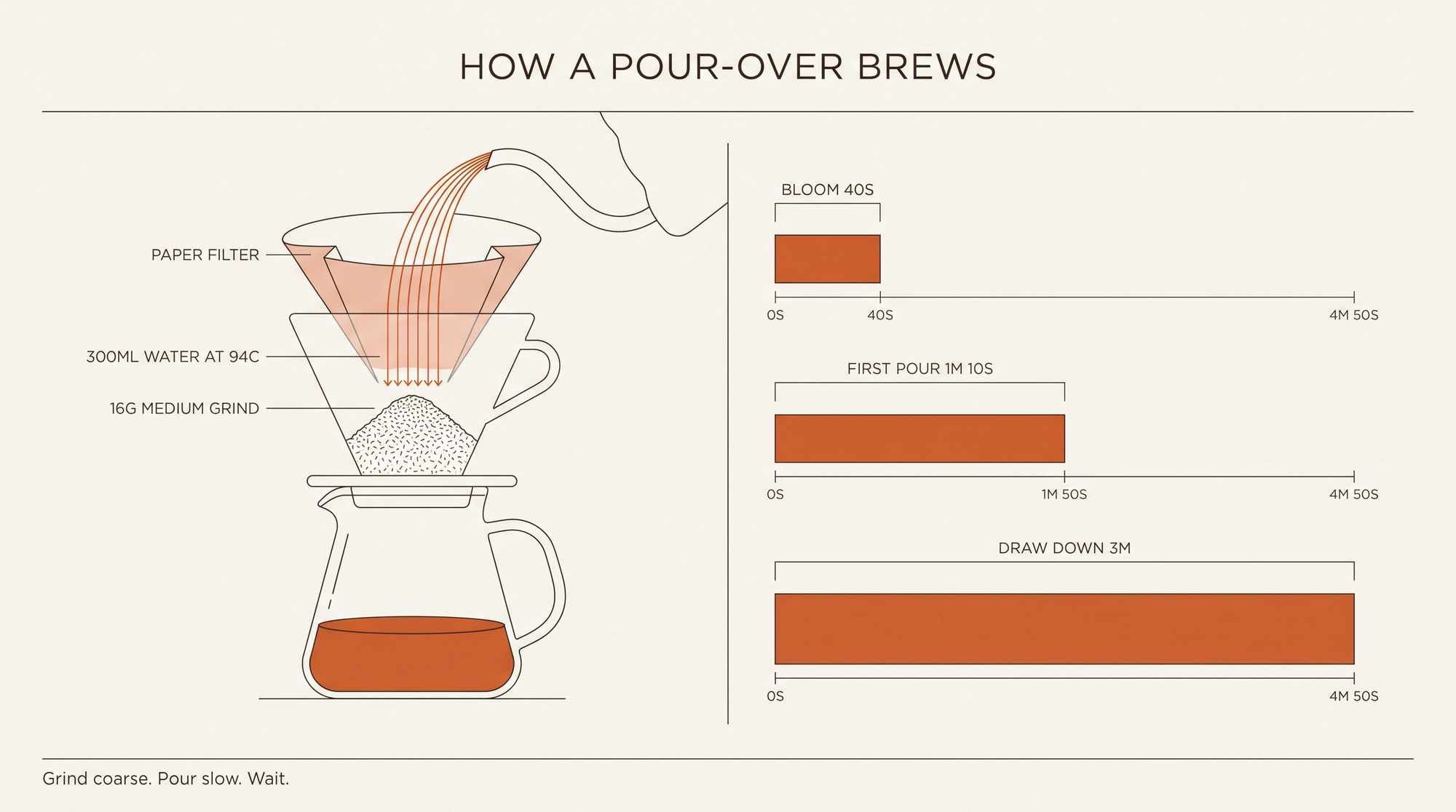
This is the example to study. The layout is genuinely good: consistent stroke weight, three callouts with leader lines that point where they should, a restrained two-colour palette, and every label spelled correctly.
The data is nonsense. All three timeline axes end at "4M 50S", but the bar labelled "BLOOM 40S" runs about a sixth of the axis, "FIRST POUR 1M 10S" about half, and "DRAW DOWN 3M" the full width. Read literally, the poster says a three-minute step takes four minutes and fifty seconds, and a forty-second bloom takes it seven times over. The model typeset a chart without computing it.
The practical rule: use it for the layout, not the arithmetic. Generate the frame, then redraw the bars in Figma or Illustrator against your real data. For diagrams where only the labels matter, it is a large time saving. For anything a reader might measure, it is not safe to ship.
4–5. 2K versus 4K
We ran the same class of prompt at both tiers to see what the resolution step buys.
Aerial landscape photograph of a tidal salt marsh at low tide, looking down at a shallow braided channel winding through olive-green samphire beds. Mud flats show fine drainage rilles and small pooled water reflecting a pale overcast sky. A single narrow wooden footbridge crosses the channel at the upper third. Soft diffuse light, no hard shadows, muted natural greens and ochres, high micro-contrast in the mud texture, extremely fine detail in the vegetation edges, no people, no boats, no text, no logos.
Settings: text-to-image, size: "4k", aspect_ratio: "16:9", 46 seconds, $0.168. Output 5504x3072.
The 4K tier is not an upscale of a smaller render. Drainage rilles in the mud hold their edges at 100%, the flooded pools carry distinct reflection gradients, and the samphire clumps have individual leaf texture at their borders rather than smearing into green mush. This is the kind of landscape stock work where the extra $0.07 over 2K is easy to justify.
A vertical concert poster for a solo cellist, portrait orientation, printed on heavy uncoated stock photographed flat. Background is a dense charcoal-black with a faint paper grain. Upper half: a single high-contrast duotone photograph of a cello's f-hole and strings, cropped tight, rendered only in cream and black. Lower half: the artist name "MIRA OKONKWO" in very large condensed serif capitals on two lines, then beneath it in small letter-spaced capitals "SOLO CELLO · THREE NIGHTS", then a hairline rule, then four lines of small centred text reading exactly: "ST CUTHBERT'S HALL", "14-16 NOVEMBER 2026", "DOORS 19:30 · NO SUPPORT", "TICKETS FROM 18 GBP". At the very base, tiny centred text: "PRINTED IN AN EDITION OF 300". Strict grid, generous margins, all type correctly spelled and optically aligned, no decorative flourish.
Settings: text-to-image, size: "4k", aspect_ratio: "2:3", 41 seconds, $0.168. Output 3392x5056.

Every character is correct, including the hyphens in "14-16", the middle dots, the "19:30" colon and the 12-pixel "PRINTED IN AN EDITION OF 300" at the base. The duotone treatment is applied to the instrument only and does not bleed into the type. For print work this is close to shippable as-is — the only correction most designers would make is optical kerning on the artist name.
6. Three reference images, one brand system
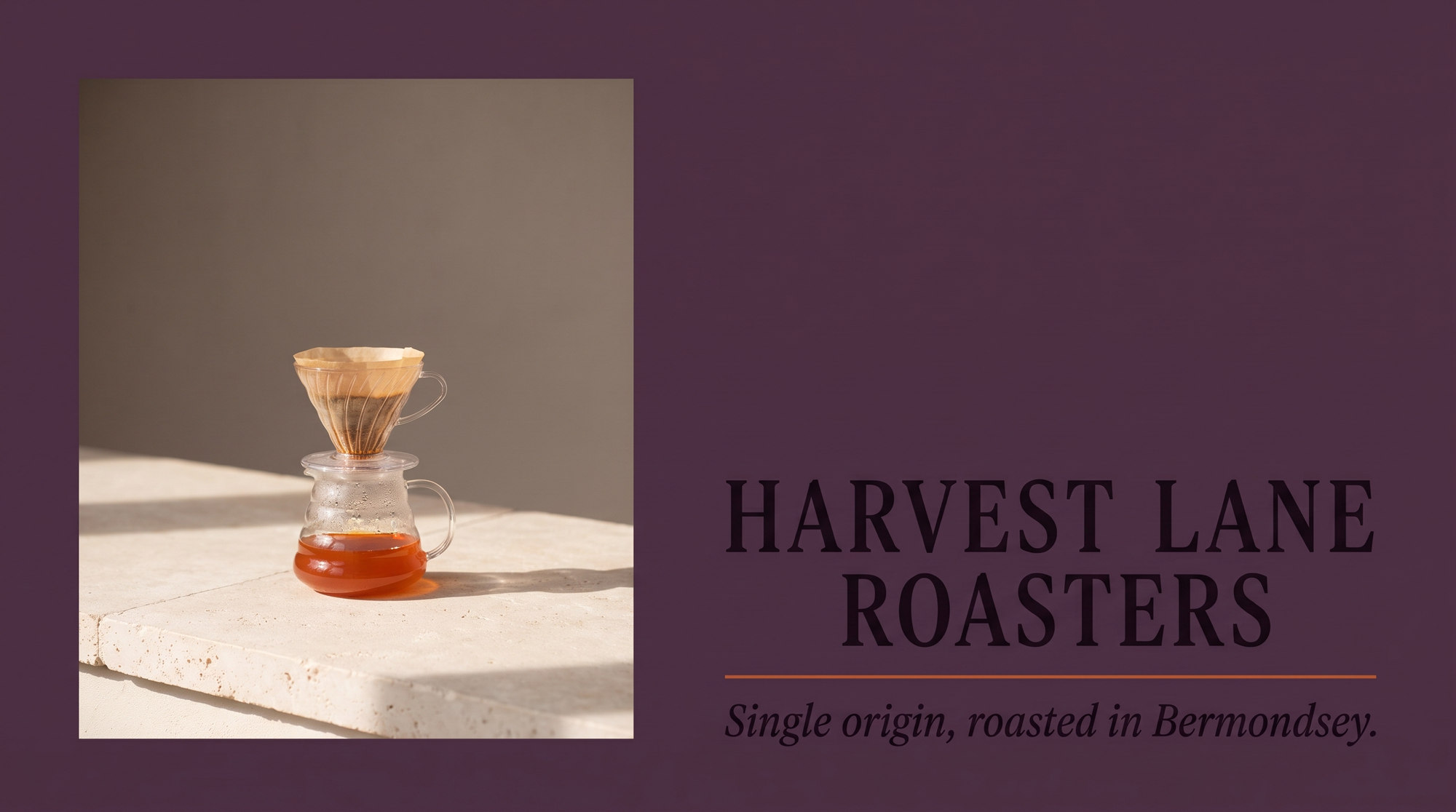
Use the three reference images as one brand system. Build a single new image: a landscape banner for the same coffee roastery, using the aubergine background and serif typography from the poster, the same warm neutral light and limestone surface from the product photograph, and the same burnt-orange accent and thin-line diagram language from the infographic. Centre the composition on a small pour-over dripper on the limestone ledge at left, with the headline "HARVEST LANE ROASTERS" in the poster's condensed serif capitals at right, and beneath it a single small line in the poster's italic: "Single origin, roasted in Bermondsey." Add one thin burnt-orange rule under the headline, the only other colour in the frame. Keep vast empty aubergine space above the headline. All text correctly spelled, one single flat print finish, no collage edges.
Settings: image-to-image, 3 input images, size: "2k", aspect_ratio: "16:9", 10 seconds, $0.098.

This is what the model is actually for. It took the aubergine from one reference, the limestone and light from another, the orange accent from the third, and produced one flat poster with no visible collage seam and a perfectly spelled headline and subhead. Ten seconds for a three-way brand composite at $0.098 is the cheapest competent version of this job we have tested.
7. All fourteen references at once
Build one contact sheet from all fourteen reference crops. The sheet is a landscape grid, seven columns by two rows, on a bone-white paper background with a thin hairline rule between every cell. Each cell holds one crop, uncropped further, fitted inside its cell with consistent gutters. Above the grid, a single line of small letter-spaced capitals reading exactly "HARVEST LANE ROASTERS · VISUAL ARCHIVE". Below the grid, a single line of small print reading exactly "Fourteen frames, one palette." Do not add captions inside the cells. Unify every crop under one consistent warm neutral grade so the sheet reads as a single printed page, no collage edges, no drop shadows and no duplicated frames.
Settings: image-to-image, 14 input images, size: "2k", aspect_ratio: "16:9", 21 seconds, $0.098.
Fourteen is the documented maximum and it did not drop a frame: all fourteen crops appear, once each, in the right order, under the requested heading, with the requested footer line spelled correctly. The header and footer are the cleanest text in the image.
The problem is density. Squeezing fourteen sources into a 7×2 grid on a 16:9 canvas forces each cell to crop its source further, so text inside the references gets cut — "HARVEST LANE" reads as "ARVEST LAN", "MIRA OKONKWO" as "KONKWO". On a 2K canvas each cell is roughly 390 px wide. If your references contain legible type, go to 4K or give the grid fewer cells.
Prompting tips for Nano Banana Pro
- Quote every string exactly, in the order you want it. The model reproduces quoted text reliably; the ones that came out wrong were the ones we did not quote.
- Say "reading exactly" before long copy. Our four-line paragraph and our four-line concert details were both introduced that way, and both came back character-perfect.
- Never trust numbers it has to compute. Bar lengths, axis scales, percentages and totals are typeset, not calculated. Redraw any chart you intend to publish.
- Use references as a mood board, not a paste-up. Describing what each reference contributes — "the aubergine from the poster, the limestone from the product shot" — is what produced the seamless three-way composite.
- Budget cells, not references, at high counts. Fourteen inputs cost no more than one, but each cell shrinks, and small type inside the references stops being legible. Go 4K above about six references.
- Ask for a flat print finish. "One single flat print finish, no collage edges" stopped the model from compositing visible seams.
- Remember there is no JPEG option. Every output is PNG. A 4K render can be 19–26 MB, which matters if you are serving images directly.
When to use Nano Banana Pro (and when not to)
Illustration generated with Nano Banana Pro on Siray AI.
Good fit:
- Print and poster work with real copy. Long paragraphs, small legal lines, multi-language localisation of existing artwork.
- Multi-reference brand composites. Three to six references at $0.098 flat, with typography that survives.
- 4K hero images. Genuine 5504x3072 output with texture that holds up in print.
- Product and landscape photography where material realism matters more than style.
Consider another model when:
- You need numbers that add up. Use it for the frame, then rebuild the chart. There is no prompt that fixes this.
- You are generating at volume. At $0.098 per 2K image it is roughly five times the cost of Seedream 5.5 at $0.02. For thumbnails and iteration, 5.5 is the better buy.
- You need many editing rounds on one image. Seedream 5.5's editing chain is cheaper per round and we have tested it to five rounds without drift.
- You want fast, cheap variations rather than one considered image. The original Nano Banana, or Z-Image, fits that job better.
- You need a JPEG output to keep file sizes down. This endpoint does not offer one.
FAQ
How much does the Nano Banana Pro API cost?
On Siray AI, $0.098 per 1K or 2K image and $0.168 per 4K image, on both the text-to-image and editing endpoints. A 30% discount was active on November 12, 2026, against a list price of $0.14 and $0.24. Input images are not charged separately, so a 14-reference composite costs the same as a single-image edit.
Does Nano Banana Pro charge per reference image?
No. On Siray AI the editing endpoint is a flat $0.098 at 2K or $0.168 at 4K regardless of whether you pass 1 or 14 images. That is different from Seedream 5.5, which adds $0.008 for every input image.
What resolution does Nano Banana Pro output?
Three tiers: 1k, 2k and 4k, chosen with the size parameter, with the shape set separately by aspect_ratio. In our tests a 16:9 4K render came back at 5504x3072 and a 2:3 4K render at 3392x5056, so 4K is roughly double the 2K frame on each axis rather than an upscale.
Can Nano Banana Pro write long text in images?
Yes — this is its strongest capability. It reproduced a four-line body paragraph, a headline, an italic subhead and a footer line in a single 2K image with every character correct, and at 4K it rendered a line of type roughly 12 pixels tall correctly. Quote the exact strings in your prompt to get the best results.
Can I get a JPEG from Nano Banana Pro on Siray AI?
No. The endpoint has no output_format parameter and every output we generated was PNG. A 4K image can be 19–26 MB, so plan storage accordingly or convert after download.
Does Nano Banana Pro support image editing?
Yes, through google/nano-banana-pro-i2i with 1 to 14 input images as URLs or data URLs, plus a prompt. Editing, compositing and style transfer from multiple references all work, and we tested the 14-image maximum successfully.
Try Nano Banana Pro on Siray AI
Create a free account, get an API key and run the typography poster prompt above — under ten cents for an image with a full paragraph of correct type. Open the Nano Banana Pro model page on Siray AI to start.
Sources
- Introducing Nano Banana Pro, Google blog, published November 20, 2025, accessed November 12, 2026.
- Gemini 3 Pro Image – Nano Banana Pro, Google DeepMind model page, accessed November 12, 2026.
- Nano Banana Pro t2i API reference, Siray AI docs, accessed November 12, 2026.
- Nano Banana Pro i2i API reference, Siray AI docs, accessed November 12, 2026.
- Siray AI model pricing API (
GET /v1/models/pricing/{model}), queried November 12, 2026.