
GPT Image 2.5 Flare Tattoo Design: Transparent Flash Sheets

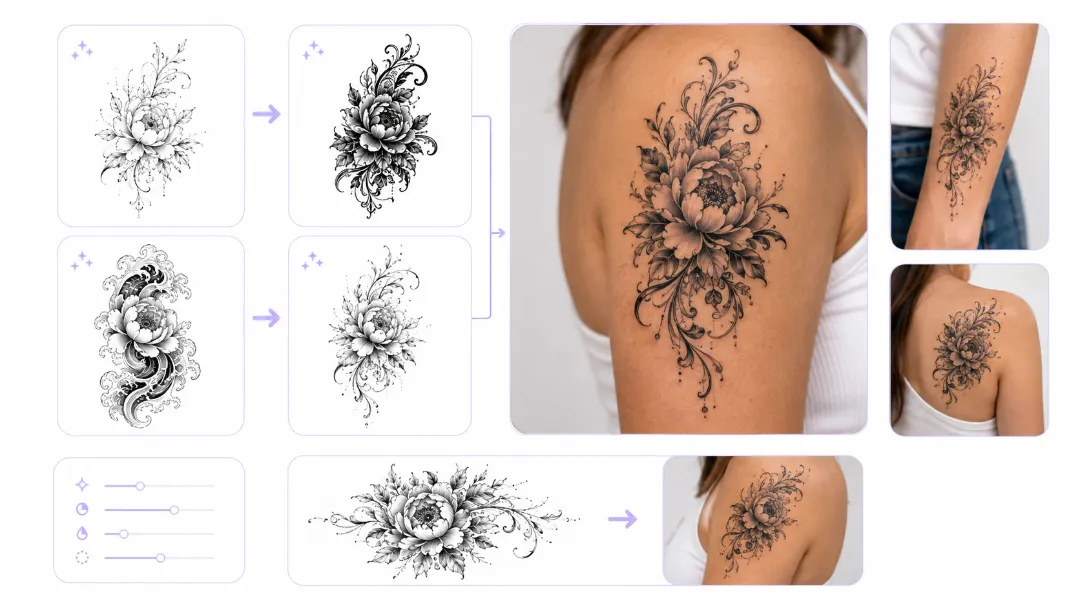
Tattoo artists lose hours to the same two chores: producing enough variations for a client to actually choose from, and cutting designs out of their backgrounds so they can be laid over a photo of the arm they are going on. Both are file-handling problems, not artistic ones, and both map directly onto fields that gpt-image-2.5-flare-t2i and gpt-image-2.5-flare-edit already expose through Siray.
Key Takeaways
- background accepts transparent, so designs come back as cut-out PNGs with no white box to erase
- n goes up to 10, so one call returns a full sheet of variations instead of one image
- The -edit endpoint accepts a mask, which is how a single element gets revised without touching an approved design
- moderation has two settings, auto and low — low is more permissive with traditional tattoo subject matter, but it is not an off switch
Transparent Backgrounds Are the Whole Point
Most image endpoints hand back a rectangle. For a tattoo that rectangle is dead weight: the artist has to key out the background before the design can sit on a reference photo or go into a printed sheet.
Flare takes background as auto, opaque, or transparent. Set it to transparent, set output_format to png, and the design arrives already cut out. Those two fields have to agree — transparency does not survive a jpg, and webp is a poor choice for something headed to a stencil printer.
Ten Variants From One Call
The n parameter runs from 1 to 10 and defaults to 1. A flash sheet is by definition a set of related designs, so this is the field that turns a single generation into a usable deliverable.A practical pattern is to fix the subject and vary the treatment in the prompt, then let n do the rest:
Traditional American tattoo flash, a coiled snake with a dagger,bold black outlines, limited palette of red and muted green,no background, sheet-ready line weightRun that at n: 10 and quality: low to see ten compositions cheaply, pick the two worth keeping, then regenerate those at quality: max. Flare exposes five quality steps — low, medium, high, xhigh, max — and the point of having five is that roughing out and finishing are different jobs.
Masked Edits for the Revision Round
Clients rarely reject a whole design. They reject one part of it. The -edit endpoint takes images (1 to 16 of them) plus an optional mask, which confines the change to the region the mask marks.
That matters because a full regeneration gives back a different drawing. A masked edit keeps the approved linework intact and only redraws the snake, or only swaps the lettering block, which is what "just change this one thing" actually means.
Both images and mask take either a hosted image URL or a base64 data URL, so a revision round can run entirely off a client's reference photo and a mask drawn on top of it, without a separate hosting step.
What moderation: low Does and Does Not Do
Traditional tattoo work is full of skulls, snakes, daggers, and religious iconography. Default content filtering on general-purpose image models is known to be twitchy about that vocabulary.
Flare exposes moderation with exactly two values: auto and low. Setting low is more permissive with this kind of subject matter. It is worth being precise about the limits here — there is no off value in the schema, and this is a mainstream OpenAI endpoint, not an uncensored one. For work that needs genuinely unrestricted generation, that is a different model class entirely.
Sizes and Delivery
size offers eleven fixed options plus custom. Vertical designs generally want 1024x1536; a wide chest or back piece is better served by 1536x1024 or one of the 4K options, 3840x2160 and 2160x3840. Setting size to custom unlocks width and height, which is the path to matching a client's actual placement dimensions rather than a stock ratio.
Lettering is the one thing worth keeping out of the generation step. Text rendering is not a documented strength of this endpoint, and tattoo lettering is a typesetting decision anyway — generate the imagery, set the type in a layout tool.
Where This Sits
Flare is one of several OpenAI image endpoints available through Siray, alongside the older GPT Image 1.5 and DALL-E 3. For work that leans on reference photos rather than text prompts, Nano Banana 2 takes up to 14 input images. One API key reaches all of them, which means the choice per job is a one-line change rather than a new integration.
Create your free Siray account and start generating flash sheets with GPT Image 2.5 Flare today.