
Hunyuan Image 3 Instruct NSFW Clothing Change & Outfit Edit: Uncensored Walkthrough

Clothing change is the single most-requested edit in uncensored image workflows, and Hunyuan Image 3 Instruct is built to handle it as a typed instruction rather than a full re-render. Tencent's Instruct release adds precise, localized editing — add, remove, or alter a specified element while everything else in the frame holds — which is exactly the mechanism an outfit edit needs. This breakdown covers the prompt elements that actually control the result: garment description, pose and identity preservation, lighting continuity, and how to grade explicitness from suggestive to fully explicit.
Why Outfit Edits Beat Full Regeneration
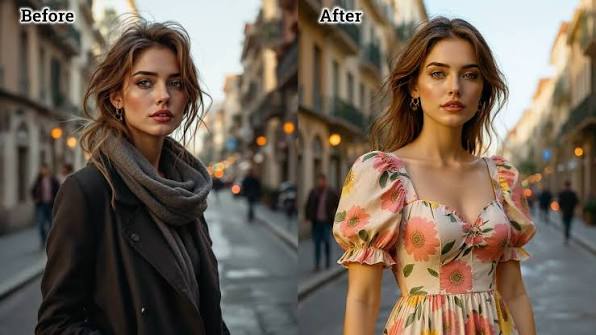
A full regeneration re-rolls the entire image from a text prompt, which means the face, pose, background, and lighting all shift slightly even when the prompt looks unchanged — a real problem for anyone building a consistent character. Instruct's precision editing targets only the region tied to the instruction. Tell it to change the garment, and the model treats everything else — face, body proportions, background, light source — as fixed context to preserve, not regenerate. That's the technical basis for outfit editing as its own category, separate from prompting a new image from scratch.
Describing the Garment
Garment description is the primary lever for both realism and explicitness level. Three variables matter most:
- Material: name the fabric directly — sheer mesh, wet-look latex, thin cotton, unbuttoned denim. Material choice drives how light interacts with the surface, which the model picks up on automatically.
- Coverage: state exactly what's covered and what isn't — "open blazer, no shirt underneath," "bikini bottom only," "fully nude." Vague coverage language produces inconsistent results; explicit coverage language produces exactly what's specified.
- Transparency: for sheer or wet fabrics, describe the transparency level directly ("semi-transparent, nipples visible through fabric") rather than relying on the material name alone.
These three variables compound — a single line like "unbuttoned sheer white shirt, no bra, fabric clinging to skin" carries material, coverage, and transparency together.
Keeping Pose & Identity Consistent
The risk in any edit-based workflow is drift — a slightly different face or body shape creeping in after the edit. Two habits keep it locked:
- Re-state the identity anchors in the edit instruction itself — "same face, same hair, same pose" as an explicit clause, not an assumption. Instruct responds well to direct consistency instructions even though it already biases toward preserving unedited regions.
- Reference the original image directly when the workflow supports image-to-image input, rather than describing the subject from scratch in text. Text-only re-description is where identity drift creeps in.
Lighting & Shadow Continuity
A clothing swap that ignores the original light source reads as fake immediately — mismatched shadow direction under new fabric is one of the fastest tells. Two fixes:
- Name the light source and direction explicitly if the original prompt didn't ("soft key light from upper left" or "warm rim lighting from behind"), so the new garment's shadows fall the same way as everything else in frame.
- For reflective or sheer materials, add a short note on how that material should catch the existing light ("sheer fabric catching the same rim light on the shoulder") — this is what prevents a swapped garment from looking pasted onto an unrelated lighting setup.
Full Example Prompt
Combining every element above into one instruction:
"Change the outfit to fully nude, keep same pose and same face, preserve the warm rim lighting from behind, natural skin tone and anatomy, background unchanged."
For a suggestive-tier variant of the same edit:
"Change the outfit to a sheer white unbuttoned shirt, no bra, fabric clinging to skin, semi-transparent, keep same pose and same face, preserve the warm rim lighting from behind, background unchanged."
Both prompts share the same identity-anchor clause and lighting clause — only the garment/coverage description changes between explicitness levels.
Run It Uncensored on Siray
Hunyuan Image 3 Instruct's Chain-of-Thought reasoning and prompt self-rewrite make it capable of handling long, detailed instructions like the ones above, but the model itself needs 80GB+ of VRAM to run — out of reach for most local setups. Hosted access through Siray.ai removes that barrier: the model is already live and directly promotable, uncensored within legal bounds, and reachable with the same one-API-key setup used across Siray's catalog, documented in the Siray API docs. For the full editing capability set beyond clothing changes — adding, removing, or blending elements — see the complete Hunyuan Image 3 Instruct editing guide.
FAQ
Can Hunyuan Image 3 Instruct change or remove clothing? Yes — its precision editing mode is built to alter a specified element (like an outfit) while preserving everything else in the frame, including face, pose, and background.
Is Hunyuan Image 3 Instruct NSFW/uncensored? Tencent doesn't market it as "uncensored" — that positioning comes from hosting platforms like Siray, which run it without the extra content filtering some hosts apply, within legal limits.
How do you prompt outfit edits without losing likeness? State identity anchors ("same face, same pose") directly in the edit instruction, and use image-to-image input over the original photo rather than re-describing the subject from text alone.
What's the difference between an outfit edit and a full regeneration? A full regeneration re-renders the entire image and can shift face, pose, and lighting even with a similar prompt. An outfit edit targets only the garment region and holds everything else constant.
Legal note: For lawful, adult (18+) creation only. Siray permits no illegal content and has zero tolerance for CSAM. "Uncensored" means no filtering beyond what the law requires — never anything illegal.