
Kling 3 Motion Control for Fitness Demo Videos on Siray

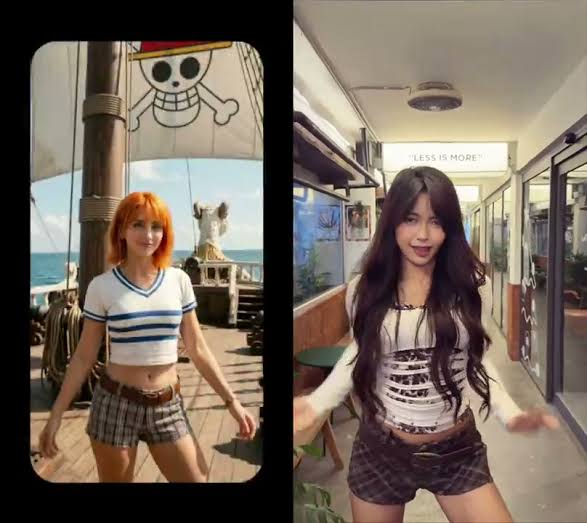
A fitness content library has a linear cost problem. Fifty exercises means fifty filmed demonstrations, and every time the branding changes, the wardrobe changes, or the trainer leaves, the whole library gets reshot. Motion control endpoints attack this differently: the movement comes from footage that already exists, and the character performing it is generated.
Key Takeaways
- Only kling-3-motion-control exposes a driving video on Siray; kling-2.6-motion-control does not
- Kling 3 takes references per element, each with a frontal_image, reference_images, and a video
- character_orientation set to video allows up to 30 seconds; set to image the cap is 10 seconds
- keep_original_sound decides whether the trainer's cues survive into the output
The Two Endpoints Are Not the Same Tool
Both kling-2.6-motion-control and kling-3-motion-control are available through Siray, and the names suggest a version bump. The request schemas say otherwise.
Field | Kling 2.6 Motion Control | Kling 3 Motion Control |
image (required) | yes | yes |
prompt (required) | yes | yes |
character_orientation (required) | video / image | video / image |
keep_original_sound | yes | yes |
elements[] | absent | present |
The 2.6 endpoint has no field anywhere in its request body for a driving video. Its character_orientation description mentions a reference video, but that input is not exposed on this endpoint. Anything built around feeding source footage to Kling 2.6 through Siray will not work, and the schema is the place that settles it.
Kling 3 carries elements, an array where each entry describes one character or object with three inputs: frontal_image, reference_images, and video. The driving footage lives inside an element, not at the top level, which means a two-person demonstration gets two elements with two separate source clips.
Thirty Seconds or Ten
character_orientation is required on both endpoints and takes two values, each with a hard duration ceiling attached:
- video — the output character's orientation follows the reference video. Better for complex motion. Maximum 30 seconds.
- image — orientation follows the reference image. Better for following camera movement. Maximum 10 seconds.
For fitness this is the selection criterion, not a detail. A full set of repetitions with a reset between them does not fit in 10 seconds. A compound lift filmed from a rotating camera is a different job than a static form demo, and the ceiling forces the choice up front rather than after a failed generation.
Practical split: form demonstrations, rep sets, and anything where the body rotates go to video. Single-rep hero shots with a moving camera, the kind that open a video, go to image.
Setting Up an Element
A workable configuration for a single-trainer demo:
- frontal_image — a clean front-facing shot of the generated trainer, neutral stance, full body in frame
- reference_images — the same character from other angles, so the model has something to work from when the movement turns away from camera
- video — the source demonstration, framed so the whole movement stays in shot
The prompt then handles setting and treatment rather than the movement itself, since the movement is coming from the footage:
Bright commercial gym, soft overhead lighting, neutral grey floor,athletic wear in brand colours, camera locked off at chest heightSound
keep_original_sound is a boolean on both endpoints. Source footage of a trainer usually carries verbal cues and counted reps, which are genuinely useful in a demo. It also carries gym noise and whatever was said between takes. This is a per-clip decision, and it is worth checking the source audio before defaulting it on.
One limit worth stating plainly: the tests behind this article read the published request schemas, not generated output. Field availability is confirmed; quality of the motion transfer is not something a schema can tell anyone.
Picking Against the Alternatives
Motion control is a narrow capability and it is easy to confuse with camera-move prompting, which is a different thing. MiniMax H3's motion control prompt guide covers how camera movement gets described in text for that model — useful, and not the same as transferring a performance from footage.
For general video generation where no source clip exists, Kling 2.6 and Kling 3.0 Omni are the text and image driven endpoints in the same family, all reachable through a single Siray key.
Create your free Siray account and start building your exercise library with Kling 3 Motion Control.