
MiniMax H3 Max Turbo: Half the Price of H3 Max, Explained

fal just shipped a Turbo variant of its MiniMax H3 Max model that costs exactly half as much at every resolution tier. It's live now on fal — not on Siray. Here's what changed, what the pricing actually looks like now that the launch discount has ended, and where to go on Siray if you want this kind of speed and cost profile today.
Key Takeaways
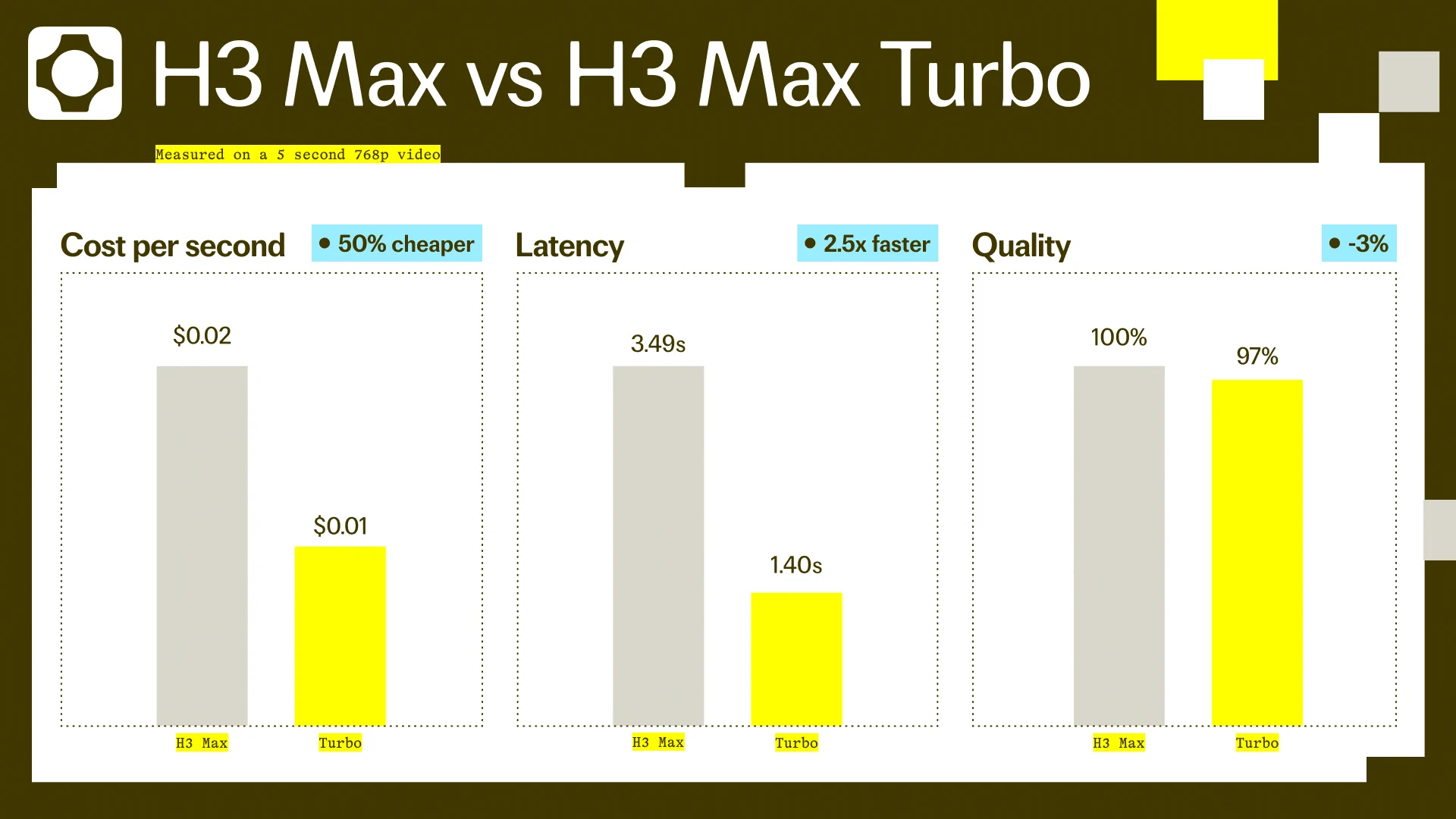
- MiniMax H3 Max Turbo costs exactly half of H3 Max at every resolution: $0.025/s (480p), $0.04/s (768p), $0.08/s (1080p) as of standard pricing.
- The 1080p option is a latent refinement from a native 768p source, not true native 1080p generation.
- MiniMax H3 Max Turbo is fal-hosted, not available on Siray — MiniMax H3 and Seedance 2.5 are the closest Siray-available alternatives.
What Turbo Actually Is
MiniMax H3 Max Turbo isn't a MiniMax release — it's fal's own distillation, one step further down a chain that starts with MiniMax's open-sourced base H3, runs through fal's own post-trained H3 Max, and now adds this faster, cheaper Turbo variant on top. Understanding that lineage matters: this is fal's engineering work layered on an open model, not an official MiniMax product tier.
The Pricing: Exactly Half
As of this article's publish date, the launch discount for both H3 Max and H3 Max Turbo has ended, so these are standard rates. MiniMax H3 Max Turbo runs $0.025/s at 480p, $0.04/s at 768p, and $0.08/s at 1080p. H3 Max itself costs $0.05/s, $0.08/s, and $0.16/s at the same three resolutions. Both fal pages independently confirm the same ratio: Turbo is precisely half of H3 Max's price at every tier, not an approximate discount.
Scaled to the model's own maximum duration of 15 seconds, that ratio holds through to the total: a full-length 480p clip runs $0.375 on Turbo versus $0.75 on H3 Max, 768p runs $0.60 versus $1.20, and 1080p runs $1.20 versus $2.40. The gap in dollar terms widens as resolution and duration climb, but the ratio itself never moves — Turbo saves exactly the same fraction whether you're generating a quick 480p test or a full 15-second 1080p clip.
What Changed vs. Base H3 Max
Turbo drops one capability at launch: there's no ref2v (reference-to-video) support, which stays exclusive to base H3 Max for now. Everything else carries over — the same resolution options, the same 5-15 second duration range, and the same six aspect ratios (21:9, 16:9, 4:3, 1:1, 3:4, 9:16). Image-to-video output follows the input image's aspect ratio automatically, and both models also share a prompt_expansion_mode setting with two options: balanced (the default) and quality, which trades a bit of generation time for a more thoroughly expanded prompt before the model renders.
The 1080p Caveat
The resolution field's own description is worth reading closely: 1080p on this model is a latent refinement from a native 768p source, not a true native 1080p capture. If your priority is genuine 1080p detail rather than an upscaled 768p base, factor that in before paying the higher per-second rate for the 1080p tier — you're paying for a refinement pass, not a resolution the model natively generates.
That distinction is easy to miss if you're only reading the resolution dropdown and the price next to it — both look like a standard resolution tier, priced the same way the 480p and 768p options are. The model's own API documentation is the only place this gets stated plainly, which is exactly why it's worth calling out here rather than assuming the pricing page tells the full story on its own.
When Turbo's Missing Piece Actually Matters
The ref2v gap is the one place Turbo's lower price comes with a real tradeoff, not just a rounding difference. Reference-to-video work — generating a clip that follows a specific reference image's style or subject rather than a text prompt alone — stays exclusive to base H3 Max for now. If that's a routine part of your workflow, the half-price Turbo tier isn't a straightforward swap; you'd be trading a capability you use for a lower per-second rate. For text-to-video and image-to-video work that doesn't touch ref2v, there's no missing feature to weigh against the discount.
If You Want This on Siray Instead
MiniMax H3 Max Turbo isn't available through Siray — it's fal's own hosted distillation. Two models already live on Siray cover the reasons someone might reach for Turbo in the first place. If you want the MiniMax lineage specifically, MiniMax H3 is Siray's live option in that family. If turbo-speed, cost-efficient video generation is the actual priority regardless of model lineage, Seedance 2.5 is Siray's comparable speed-and-cost-oriented option. Neither is a drop-in replacement for Turbo's exact spec, but both solve the underlying reason to consider it.
Which of the two to pick comes down to what actually drove you to look at Turbo in the first place. If it was brand familiarity with the MiniMax lineage, MiniMax H3 keeps you in that family without leaving Siray. If it was specifically the price-per-second and generation speed, Seedance 2.5 is the option built around that same tradeoff rather than around MiniMax's model architecture. Either way, you're not stuck waiting for Turbo itself to land on Siray to get a version of what made it worth reading about.
Explore Siray's video models, including MiniMax H3 and Seedance 2.5, available today.