
Seedance 2.0 Prompt Guide: Why Reference-to-Video Beats Text-to-Video


The most common complaint about Seedance 2.0 isn't quality — it's predictability. Type a detailed text prompt, hit generate, and the output often drifts from what was actually asked for. Testing across generation modes points to a clear fix: the input format matters more than the wording. This guide breaks down which mode actually delivers the requested output, and how to prompt it once it does.
Key TakeawaysReference-to-video (R2V) — feeding Seedance 2.0 a reference video clip — consistently produces the expected result.Text-to-video (T2V) alone struggles to hit the intended output; it's the mode to avoid when precision matters.Complex scenes with detailed motion, timing, facial expression, and sound need every one of those elements spelled out in the prompt — Seedance 2.0 won't infer them.
Two Ways to Prompt Seedance 2.0
Seedance 2.0 accepts two fundamentally different kinds of input: a reference video clip (R2V) or a text-only description (T2V). They are not interchangeable in reliability. One consistently reproduces what's asked for; the other frequently doesn't. Knowing which one to reach for is the single biggest factor in getting a usable result on the first try.
Reference-to-Video (R2V) — the Reliable Path
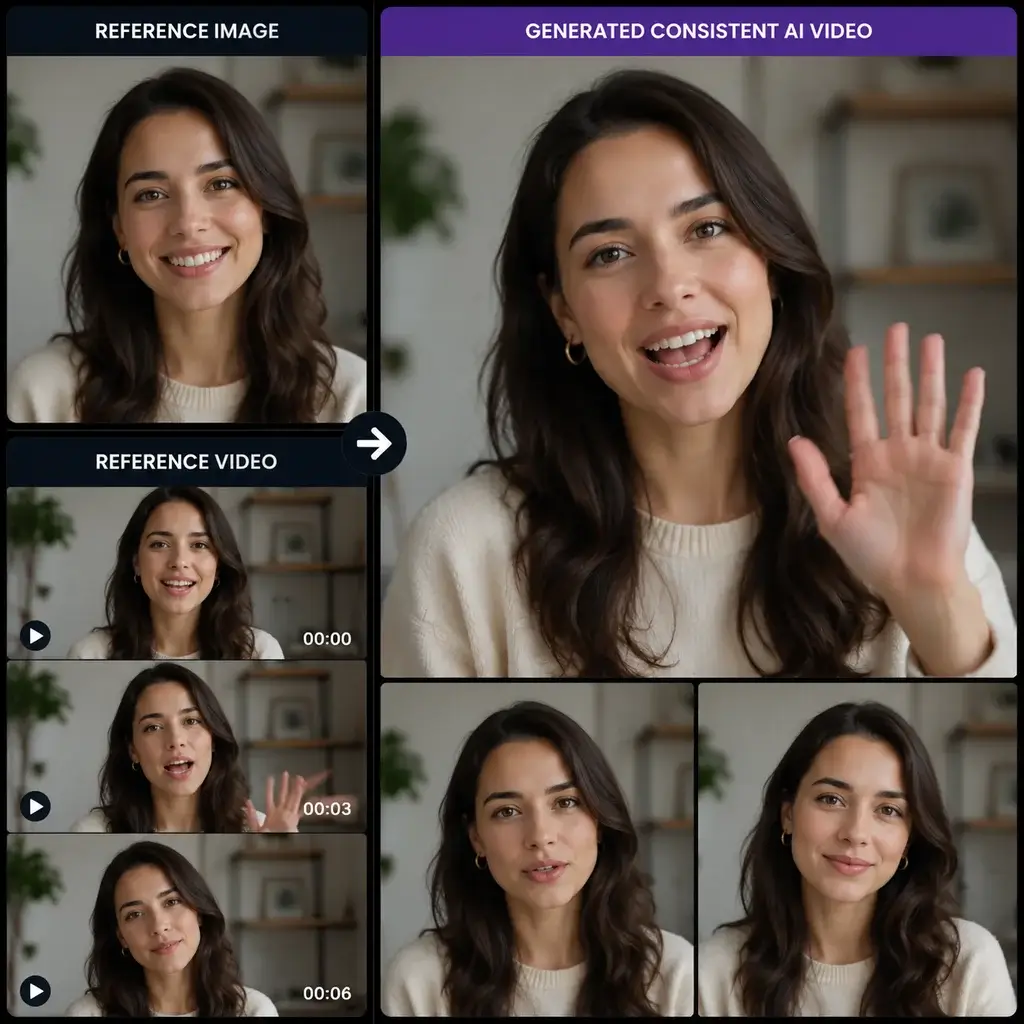
R2V works by giving Seedance 2.0 something concrete to anchor to: a video clip, not just a description of one. In practice, that means downloading a source video, cutting it down to the specific segment that has the motion, pacing, or framing wanted, and feeding that segment in as the reference for generation.
Workflow: download the source clip → trim to the relevant segment → use that segment as the reference input → generate.
This approach reproduces the intended output far more reliably than describing the same scene in words. If a specific camera move, action sequence, or performance needs to land exactly, this is the mode to use.
Why Text-to-Video Falls Short
T2V takes a written description alone and generates from scratch, with nothing concrete to anchor to. Across testing, this mode struggles to produce the intended result — the model has to guess at motion, pacing, and staging that a reference clip would have made explicit. For anything where the output needs to match a specific vision, T2V-only prompting is the mode to avoid; treat it as a rough draft tool at best, not a way to reliably land a precise shot.
Writing Prompts for Complex Scenes
Even with a strong reference clip, scenes involving detailed character behavior need their key elements spelled out directly in the prompt rather than left implicit. Break the scene into these elements and describe each one deliberately.
Motion & Action
State exactly what the character is doing, not a general gesture category.
Example: "raises the coffee cup with the right hand, pauses briefly, then takes a slow sip."
Rhythm & Timing
Pacing doesn't carry over from a vague description — specify the tempo directly.
Example: "the turn happens slowly over two seconds, then the head snap is sudden and fast."
Facial Expression
Name the specific expression and how it shifts, not just an emotion label.
Example: "a subtle smile forms, then widens into a full laugh as the eyes crinkle."
Voice & Sound
If dialogue, tone, or ambient sound matters to the scene, describe it explicitly — it won't be inferred from the visual description alone.
Example: "a low, warm voice says the line calmly, background café ambience audible underneath."
Full combined example (all four elements stacked):
"Raises the coffee cup with the right hand, pauses briefly, then takes a slow sip; the turn happens slowly over two seconds before a sudden, fast head snap; a subtle smile forms and widens into a full laugh as the eyes crinkle; a low, warm voice delivers the line calmly, with background café ambience audible underneath."
Try Seedance 2.0 on Siray
Seedance 2.0 is available on Siray now, with both R2V and T2V input supported through the same one-API-key setup used across Siray's model catalog. Pricing runs meaningfully below official channels on several models — see the full breakdown in Siray's AI video API pricing comparison for verified per-second rates against other providers.
FAQ
What's the best way to prompt Seedance 2.0? Use reference-to-video (R2V) — feed it a trimmed reference clip rather than a text-only description — for results that consistently match what's intended.
Does text-to-video work well on Seedance 2.0? Not reliably. T2V-only prompting struggles to produce the intended output; treat it as a rough draft tool, not a way to land a precise shot.
What is reference-to-video (R2V)? A generation mode where a trimmed video clip, not just a text description, is fed in as the reference — Seedance 2.0 uses it to anchor motion, pacing, and framing.
How detailed should Seedance 2.0 prompts be? For complex scenes, spell out motion, timing, facial expression, and sound explicitly — the model won't infer details that aren't written into the prompt.
Ready to generate with a mode that actually delivers? Create your free Siray account and start with Seedance 2.0 today.