
Seedream 5.0 Pro Spicy: Prompting Two Subjects in One Frame

Ask seedream-5.0-pro-t2i-spicy for two people in one image and it often blends them: one face on both bodies, a pose that fits neither figure, an outfit migrating between subjects. There's no parameter for this — the request body has three required fields and one optional one, nothing that pins an identity or position directly. Getting two subjects to hold separate and coherent comes down to the prompt text alone.
Key Takeaways
- The request body takes only model, prompt, size (required) and output_format (optional) — no reference image, no seed, no negative_prompt to keep two subjects apart.
- Front-loading a distinct descriptor for each subject cuts identity bleed more than any other single change.
- Spatial anchor language ("on the left," "closer to camera") does the job a dedicated field would — there is no aspect_ratio or region control here.
- Console-verified pricing: $0.045 per image, flat, no active discount as of 2026-08-31.
What Seedream 5.0 Pro Spicy Actually Gives You to Work With
The full spec is model, prompt, size (required), plus an optional output_format (jpg or png — its description carries an upstream typo, "output format for the 3D model," safely ignored; this is a 2D endpoint). That's the entire surface. No seed means a good composition can't be reproduced or nudged from that draw. No negative_prompt means steering is affirmative only — describe what each subject is, never what to avoid. No reference-image input means no ref2i shortcut for anchoring a face, as this breakdown of three uncensored endpoints shows. Everything below is a prompt-text technique, because that's the single lever this endpoint exposes.
Prompting Two Subjects: Three Things That Actually Work
Give each subject a distinct descriptor, first
Put what makes each subject different — hair color, build, clothing color — at the start of that subject's clause, ahead of anything generic. Vague filler up front gives the model nothing to separate them on.
Anchor position with spatial language
With no aspect_ratio, mask, or region field, position exists only as words: "on the left," "in the foreground," "behind her." State it once per subject, and keep it consistent.
Split the actions into separate clauses
Give each subject their own verb instead of a shared action for "them." "She is reading; he is watching over her shoulder" reads as two distinct poses. "They are sitting together reading" tends to collapse into one.
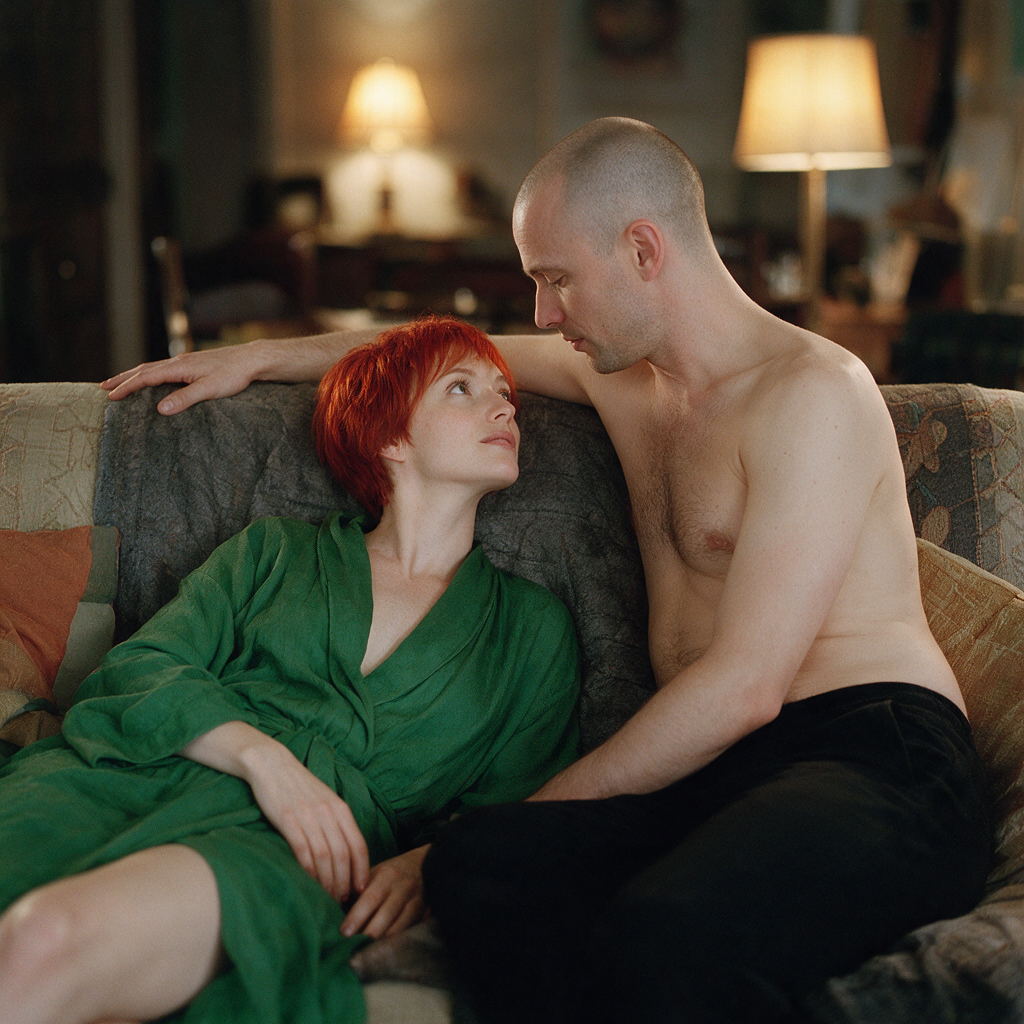
model: bytedance/seedream-5.0-pro-t2i-spicy
prompt: "Two people on a sofa, side by side. On the left, a woman with shortred hair, wearing a green robe, reclining. On the right, a man with ashaved head, wearing black trousers, leaning toward her. She is looking upat him; he is resting one hand on the back of the sofa. Warm lamp light,soft focus background."
size: "1584x2816"
Seedream spicy prompt
Picking a Size That Fits Two Bodies
There's no aspect_ratio field — the ratio lives inside the 16-value size enum, 8 ratios across two resolution tiers. Wider values give two side-by-side subjects room without cropping either one; a portrait like 1584x2816 (exact 9:16) suits a closer, stacked composition. Pick the size string before writing the prompt — nothing overrides it afterward.
What It Costs, and What a Miss Costs You
Cross-verified today against the console's catalog and the public pricing page: $0.045 per image, flat, no discount running. With no seed, a good composition can't be regenerated at a different size or nudged from that draw — the next call is a fresh roll. Iterate by rewriting the prompt, not chasing a seed that doesn't exist. For pricing and spec context, see Seedream 4.5 Spicy vs 5.0 Pro Spicy.
When Two Subjects Isn't the Job
Keeping two characters consistent across separate video shots is a different mechanism — see Seedance 2.5 Spicy vs Wan 3.0 Spicy: Multi-Character Fix. Need one character recognizable across a set instead? That's a different endpoint family with its own reference workflow — see Seedream X Spicy's NSFW character sheet. To compare uncensored image endpoints generally, see the 2026 roundup.
FAQ
Can I lock a seed to reproduce a two-subject composition?
No. There's no seed field — identical prompts return a different draw each time.
Does it accept a negative_prompt to keep two subjects from blending?
No. Steering is affirmative only — describe what each subject is, not what to avoid.
How do I control where each subject sits in the frame?
Through prompt text alone. There's no aspect_ratio, mask, or region field — spatial language ("on the left") is the lever this endpoint gives you.
Create your free Siray account and test a two-subject prompt before scaling to a full set.
Compliance: Siray is committed to responsible AI use. All content generated through the platform must comply with applicable laws. Siray maintains zero tolerance for CSAM and any illegal content. Uncensored generation capabilities are provided exclusively for lawful adult content creation by and for consenting adults aged 18 and over.