
Seedream X Spicy NSFW Prompt Guide: Uncensored Tips (2026)

I've been running the same test prompts through Seedream X Spicy for a couple of weeks, and the model has one habit that trips people up: it rewards density. Feed it a short, tag-heavy prompt like you would Stable Diffusion, and you get flat, generic results. Feed it a full, layered scene, and the uncensored detail actually shows up. This Seedream X Spicy NSFW prompt guide breaks down exactly which elements matter, one at a time.
Key TakeawaysSeedream X Spicy still supports negative prompts normally — the real lever is prompt density and word order, not avoiding negatives.Wardrobe and explicitness language is the core uncensored control, from suggestive to fully explicit.Front-load the details that matter most; the model reads prompts as full scenes, not tag soup.
Why Seedream X Spicy Prompts Need More Detail, Not Fewer Negatives
Seedream X Spicy, ByteDance's uncensored-mode variant of the Seedream image line, keeps standard negative-prompt support — so if you're coming from a model that ditched negatives entirely, don't. What actually changes your output here is prompt density and order. The model reads a prompt as a full scene description, and it fills in anything you leave vague with generic defaults.
Think of it less like a camera and more like a director who showed up expecting a shot list. Hand it one line and it improvises something safe. Hand it a stacked, ordered scene — shot, subject, wardrobe, light, texture — and it commits to every detail you gave it, uncensored included.
Prompt Elements That Actually Move the Needle
Don't dump every idea into one sentence. Break the scene into these five elements, write each deliberately, then stack them in order.
Shot & Framing
This sets distance and intimacy before anything else loads. A wide establishing shot reads as scene-setting; a tight crop reads as intimate.
Example: "three-quarter shot, 50mm lens, slight low angle."
Subject & Physical Detail
Say age (adult), build, and distinguishing features up front — the model defaults to generic features if you don't.
Example: "adult woman, curvy build, olive skin, long wavy auburn hair."
Wardrobe & Explicitness
This is the real uncensored lever. Seedream X Spicy will render exactly the level of explicitness you spell out, so move through tiers deliberately instead of jumping straight to full nudity and losing detail control.
Example (suggestive): "unbuttoned satin blouse, one shoulder exposed, fabric pulling tight across the chest."
Example (explicit): "fully nude, kneeling pose, back arched, skin flushed, detailed anatomy, natural proportions."
Lighting & Atmosphere
Lighting is what separates a flat render from something that looks shot, not generated.
Example: "golden hour light through a window, soft shadows, warm atmosphere."
Skin & Material Realism
Ask for texture directly or the skin renders smooth and plastic.
Example: "realistic skin texture, visible pores, natural sheen, fine fabric weave."
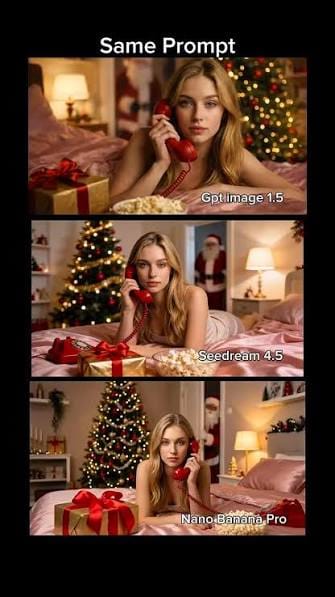
Full stacked example (every element in order):
"Three-quarter shot, 50mm lens, slight low angle, of an adult woman with a curvy build, olive skin, long wavy auburn hair. Unbuttoned satin blouse slipping off one shoulder, cozy apartment at dusk, golden hour light through the window. Soft shadows, warm intimate atmosphere, realistic skin texture with visible pores, natural sheen, fine fabric weave, sharp focus."
Negative prompt still applies as usual here: "blurry, deformed hands, extra limbs, low detail, watermark."
Settings & Format Tips
- Aspect ratio: pick portrait for single-subject intimate shots, wide for scene-setting.
- Negative prompts: work normally — use them to clean up anatomy and remove artifacts, unlike distilled models that skip this step entirely.
- Consistency across a set: reuse the same subject-description block across prompts and only change wardrobe/pose/lighting for a coherent series.
- Bilingual prompts: ByteDance's model family generally tolerates mixed English/Chinese phrasing reasonably well if you're more comfortable drafting in Chinese first.
Run Seedream X Spicy Uncensored on Siray
Seedream X Spicy is available on Siray now — no waitlist, no local GPU. Most hosted APIs like Fal and Replicate filter this exact use case out; Siray gives you Seedream X Spicy through one API key, alongside other already-launched uncensored models like Z-Image and Hunyuan Image 3 Instruct, at a lower cost than going through official channels. Prefer a node-based workflow? Install the siray-comfyui node from ComfyUI Manager (search siray-comfyui) to route Seedream X Spicy into your graph with just an API key — no local weights to download, no VRAM upgrade needed.
FAQ
Is Seedream X Spicy uncensored? Yes — it's ByteDance's uncensored-mode variant of Seedream, available on Siray now, for lawful adult use only.
How detailed should my prompt be? Stack all five elements — shot, subject, wardrobe, lighting, texture — in order. Short, vague prompts default to generic output.
Do negative prompts work with Seedream X Spicy? Yes, normally — use them to clean up anatomy and artifacts, unlike distilled models that skip negative prompts entirely.
Can I run it without a local GPU? Yes. Siray hosts Seedream X Spicy behind one API, no local setup required.
Ready to write prompts that actually land? Create your free Siray account and start generating with Seedream X Spicy now.
Legal note: For lawful, adult (18+) creation only. Siray permits no illegal content and has zero tolerance for CSAM. "Uncensored" means no filtering beyond what the law requires — never anything illegal.