
Qwen Image 3 Edit: AI Fashion Catalog Generation, No Reshoot

Every new outfit that ships usually means another photo shoot: booking a model, a photographer, a studio slot, just to get one more listing photo. The reshoot cost doesn't scale with catalog size — it scales with every single SKU. Reusing the same model reference across every new listing removes that recurring cost entirely.
Key Takeaways
- This isn't "AI generates a model from nothing" — it's the same model reference reused across every outfit listing, which is what removes the reshoot.
- The mechanism is alibaba/qwen-image-3-edit, taking 1-3 reference images (model pose + garment) and combining them into one edited output.
- Pricing is a flat $0.030 per output image, regardless of resolution or aspect ratio.
- size and aspect_ratio have no defaults — both must be set explicitly or the call errors.
How the Reuse Actually Works
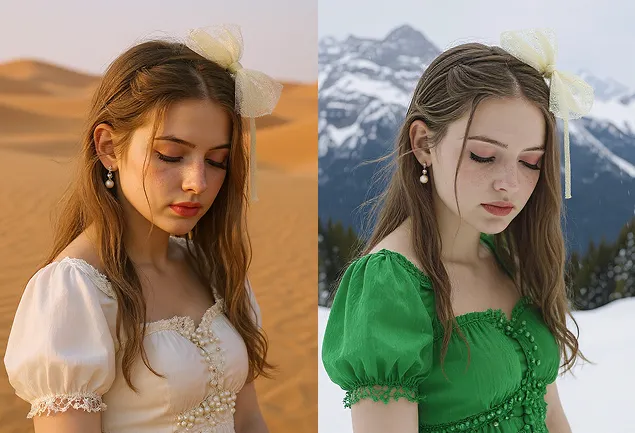
alibaba/qwen-image-3-edit takes an images array of 1-3 reference images. For a catalog run, that's typically one image of the model in a base pose and one (or two) images of the garment — the edit call combines them into a single output showing the model wearing that garment.
model: alibaba/qwen-image-3-edit
images: [model_base_pose.jpg, garment_dress_01.jpg]
prompt: "replace the model's dress from image1 into green dress, standing in the same pose and replace the background into snow mountain"
size: "2k"
aspect_ratio: "3:4"
Prompts
One call per outfit. The model reference stays constant; only the garment reference changes between calls, which is what turns "book another shoot" into "run another edit call."
Cost Math for a Real Catalog Run
Pricing is flat: $0.030 per output image, confirmed fixed regardless of size (1k/2k) or aspect_ratio (15 options available). The n parameter (default 1, range 1-6) multiplies cost directly — an n=6 call costs 6 × $0.030 = $0.180.
For a 20-outfit catalog batch, that's straightforward: 20 separate single-image calls run $0.60 total. If several outfits can share a batch (same pose, different garments queued together), that's roughly 4 calls at n=6 rounded up — still landing around the same total, since n scales cost linearly rather than offering a batch discount.
Batch shape | Calls | Cost |
20 × single call (n=1) | 20 | $0.60 |
~4 × batched call (n=6) | 4 | $0.60-0.72 |
Either way, the entire 20-outfit run costs less than a single hour of studio time.
What It Can't Do
There's no negative_prompt on this endpoint — you can't tell it what not to render, so garment descriptions need to be positive and specific ("form-fitting knee-length navy dress" rather than "not baggy, not floor-length"). There's also no safety_tolerance parameter to configure. And both size and aspect_ratio are required fields with no default — a call that omits either one errors rather than falling back to a sensible default, which is a common pitfall in code samples copied from other endpoints.
Developer Note
This runs on the same request shape as any other Qwen Image 3 call — swap the images array contents between runs, keep the model string fixed, and the rest of the integration doesn't change. One API key covers the full catalog pipeline.
For product photography that doesn't need a model at all (flat-lay or product-only shots), see our AI product photo generation guide. If the catalog needs video instead of stills, our Wan 3.0 for e-commerce product demos covers that pivot directly.
Create your free Siray account and run your next outfit listing through an edit call instead of a reshoot.