GPT Image 2.5 Product Shadows: Ground the Object First

A product can look pasted onto a table when its base lacks a believable connection to the surface. The fix is not necessarily a larger or darker shadow. Start by identifying where the object touches the table and where the light comes from. This GPT Image 2.5 workflow uses the verified Flare edit endpoint as a specific example, not as a synonym for every variant.
Key TakeawaysSeparate the contact area beneath the product from the longer shadow cast across the surface.Ask for a restrained lighting correction while preserving the product's actual shape and label.
Siray's Flare edit schema accepts reference images and an optional mask, but no seed. Those controls do not guarantee unchanged product pixels; compare every result with the source photograph.
Where Does the Object Touch the Surface?
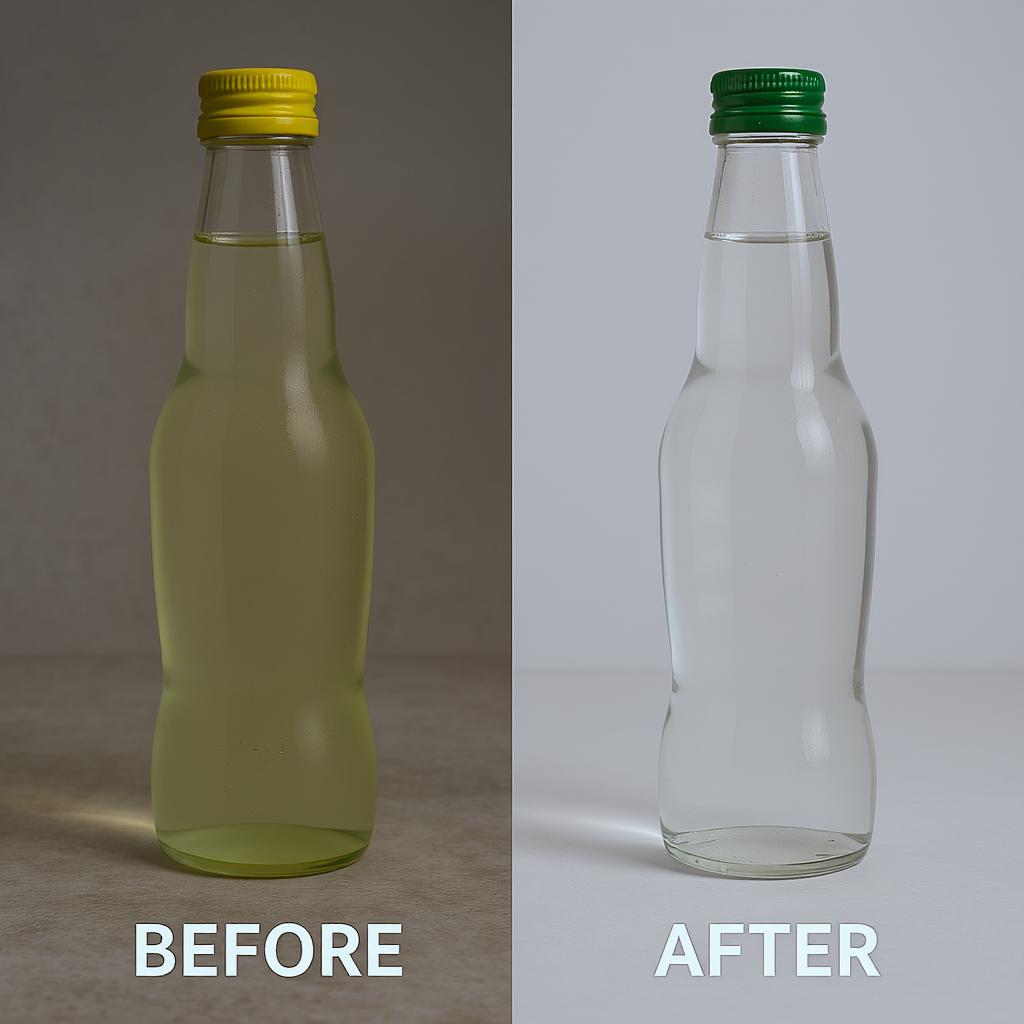
Identify the visible contact points before asking for a shadow. A flat-bottomed bottle, a raised-foot bowl and a chair do not meet the surface in the same way. The source photograph should make those relationships readable. If the underside is hidden, don't invent a precise physical construction just to make the shadow look convincing.
A contact shadow describes the darkened region close to where surfaces meet. A cast shadow extends away from the object according to the light. These can overlap visually, but they answer different questions: where the object rests, and where it blocks the light.
What Should the Edit Instruction Say?
Name the product, the receiving surface and the intended light direction. Keep the first correction limited to grounding. Replacing the tabletop, moving the light and changing the camera angle simultaneously makes it harder to tell whether the edit improved the original problem or simply invented a different scene.
Ask for a shadow connected to the base rather than a dark oval somewhere below it. Inspect whether the darkest region fits the intended contact and softens plausibly away from it. The exact appearance depends on the scene; there is no universal shadow shape that suits every product.
An illustrative instruction:
Keep the bottle's silhouette, cap, label and position consistent with the supplied photograph. Add a restrained contact shadow where the bottle base meets the tabletop, connected to the base rather than floating below it. Let the cast shadow follow the existing light from the upper left. Preserve the surrounding table texture and the overall composition.
This is a creative target, not a guarantee that every named feature will remain unchanged.
Which GPT Image 2.5 Endpoint Is Used?
Use openai/gpt-image-2.5-flare-edit for this example. As checked on October 15, 2026, the Siray Flare edit specification requires model, prompt, images and size. The images array accepts one to sixteen URL or data-URL strings. One clear product photograph is sufficient as the input plan for this exercise.
The schema offers an optional mask, described as an inpainting mask image. Its brief description does not establish a detailed polarity or alignment convention, so this tutorial does not invent one. Follow the current mask instructions for your integration before using it, and inspect the result rather than assuming every unmasked pixel is protected.
There is no seed field. n accepts one to ten outputs, defaulting to one. Output formats include jpg, png and webp; background offers auto, opaque and transparent. A tabletop scene does not need a transparent background to demonstrate contact with a surface.
For a different use of the same model family, the GPT Image 2.5 Flare design guide discusses isolated artwork. Do not transfer its visual goals to a product photograph without checking the task.
What Should You Inspect Before Accepting It?
Compare the source and output side by side. A better shadow does not excuse a widened bottle, distorted logo or altered cap. First inspect the product silhouette and label, then the contact boundary, then the direction and softness of the cast shadow.
What if the shadow looks pasted on? Revise the connection to the base and the relationship to the existing light. A stronger blur alone may not fix the problem.
What if the product must remain pixel-identical? Use conventional compositing with the original product layer. A generative edit should not be presented as a pixel-preserving operation without evidence.
Explore a restrained contact-shadow correction through Siray, and keep only results that satisfy both grounding and product-accuracy checks.
Source: Siray, GPT Image 2.5 Flare edit OpenAPI specification, retrieved October 15, 2026, linked above. No inference test or price comparison was performed.