
Flux Kontext Pro vs Max: When the 2x Price Is Worth It

Key Takeaways
- All four Flux Kontext endpoints — t2i-pro, i2i-pro, t2i-max, i2i-max — are live on Siray, Max included for both text-to-image and image-to-image.
- Max costs exactly 2x Pro, discounted ($0.032 vs $0.064) or list ($0.040 vs $0.080).
- The request schemas match field-for-field except the model ID — no resolution or quality parameter separates them.
The Price Is Exactly 2x. The Schema Is Not.
Pro and Max bill per output image, and Max costs exactly double — not roughly double — at both price tiers. The console Pricing block lists Pro at $0.032 (20% off $0.040 list) and Max at $0.064 (20% off $0.080 list); either pair divides to 2.000. The same exact-ratio check runs in Flux 3 vs MiniMax H3 on the video side of Siray's catalog. Less expected: diffing all four OpenAPI specs turns up no difference beyond the model ID itself.
What Each Endpoint Actually Requires
Pro and Max share identical values below — the split that matters is t2i versus i2i, not Pro versus Max:
- prompt: required on both.
- aspect_ratio: required on both — t2i has 13 enum values, i2i has 14 (the extra one, match_input_image, locks output to the input photo's ratio).
- image: not applicable on t2i, required (single photo) on i2i.
- seed: optional on both.
- size, negative_prompt, safety_tolerance, batch count: absent on both.
See Qwen Image 3 Manga Panels for a full editing workflow on a comparable endpoint.

What the Extra $0.032 Actually Buys
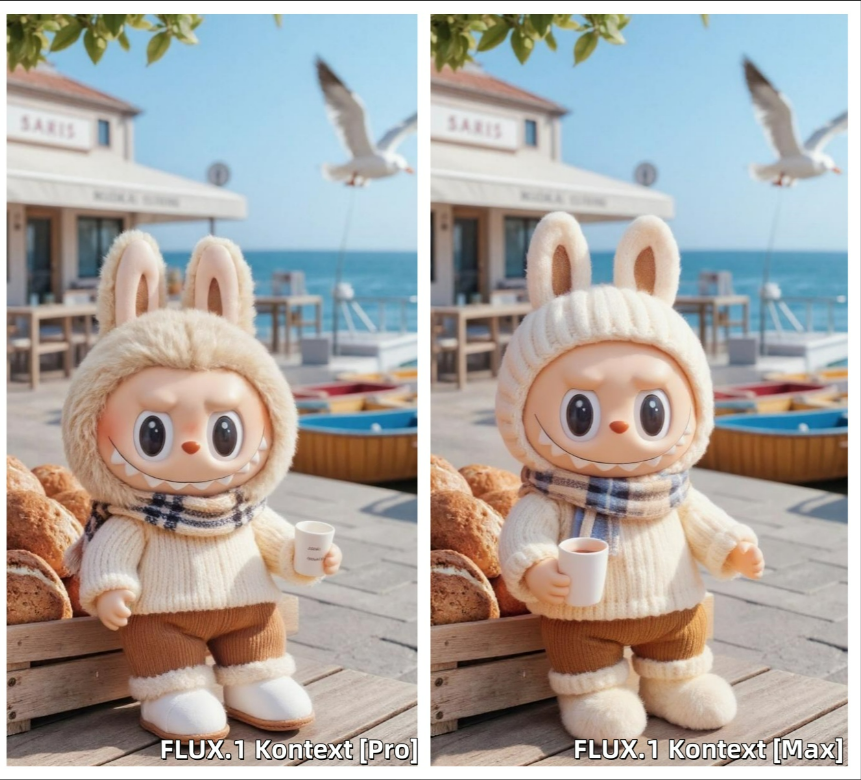
Since the schemas match, the price isn't buying a selectable capability — no dial on Pro unlocks Max's behavior. Per Black Forest Labs' own description, it buys a different underlying model: Max is documented as more photorealistic and cinematic, with stronger typography and better edit-to-edit consistency — a claim about model weights, not a parameter. MiniMax faces the same wait-or-pay question with its own tiered variant; see MiniMax H3 Max vs H3. This piece checked schema and pricing only, not rendered output, so treat the quality claim as Black Forest Labs' own, not independently verified here.
Which One to Reach For
Default to Pro. Every field Pro accepts, Max accepts identically, so switching later is a model-ID swap, not a schema migration. Reach for Max upfront when the output rewards Black Forest Labs' stated strengths — dense on-image text, a marketing hero shot under close inspection, or a batch where consistency matters more than per-image cost. For experimental or budget-sensitive work, Pro's identical parameters at half price is the safer default. Comparing across brands? See Qwen Image 3 Edit vs Flux Kontext Pro. Pure text-to-image with no photo to edit? See Flux 1.1 Pro.
FAQ
Does Flux Kontext Max support higher resolution than Pro?
No parameter says so. Neither schema exposes a size or resolution field — any visual difference happens inside the model, not through a controllable input.
Is the 2x price a discount artifact?
No. Pro is $0.032 (20% off $0.040); Max is $0.064 (20% off $0.080) — exactly 2x at both the discounted and list rate.
Can I use match_input_image with Flux Kontext Max?
Yes. Both i2i-pro and i2i-max share the same 14-value aspect_ratio enum, including match_input_image, which locks output to the input photo's ratio.
Summary
The 2x price between Flux Kontext Pro and Max is real and exact, but no parameter this article could verify explains it — it's a bet on Black Forest Labs' higher-tier weights, priced consistently, behind an identical API on both sides.
Get Started
Create your free Siray account and try Flux Kontext Pro or Max on the same prompt — swapping the model ID is the only change either way.