
GPT Image 2.5 Flare: Coffee Machine Exploded-View Posters

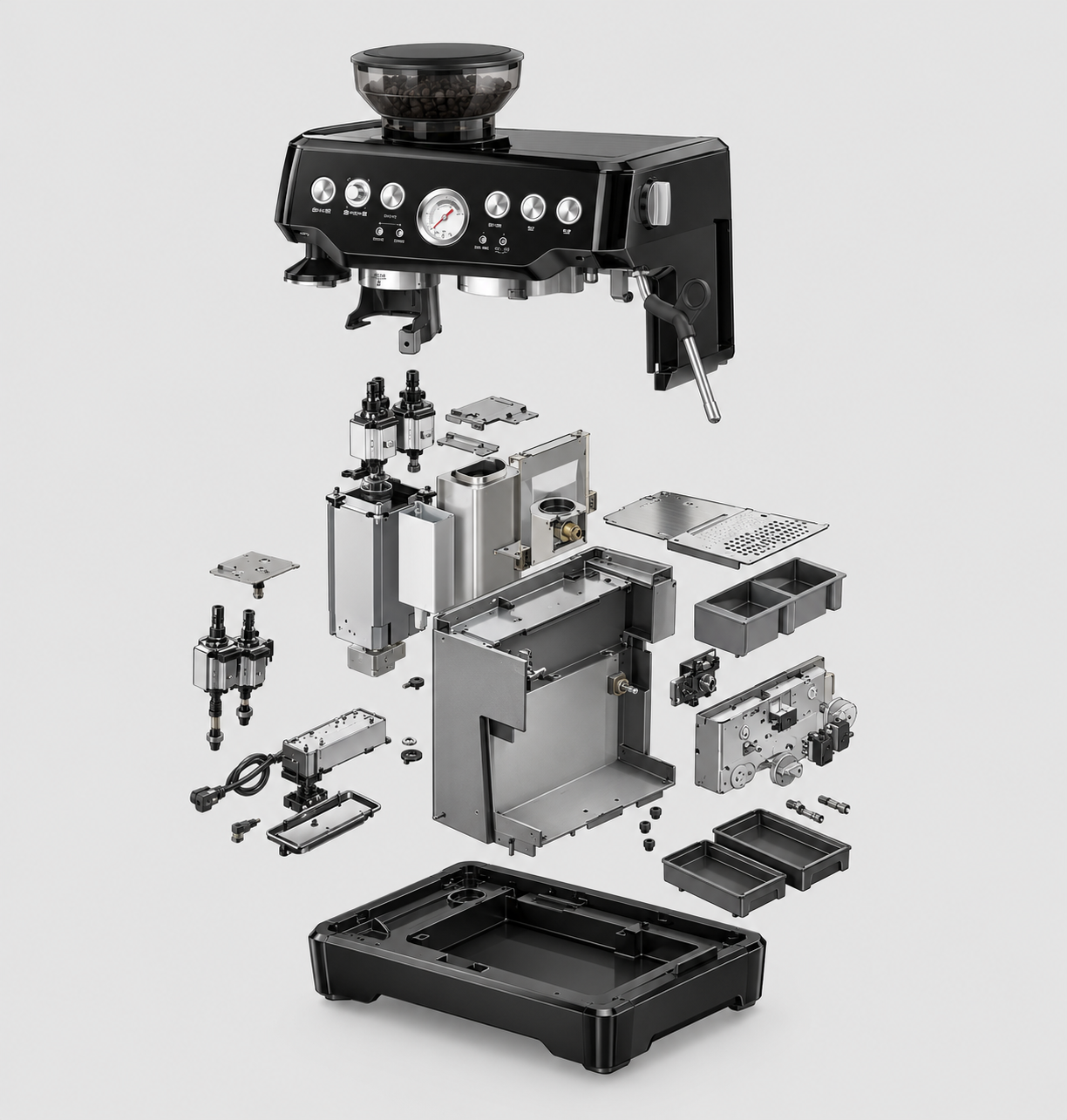
An exploded-view coffee-machine poster should explain relationships, not scatter convincing-looking parts around a shell. GPT Image 2.5 Flare can accept multiple images for an editing request, but a photograph of the exterior does not reveal the machinery inside. Start with an authorised component reference and a simple separation plan. The output is a visual concept that still needs checking against the real assembly.
Key Takeaways
- A separated assembly is an exploded view, not a cutaway.
- Use documented components instead of inventing hidden machinery.
- Choose one separation axis and a readable set of groups.
- Add labels and leader lines after the parts are approved.
Decide What the Poster Must Explain
Pick one message: how the outer housing, an identified internal assembly and the base relate. Do not try to show every screw in a first concept. An exploded view separates components while preserving their spatial relationship; a cutaway removes part of the outer surface to reveal what remains inside. Mixing those conventions can make the assembly harder to read.
Choose a machine for which approved assembly images, component photographs or a usable design drawing are available. If only the exterior photo exists, the missing structure remains unknown. Obtain references or label a wholly fictional design as such; do not present invented internals as a real product explanation.
Build a Small, Verified Parts Inventory
For the example, use a reference board that groups the actual housing, documented internal assembly and base in a consistent view. These are communication groups, not a claim that every coffee machine disassembles into three pieces. Use existing authorised documentation rather than opening an electrical appliance just to make a picture.
Group | Evidence to provide | Visual check |
Housing | Exterior and housing reference | Openings and outline remain identifiable |
Internal assembly | Approved component view | No extra tanks, gears or duplicate parts |
Base | Matching assembly reference | Footprint still aligns with the housing |
Keep a labelled inventory outside the generated image. If a connector is not visible in the references, do not ask the model to design one and then treat it as verified. More decorative detail can make a technical-looking image less truthful.
Separate Along One Axis
For a vertical layout, place the housing above the internal group and the base below, with enough space to distinguish their outlines. Keep the same viewing angle for all groups. A lid shown from above and a base shown from below may look dramatic but fail to explain how they relate.
Spacing is a communication choice, not a measured assembly distance. Ask for clean gaps and aligned centres rather than millimetre values the output cannot certify. Leave a margin for labels, but do not depend on a prompt to produce final typography.
Supply References, Not a Guess About the Interior
The Siray GPT Image 2.5 Flare Edit specification requires model, prompt, images and size. The input array accepts one to sixteen images. This example uses an exterior photo plus a verified component board and identifies their different roles in the prompt. Multiple inputs do not guarantee exact part correspondence.
The product-photo editing comparison covers changing existing product images with other endpoints. Here the additional requirement is evidence for the hidden structure; an editing API is not an inspection tool.
Label Only What Has Been Checked
Compare each generated group with the inventory before adding numbers. Check duplicated objects, missing openings, changing perspective and parts merged into the wrong layer. Reject or retouch a candidate that fails those relationships; do not rescue it with confident labels.
Add the title, numbers and leader lines in a layout tool. Use plain component names from the approved documentation, and mark the poster as an illustrative exploded-view concept. It is not CAD, a dimensioned drawing, a service manual or proof of safe disassembly. No completed generation or engineering validation is claimed here.
Create your free Siray account and turn one documented assembly into a readable poster concept.