
Hunyuan Image 3 Instruct NSFW Multi-Image Fusion: Combine Faces and Scenes (Uncensored Walkthrough)

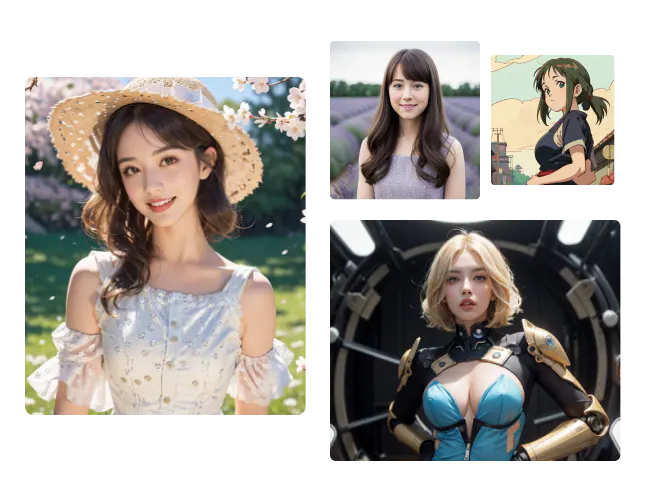
Searching for a Hunyuan Image 3 Instruct "face swap"? There isn't one — no toggle, no button, no dedicated pipeline. What it does have is Multi-Image Fusion: feed it up to three reference images and an instruction, and it composites them into one coherent result. Prompted the right way — a face reference, a body or scene reference, told explicitly to combine them — it gets close to the effect people search "face swap" for. It's just not identity-locked the way a purpose-built swap tool is, and knowing that difference changes how you should prompt it.
TL;DR:
- Hunyuan Image 3 Instruct has no native face-swap feature — the real capability is Multi-Image Fusion, combining up to 3 reference images.
- It's a general compositing tool, not identity-locked: results depend on how specifically you assign each reference a role.
- Treat it as draft → inspect → regenerate, not a one-shot guarantee.
- Need a dedicated identity-swap route instead? Seedream X Spicy's ref2i endpoint is built for that (linked below).
What Multi-Image Fusion Actually Is (Not a Face-Swap Toggle)
Hunyuan Image 3 Instruct's Chain-of-Thought reasoning and prompt self-rewrite let it read up to three reference images together and understand what each one contributes — not a pixel blend, but an actual read of each source. Tencent's own framing covers things like combining a logo with a material texture, or merging a portrait with a different style. Nothing in the official model documentation names a face-swap mode; the effect people want from "face swap" is something you reach by prompting fusion carefully, not something the model exposes as a discrete feature. Running it yourself needs 80GB+ of VRAM — Siray's hosted endpoint skips that requirement, reachable with the same API key used across the rest of the catalog (docs.siray.ai).
Prompting Each Reference's Role
Fusion output quality comes almost entirely from how clearly you assign each image a job. Three levers matter:
Face reference — name it as the source of identity only: "use the face from image 1, unchanged." Vague references ("like the first photo") let the model drift toward an average rather than a specific identity.
Body or scene reference — name what it contributes separately from the face: "use the pose and setting from image 2." Mixing this instruction into the same sentence as the face reference is the most common cause of the model blending features from both images instead of keeping them distinct.
Style or lighting reference — optional third image, named for tone only: "match the lighting and color grade of image 3." Leave this out entirely if you only have two references; forcing a third weak reference tends to muddy the result rather than sharpen it.
A Full Combined Example
Putting all three levers into one instruction:
Combine these three images: use the face from image 1 exactly as shown,use the pose and bedroom setting from image 2, and match the warmlamp lighting and color grade from image 3. Keep the face unchanged —do not blend it with any other face in the references.That last sentence — explicitly telling the model not to blend the face — is the single highest-leverage line in this kind of prompt, because fusion's default behavior is to synthesize across all inputs unless told otherwise.
What It Won't Guarantee
This is the honest boundary: Multi-Image Fusion is instruction-driven, not identity-locked. The same prompt can produce a closer or looser match to the source face across attempts, because the model is reasoning about the references rather than copying pixels from one of them. Treat every result the same way Siray recommends for other Hunyuan edits — draft, inspect, regenerate with a sharper instruction if the identity drifted — rather than expecting a single guaranteed pass. If guaranteed identity preservation across a batch matters more than flexibility, Seedream X Spicy's ref2i endpoint was built specifically for role-based reference compositing and is the more purpose-built option for that use case.
Key Takeaways
- No native face-swap feature exists on Hunyuan Image 3 Instruct — Multi-Image Fusion (up to 3 references) is the real mechanism.
- Name each reference's role explicitly (face / body-scene / style) and tell the model not to blend the face — that instruction matters more than any other.
- Results aren't identity-locked; inspect and regenerate rather than expecting one perfect pass.
- For guaranteed identity-preserving swaps, Seedream X Spicy's ref2i route is the more purpose-built path.
FAQ
Does Hunyuan Image 3 Instruct have a real face-swap feature?
No — Tencent's official documentation names no face-swap, identity-swap, or face-replacement feature. Multi-Image Fusion, a general 3-image compositing capability, can be prompted toward that effect but isn't built or guaranteed for it.
How many reference images can it combine?
Up to three.
Do I need a GPU to use it?
Not on Siray — the model needs 80GB+ of VRAM to self-host, but Siray's hosted endpoint runs it behind one API key, no local hardware required.
Create your free Siray account and run Hunyuan Image 3 Instruct's Multi-Image Fusion through the same one API key used across the rest of Siray's catalog — no 80GB GPU required. For the model's full editing capability set, see the complete Hunyuan Image 3 Instruct editing guide; for general prompting fundamentals, see the Hunyuan Image 3 Instruct prompt guide.
NSFW compliance: Siray permits lawful adult (18+) content only. Every example described here is fictional and AI-generated, never a real individual without consent and never a minor. Siray rejects all illegal content and has zero tolerance for CSAM. "Uncensored" means no filtering beyond what the law requires — it never means over-censorship, and it never permits anything illegal.