
Hunyuan Image 3 Instruct NSFW Prompt Guide: Uncensored Tips

This Hunyuan Image 3 Instruct NSFW prompt guide is about one thing: structure. The gap between a mediocre uncensored generation and a great one is rarely the model — it's how the prompt is built. Hunyuan Image 3 Instruct is an uncensored text-to-image model on Siray, and like any instruct-tuned model, it rewards explicit, well-organized description over a vague wishlist. The approach below breaks a prompt into five levers you control one at a time.Key Takeaways
- Great uncensored results come from five prompt levers: shot & focal length, body & appearance, wardrobe & explicitness, lighting & mood, and skin & texture.
- Wardrobe is the core uncensored lever — phrase it on a suggestive → partial → explicit ladder so you can dial the exact level you want.
- Stack the levers deliberately; don't cram them into one run-on line. A negative prompt does the cleanup.
- Every subject must be an adult (18+). This guide is for legal adult content only.
How Hunyuan Image 3 Instruct Reads a Prompt
Instruct-tuned models treat a prompt as a set of instructions, not a mood board. That means specificity pays: naming the shot, the body, the wardrobe, the light, and the skin as separate details gives the model clean signals to follow. In Siray's testing, the same subject swings from generic to photographic depending on whether these five levers are named explicitly or left to the model's defaults. "Uncensored" here means the model doesn't over-filter within legal limits — it renders the explicit adult content described directly, so the writing has to be direct too. Tencent's Hunyuan Image 3 model card documents its instruct design; the practical takeaway is that euphemism produces soft, generic output while concrete language produces what was asked for.
Lever 1 — Shot & Focal Length
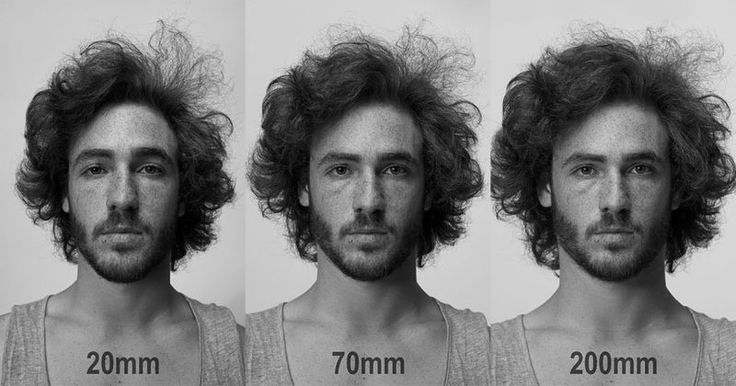
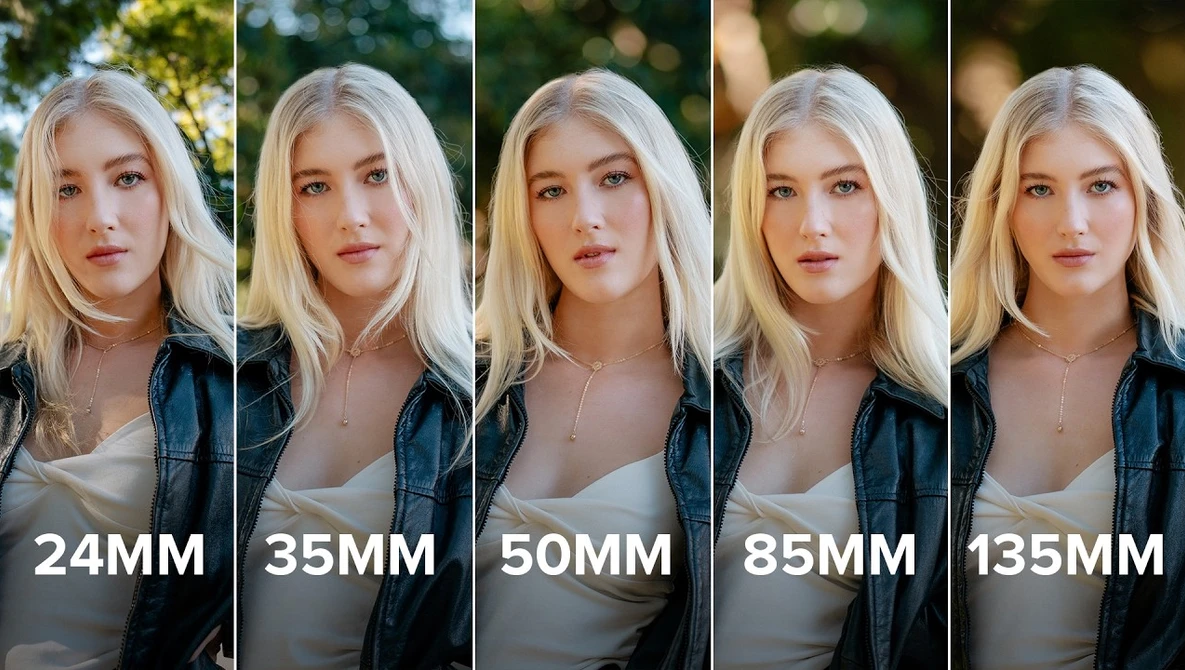
This lever controls framing and distance. Decide how much of the subject is in frame and how the lens compresses it. Use camera language the model understands: extreme close-up, full-body shot, 85mm portrait, wide shot, low-angle, over-the-shoulder. Focal length also shapes intimacy: a wide 35mm keeps context and body language in frame, while an 85mm or tighter crop isolates the subject and softens the background. State the lens explicitly, since the model falls back to a neutral mid-shot when it isn't told otherwise.Mini example: full-body shot, 35mm, adult woman standing, slight low angle
Lever 2 — Body & Appearance
This lever defines the subject's anatomy and features. Anchor adulthood explicitly, then describe body type, proportions, and face. Helpful phrasing: adult woman, mid-20s, athletic build, symmetrical features, perfect human anatomy, natural proportions. The anatomy terms also cut down on the deformed-limb artifacts these models sometimes produce.Mini example: adult woman, late 20s, curvy build, symmetrical face, perfect human anatomy, natural skin
Lever 3 — Wardrobe & Explicitness ⭐
This is the core uncensored lever, and the one worth phrasing most carefully. Think of it as a dial with three stops, and choose the wording that matches the exact level you want:
- Suggestive: silk robe slipping off one shoulder, sheer fabric, wet white shirt
- Partial: topless, unbuttoned, open blouse, lingerie pulled aside
- Explicit: fully nude, full nudity, explicit pose and anatomy described directly
Lever 4 — Lighting & Mood
Lighting sets realism and tone. Name the source and quality: cinematic lighting, soft rim light, warm dim bedroom light, golden hour, subsurface scattering for skin glow. Rim light and low-key setups add depth and make a nude subject read as photographed rather than flat.Mini example: warm dim light, soft rim lighting, cinematic, subsurface scattering
Lever 5 — Skin & Texture
This lever is what separates a plastic render from a believable one. Push detail and realism: realistic skin pores, sweat beads on skin, subsurface scattering, sharp focus, 8K detail, highly detailed. Texture terms matter most on explicit output, where soft or waxy skin breaks the illusion fastest.Mini example: realistic skin texture, fine pores, light sweat sheen, sharp focus, 8K detail
Negative Prompts
A negative prompt removes the failure modes so the positive prompt can do its job. Keep one reusable block on hand:blurry faces, deformed limbs, extra fingers, mutated hands, low quality, text overlays, watermark, censorship, bad anatomyAnatomy and hand artifacts are the most common failures on explicit generations, so deformed limbs, extra fingers, and bad anatomy earn their place in every run. Adding censorship and text overlays stops the model from self-limiting or stamping the output. Keep the block tight, though: overloading a negative prompt can strip the very detail the positive prompt is trying to add.
Full Stacked Example
Now layer all five levers plus the negative block into one prompt:Positive: full-body shot, 85mm, adult woman late 20s, curvy build, symmetrical features, perfect human anatomy, silk robe slipping off one shoulder, partial, fabric tension and release, warm dim bedroom light, soft rim lighting, subsurface scattering, realistic skin pores, light sweat sheen, sharp focus, 8K, highly detailedNegative: blurry faces, deformed limbs, extra fingers, low quality, text overlays, censorship, bad anatomyRead the positive prompt back and each lever appears in order: shot, body, wardrobe, light, skin. That's the whole method behind this Hunyuan Image 3 Instruct NSFW prompt guide — build the levers separately, then stack them. For the same element-by-element approach on a different model, compare this prompt guide for Z-Image or the Seedream X Spicy prompt guide.
Create your free Siray account and start generating with Hunyuan Image 3 Instruct — available on Siray now.
Compliance note. Siray refuses all illegal content, with zero tolerance for CSAM. Every example and workflow in this guide is for legal adult (18+) content only — all subjects must be adults. "Uncensored" means Siray does not over-filter beyond what the law requires; it never means anything illegal.