Midjourney V8.2 API: Pricing, Features & Prompt Examples
What Midjourney V8.2 does well, what it costs on Siray AI, and four prompts we tested end to end, including an image-to-image run that did not follow the prompt.
The Midjourney V8.2 API gives developers Midjourney's July 2026 image model through a standard REST call. On Siray AI, text-to-image is listed at about $0.021 per image. It suits art direction, stylized imagery and photographic concepts. This guide covers endpoints, pricing, a quickstart and four prompts we tested.
Key takeaways
- Two endpoints on Siray AI: text-to-image (
midjourney/midjourney-v8.2-t2i) and image-to-image (midjourney/midjourney-v8.2-i2i). - Four images per text-to-image task: all seven of our text-to-image tasks returned four candidates.
- Seven aspect ratios: 1:1, 9:16, 16:9, 4:3, 3:4, 3:2 and 2:3. You choose a ratio, not a pixel size.
- Slower than the progress bar suggests: our text-to-image tasks took 192 to 372 seconds. In the two runs where we logged progress, most of that time was spent at 98%.
- Short text held up: all four candidates spelled a two-line poster correctly.
- Image-to-image needs testing first: our one run returned a four-up grid and ignored the requested scene change.
What is Midjourney V8.2?
Midjourney V8.2 is a closed image model from Midjourney, launched on July 24, 2026. It is Midjourney's model, available on Siray AI through a unified API.
Midjourney says the release "focuses on aesthetics and image quality and personalization." Its announcement makes three specific claims:
- Look. Images "should be more creative, bold, sophisticated, edgy and fresh."
- Consistency. "Random situations where you'd get a low quality image should be dramatically reduced."
- Personalization. The model should "understand" personal taste much better, especially with many ratings under a profile.
Personalization is tied to Midjourney profiles, and the Siray AI parameter list has no field for it.
Midjourney also describes a separate V8.2 edit model with instruction-based editing, inpainting and outpainting, and up to four image references. It warned of "a lot of edge cases" during testing. The Siray AI docs do not say whether the i2i endpoint uses this edit model, so do not assume those features are available through it.
Midjourney V8.2 endpoints on Siray AI
| Model ID | Task | Required inputs |
|---|---|---|
midjourney/midjourney-v8.2-t2i |
Text-to-image | prompt, aspect_ratio |
midjourney/midjourney-v8.2-i2i |
Image-to-image | prompt, aspect_ratio, image (URL or data URL) |
Both endpoints share these optional parameters:
| Parameter | Values | What it does |
|---|---|---|
stylize |
0–1000, default 100 | Strength of Midjourney's aesthetic |
raw |
true / false |
Reduces default aesthetic processing |
chaos |
0–100 | Varies the initial image grids |
weird |
0–3000 | Adds unusual aesthetics |
negative_prompt |
text | Lists content to exclude |
seed |
-1 to 9999999999 | Sets the random seed |
style_reference |
URL, number or random |
Provides a style reference |
style_weight |
0–1000, default 100 | Weight of the style reference |
quality |
1, 2, 4 |
Sets the quality option |
tile |
true / false |
Creates repeating tile images |
We tested raw, stylize and negative_prompt. The other parameters are listed from the docs and were not part of our tests.
Midjourney V8.2 pricing on Siray AI
| Endpoint | Listed price |
|---|---|
| Text-to-image | About $0.021 per image |
| Image-to-image | Not returned by the pricing API at the time of writing |
The pricing description reads "billed at approximately $0.021 each," and it does not say whether a four-image task counts as one image or four. Until you confirm this on your own usage page, budget for the higher figure:
- One task: $0.021 if billed once, or 4 × $0.021 = $0.084 if billed per output.
- 100 tasks: $2.10 if billed once, or $8.40 if billed per output.
Prices were read from the Siray AI pricing API on November 4, 2026 and re-checked on November 23, 2026, unchanged and with no discount active. Check the Midjourney V8.2 model page for live prices. For broader context, see our AI image and video API cost breakdown.
Quickstart: call the Midjourney V8.2 API
Generation is asynchronous. You submit a task, get a task_id, then poll every 3–5 seconds until the status is SUCCESS. The image URLs are in data.outputs.
Illustration generated with Midjourney V8.2 on Siray AI.
1. Submit a task
curl -X POST https://api.siray.ai/v1/images/generations/async \
  -H "Authorization: Bearer $SIRAY_API_KEY" \
  -H "Content-Type: application/json" \
  -d '{
    "model": "midjourney/midjourney-v8.2-t2i",
    "prompt": "Studio product photograph of a matte sage-green ceramic coffee mug on a pale travertine block, a thin curl of steam rising, soft window light from the left, gentle shadow, warm neutral background, shallow depth of field, crisp detail on the glaze texture, e-commerce hero shot.",
    "aspect_ratio": "3:2",
    "raw": true
  }'
2. Poll for the result
curl https://api.siray.ai/v1/images/generations/async/$TASK_ID \
  -H "Authorization: Bearer $SIRAY_API_KEY"
Three things we noticed while integrating:
- Do not resubmit at 98%. Progress stayed there for minutes in the runs we logged. Set your client timeout to at least 10 minutes.
- Check
status, notfail_reason. On our successful tasks,fail_reasoncontained the output URLs instead of being empty as the docs example shows. - Do not hard-code pixel sizes. Most of our 16:9 tasks returned 1456x816, but one returned 1024x573. Our 3:2 tasks returned 1344x896.
Full details are in the Midjourney V8.2 t2i API reference and the image task status API.
Midjourney V8.2 prompt examples (tested)
We ran every prompt below through the Siray AI API on November 4, 2026. Timings include queueing. Each result is one unedited output from the task.
1. Product photo with raw mode
Studio product photograph of a matte sage-green ceramic coffee mug on a pale travertine block, a thin curl of steam rising, soft window light from the left, gentle shadow, warm neutral background, shallow depth of field, crisp detail on the glaze texture, e-commerce hero shot.
Settings: text-to-image, aspect_ratio 3:2, raw true, 306 seconds, four outputs at 1344x896.
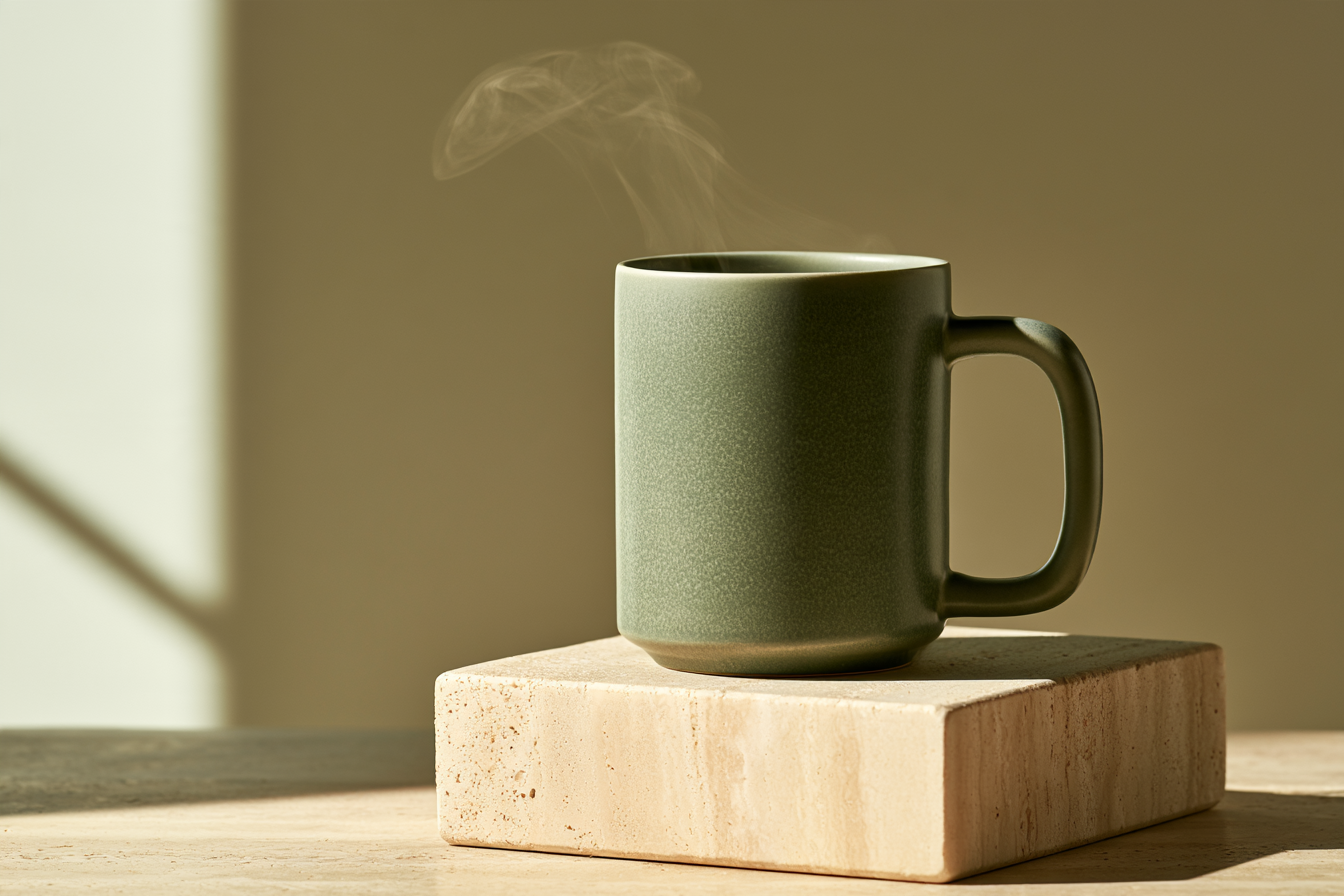
The light direction, glaze and stone texture all follow the prompt. The mug's shape changed between candidates, from a wide cup to a straight mug, so this works better for concepts than for matching a real product.
2. Poster with short exact text
A minimalist Swiss-style concert poster on off-white paper. Large bold black sans-serif headline with the text "NIGHT SIGNALS" across the top, a single cobalt blue circle in the center, and smaller text at the bottom reading "LIVE AT HALL 7". Clean grid layout, generous margins, subtle paper texture, photographed flat under soft daylight.
Settings: text-to-image, aspect_ratio 3:2, raw true, stylize 50, 192 seconds, four outputs at 1344x896.
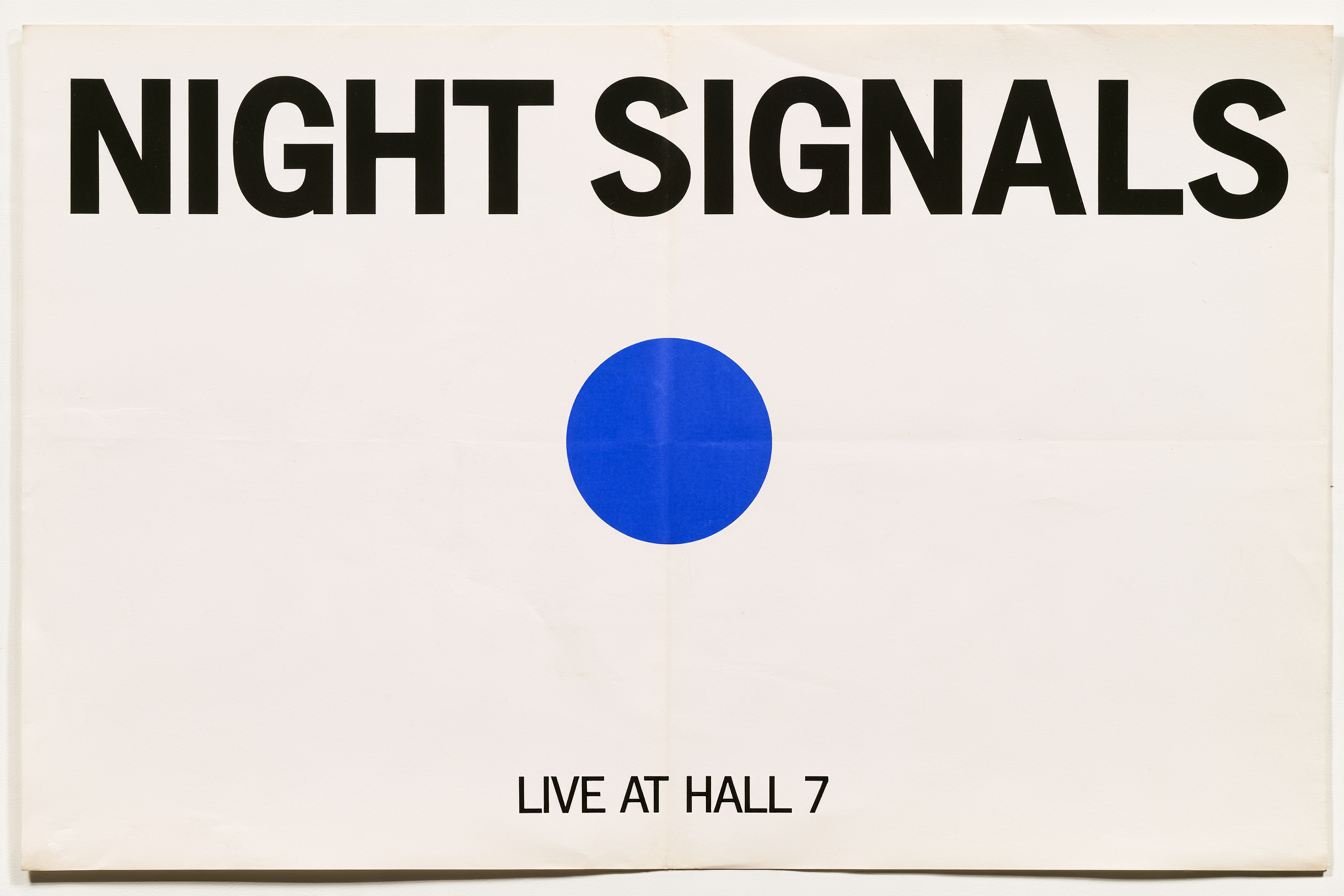
All four candidates spelled both lines correctly and kept the layout. Letter spacing and letter shapes were uneven in some candidates, and some added fold lines we did not ask for. Check them at full size before use.
3. Painterly image with high stylize
A lighthouse on a black basalt cliff during a storm at dusk, painted in thick impasto oil, sweeping beam of pale gold light cutting through rain, towering teal waves, dramatic and dreamlike, gallery painting.
Settings: text-to-image, aspect_ratio 3:2, stylize 750, 313 seconds, four outputs at 1344x896.
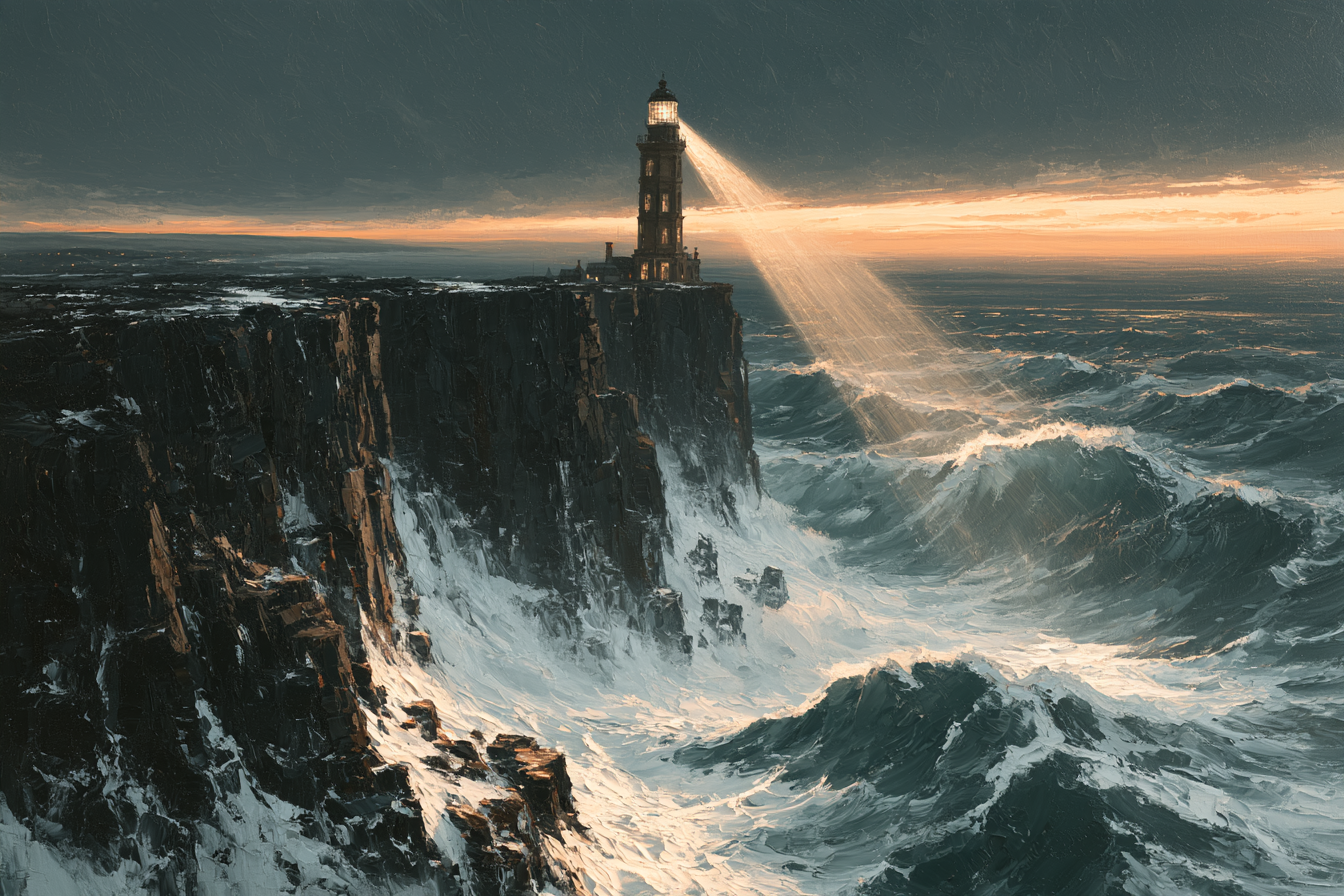
This is the strongest result of our tests. The brushwork, the palette and the beam all match, and the candidates differed in composition, which gives you real options from a single task.
4. Image-to-image scene change
The same mug and travertine block, now outdoors on a sunlit stone garden wall at golden hour, soft olive leaves blurred in the background, warm evening light from the right.
Settings: image-to-image with the mug result above as a data URL, aspect_ratio 3:2, 73 seconds, one output at 2048x1364.
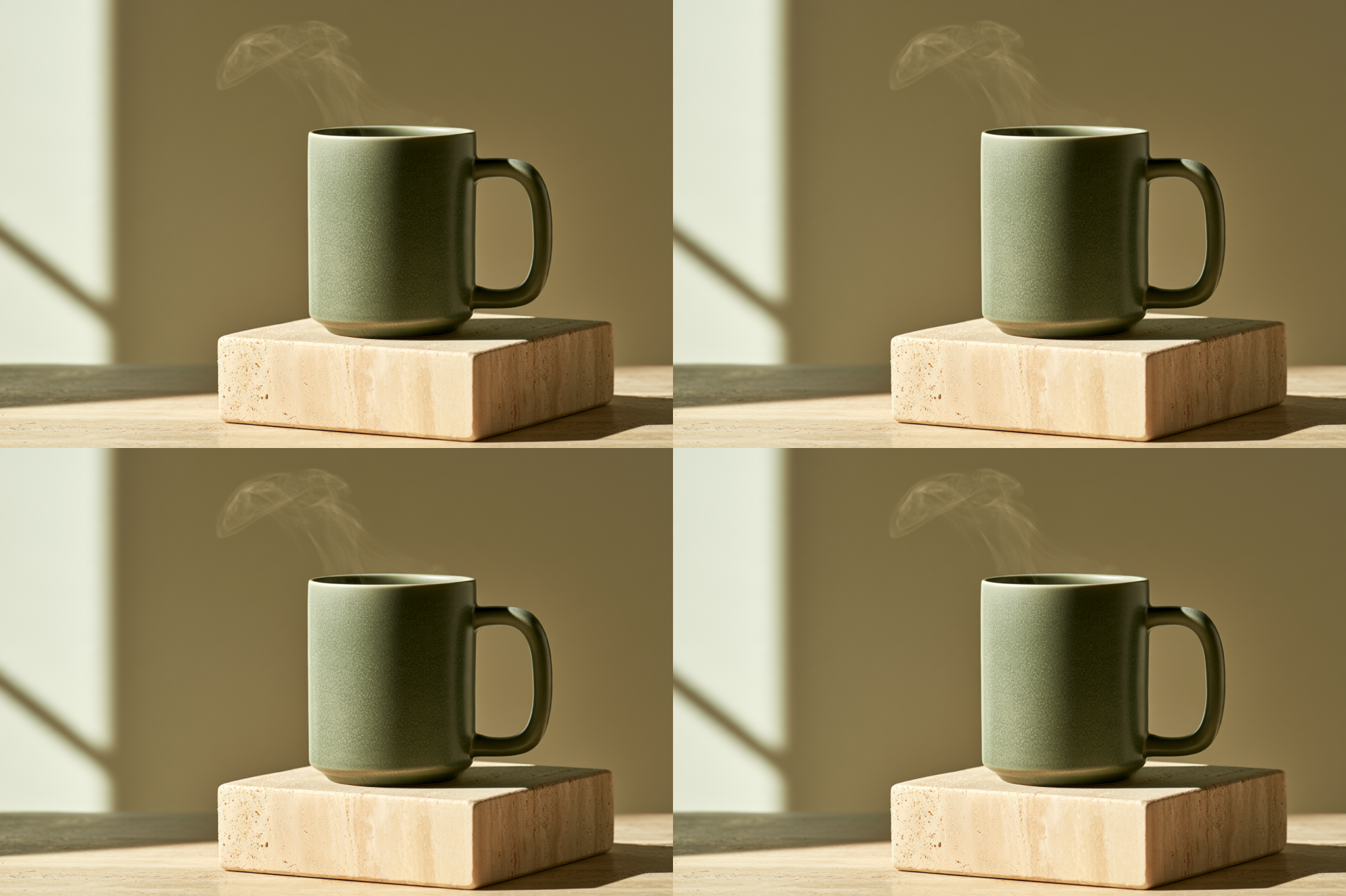
The scene did not change: the mug stayed indoors in the original light. The task also returned one image containing a two-by-two grid, so each variation is only about 1024x682 and has to be cropped out. It stayed very close to the input, which may suit near-copies. This is one run with default settings, so test your own use case before relying on this endpoint.
Prompting tips for Midjourney V8.2
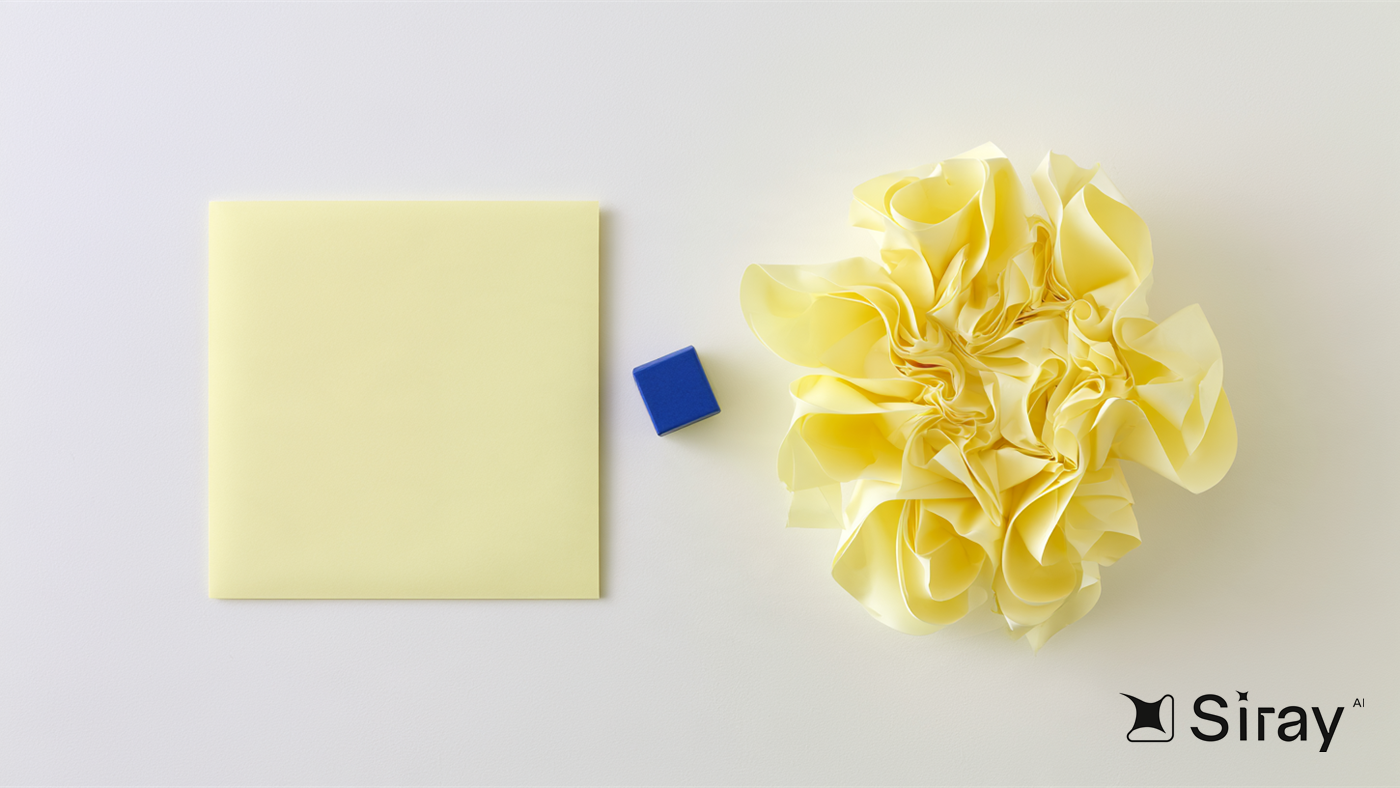
Illustration generated with Midjourney V8.2 on Siray AI.
- Pick
rawor highstylizeby goal. Our most literal results usedraw, and our most expressive one usedstylize750. Midjourney's V8 alpha notes also suggestrawfor photos or a plainer look. - Put exact text in double quotes. Midjourney's alpha notes tie better text to words "specified in quotes." Keep it short: we tested two short lines, not paragraphs.
- Review all four candidates. Shape and composition varied noticeably, so the best image is often not the first.
- Plan for cropping. You pick from seven ratios, so resize afterward for fixed formats such as 1400x788.
- Add
negative_promptfor clean art. We passed "text, letters, logo, watermark, people" for the illustrations here and saw no stray text in the images we reviewed.
When to use Midjourney V8.2 (and when not to)
Good fit:
- Concept art, mood boards and editorial illustration.
- Painterly or strongly art-directed images.
- Campaign exploration, where four candidates per task help.
- Short display text, reviewed by a person.
For anime-style characters, see how it compares in our Niji 7 vs Midjourney V8 test.
Consider another model when:
- You need precise edits to an existing image. See how Qwen Image 3 Edit recolors shoes.
- You need text on real packaging. See GPT Image 2.5 Flare for packaging localization.
- You need native 8K output or a full product label rendered exactly. See our Kling Image 4.0 first tests.
- You want a specific print style with composition checks. See FLUX Kontext Pro woodcut posters.
- Your product needs results within seconds. Our tasks took minutes.
FAQ
How much does the Midjourney V8.2 API cost per image?
Siray AI lists text-to-image at about $0.021 per image. A task returned four images in our tests, and the listing does not say how that is counted, so budget up to $0.084 per task. Prices were checked on November 23, 2026.
Is Midjourney V8.2 available via API?
Yes. On Siray AI, use midjourney/midjourney-v8.2-t2i or midjourney/midjourney-v8.2-i2i through the async image endpoint with one API key.
How long does Midjourney V8.2 take to generate images?
Our seven text-to-image tasks took 192 to 372 seconds, including queue time. Our single image-to-image task took 73 seconds.
Does Midjourney V8.2 support image-to-image?
Yes, through midjourney/midjourney-v8.2-i2i, which takes one image as a URL or data URL. In our one test it stayed close to the input, ignored the requested scene change and returned a two-by-two grid.
Can Midjourney V8.2 render text accurately?
In our test, all four candidates spelled two short lines correctly when the text was in double quotes. Letter shapes and spacing were uneven in some, and we did not test long text.
What sizes does Midjourney V8.2 return?
You set one of seven aspect ratios rather than a pixel size. Our 3:2 tasks returned 1344x896 and our 16:9 tasks usually returned 1456x816, with one at 1024x573.
Try Midjourney V8.2 on Siray AI
Create a free account, get an API key and run the lighthouse prompt above. Open the Midjourney V8.2 model page on Siray AI to start.
Sources
- Version 8.2, Midjourney, published July 24, 2026, accessed November 4, 2026.
- Edit Model for V8, Midjourney, accessed November 4, 2026.
- V8 Alpha, Midjourney, accessed November 4, 2026.
- Midjourney V8.2 t2i API reference, Siray AI docs, accessed November 4, 2026.
- Midjourney V8.2 i2i API reference, Siray AI docs, accessed November 4, 2026.
- Image task status API, Siray AI docs, accessed November 4, 2026.
- Siray AI model pricing API (
GET /v1/models/pricing/{model}), queried November 4 and November 23, 2026.