
PixVerse V6 Album Covers: Animate Without a Redesign

An animated album cover should still read as the same cover when paused. With PixVerse V6, begin with a clean artwork image and choose one element to move: smoke, a reflected light or a loose sleeve. Keep typography out of the generation when exact lettering matters. This is a proposed workflow, not a tested claim that the model can lock the rest of the image.
Key Takeaways
- Use artwork you own or have permission to animate.
- Choose one motion focus before adding camera movement.
- Restore the artist name and title in editing.
- Siray's PixVerse V6 i2v specification takes one source image and exposes no aspect-ratio field; prepare the composition before submission.
What Should Be Removed Before Animation?
Export a version without the album title, artist name or small legal lettering. If those elements are baked into the image, a generation may alter their shapes. Reapplying the original typography later gives the editor direct control over spelling, placement and timing.
Keep the original layered design if available. Do not erase watermarks from someone else's cover or assume a musician's photograph can be reused. For a new illustrated layout rather than animation, the cover-art workflow addresses the separate job of building a static composition.
Which Element Should Move?
Choose the movement that supports the artwork's mood. Thin smoke drifting beside a window can suit a quiet portrait. A small reflection moving across a metallic object can suit an abstract cover. Asking for smoke, blinking lights, turning heads and a camera push in the same first attempt makes the result harder to evaluate.
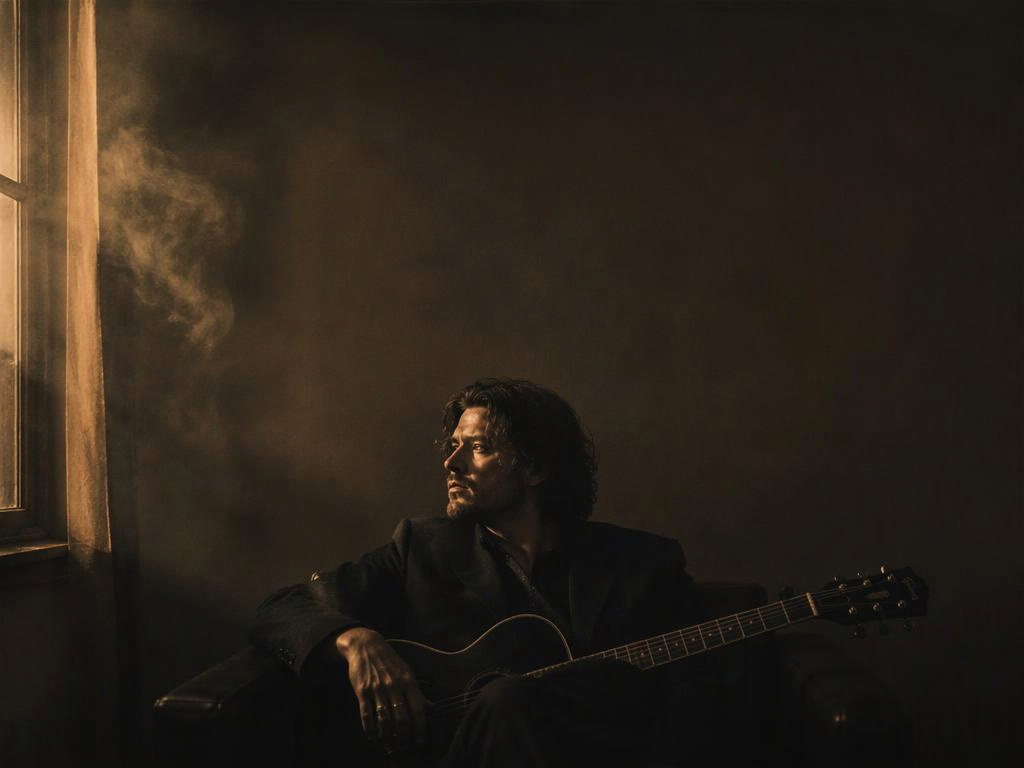
Mini-example: “Only the faint smoke near the window drifts upward; the seated subject holds the pose.” “Only” expresses the desired scope, not a masked editing feature. The endpoint has no mask input for freezing the rest of this image.
How Do You Keep the Cover Recognisable?
Describe the visual hierarchy, not just “preserve everything.” Name the central subject, the empty space reserved for type and the intended frame. Avoid an orbit or a large zoom when those moves would reveal background that the original artwork never designed.
This proposed prompt sets a restrained target:
Animate the supplied album artwork as a single stationary shot.
The seated adult musician holds the original pose. Faint smokebeside the window drifts slowly upward through the narrow light beam.
Keep the central subject and the open space above the head readable.Subtle atmospheric movement, no scene change, no added lettering.
Prompt example
If the subject starts singing or the camera travels, simplify the action further. Inspect several moments rather than choosing a clip because its first frame matches. A recognizable thumbnail can hide substantial changes later in the take.
Which PixVerse Settings Fit a Single Cover?
As checked on October 10, 2026, Siray's PixVerse V6 i2v specification requires model, prompt, image, duration and size. Use pixverse/pixverse-v6-i2v; six seconds and 720p are supported example values. The input is one image, not an image array. Prepare the intended crop first; this endpoint exposes no aspect_ratio.
Set multi_clip to false for this single-shot experiment. The field exists, but its documentation does not promise precise scene allocation or editing behavior. The PixVerse multi-clip article discusses that separate approach. Record a seed if comparing requests, without treating it as a guarantee that pixels outside the smoke remain fixed.
Finish the Type and Inspect the Ending
Place the original lettering over the selected clip in an editor. Scrub through the face, frame edges and reserved title area. Reject movement that competes with the cover's identity, then export for the intended destination's current format requirements.
Quick Questions
Will it loop seamlessly?
Do not assume so. Compare the last and first frames. Trim, blend or regenerate as needed; a blend may still produce a visible pulse.
Is sound needed?
This workflow uses the authorized music track in editing. Set audio_enable to false rather than depending on generated audio to fit the release.
Create your free Siray account and give one element of your cover a reason to move.