
Restaurant Menu Videos With Pixverse V6 Multi-Clip Mode

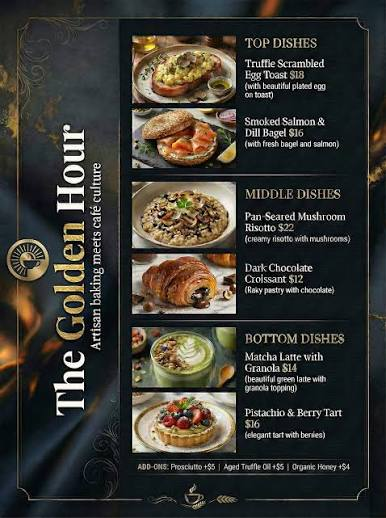
Most restaurants already own the hard part. There is a folder of plated dish photographs, shot for the menu or for delivery listings, and none of it moves. Pixverse's image-to-video endpoints are the short path from that folder to something that can run on a screen by the counter or in a delivery app carousel.
Key Takeaways
- Three Pixverse generations are live on Siray: pixverse-c1-i2v, pixverse-v5.6-i2v, and pixverse-v6-i2v. Their field lists are not the same.
- multi_clip appears on V6 only. Neither C1 nor V5.6 declares it.
- thinking_type appears on V6 and V5.6, with enabled, disabled, and auto. C1 has no such field.
- V5.6 accepts only [5, 8, 10] seconds. C1 and V6 accept any integer from 1 to 15.
- All three carry seed, negative_prompt, audio_enable, and a size enum of 360p, 540p, 720p, 1080p.
- None of the three i2v endpoints takes more than one photo: image is a single string, not an array.
Three Generations, Three Field Lists
pixverse-c1-i2v | pixverse-v5.6-i2v | pixverse-v6-i2v | |
duration | 1–15 | [5, 8, 10] | 1–15 |
multi_clip | — | — | present |
thinking_type | — | present | present |
seed | present | present | present |
negative_prompt | present | present | present |
The version numbers suggest a straight line of improvements. The schemas do not. V5.6 tightened the duration enum to three fixed values while C1, the older endpoint, still takes any length from one second to fifteen. If a menu loop has to be exactly six or seven seconds to match a screen rotation, V5.6 cannot produce it and C1 can.
What Multi-Clip Actually Says
The V6 spec describes multi_clip in one line: Whether to enable multi-clip generation mode. That is the whole documented surface. It does not say how many clips a single request produces, how they are joined, or how the prompt is divided among them.
For a menu that means the field is worth testing and not worth assuming. A dish shown from a fixed angle, then closer, then with steam rising is the kind of sequence the name suggests, but the schema does not promise that mapping. Run one dish through it at 540p before rebuilding a whole menu around the result.
Thinking Mode Is Also One Line
thinking_type gets the same treatment: Thinking mode for the model, with three values. The spec does not describe what changes between enabled and disabled, and it does not say what auto decides on. Food is an unforgiving subject, so treat all three as settings to compare on a single dish rather than a quality dial to turn up.
Orientation Comes From the Photo
None of the three image-to-video endpoints declares aspect_ratio. The output follows the source image, so a menu shot framed 4:3 for print will not become a vertical clip by asking. The text-to-video sibling pixverse-v6-t2v does expose aspect_ratio with eight values including 9:16 and 21:9, which is the endpoint to reach for when the kitchen has no usable photograph and the frame has to be set by the request.
One Image In, Not Two
None of the three i2v endpoints accepts more than one photo. image is a required single string, not an array, so combining a wide shot and a close-up of the same dish in one call isn't supported. A Pixverse menu clip works from whichever single photo the kitchen already has.multi_clip also appears on pixverse-v6-t2v, not only pixverse-v6-i2v — the field tracks the V6 generation, not the image-conditioned path.
Seed and Negative Prompt Are on All Three
Every generation in the family carries seed from -1 to 2147483647 and a negative_prompt string. For a menu that matters more than it does for a one-off clip, because a set of dishes shot under the same lighting should move the same way. Fixing the seed across a batch is the lever for that, and the negative prompt is where hands, steam artifacts, or a reflection of the photographer get excluded.
Pricing for each generation sits on its model detail page in the console. Read it there rather than estimating from a per-second rate, since the rate shown on a listing is a floor and not the billed formula.
For pairs of stills rather than a single photo, see renovation before-and-after videos from two photos. For broader scene planning, the Wan 3.0 short-form video scene guide and the Wan 3.0 e-commerce product demo walkthrough cover adjacent ground.
All three Pixverse generations are live. Run one dish through each at console.siray.ai/model-api.