
Seedance 2.5 vs MiniMax H3 for Fan Edits: Which to Use

Key TakeawaysSeedance 2.5 accepts up to 30 reference images for character lock-in and runs clips up to 30 seconds natively — built for motion-heavy remixes.MiniMax H3 renders at 2K with original native stereo audio, making it the right call when scene atmosphere carries as much weight as the action.Both run on Siray under one API key. Switching models is a single-line change.
Fan editors working with existing footage or established characters run into two distinct problems. The first is motion continuity: making a reimagined cut feel physically coherent across frames when the source material changes angle, speed, or staging. The second is character identity: keeping a recognizable appearance stable when lighting or camera position shifts between takes.
Seedance 2.5 and MiniMax H3 address these problems differently. Choosing between them comes down to which problem matters more for a given segment. For a general spec-level comparison outside the fan-edit context, see the Seedance 2.5 vs MiniMax H3 comparison.
Quick Comparison
Seedance 2.5 | MiniMax H3 | |
Max clip duration | 30 seconds (native) | ~30 seconds (via Extend) |
Resolution ceiling | 720p | 2K |
Reference inputs (ref2v) | Up to 30 images + 10 videos | Images, video, audio |
Native audio | Not documented on this endpoint | Original stereo, native |
Endpoint set | t2v / i2v / ref2v | t2v / i2v / ref2v |
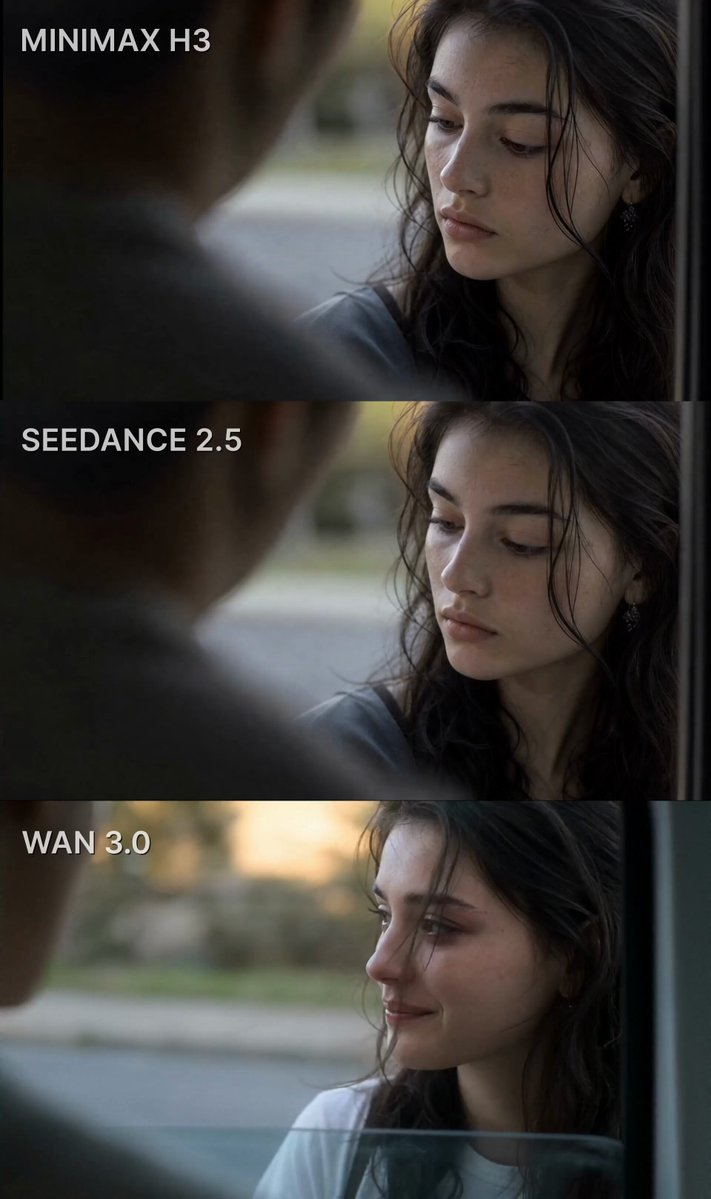
When the edit involves significant movement — a martial arts sequence, a vehicle chase, a choreographed dance staged differently — Seedance 2.5's motion fidelity holds through longer durations. The native 30-second clip length reduces the number of hard cuts required, which is where most fan edit continuity breaks originate.
The ref2v endpoint is particularly useful here. Feeding it up to 30 reference images drawn from the source material gives the model enough visual data to keep a character's appearance consistent across an extended take. Combined with up to 10 reference videos for motion reference, it handles the kind of character lock-in that fan edits require when working with recognizable IPs.
Resolution caps at 720p, which is a real constraint for edits destined for 1080p or higher delivery. If that ceiling is a problem for the project, it needs to factor into the decision.
Atmosphere and Dialogue Scenes: MiniMax H3
Scenes built around presence rather than action — a character entering a room, a slow confrontational exchange, a mood-setting opener — land differently when the rendering quality is higher. H3's 2K output and native stereo audio make a visible and audible difference in segments where the audience is reading the atmosphere rather than tracking movement.
H3's audio pipeline also accepts reference audio tracks directly, which matters for fan dubs and scenes where a specific soundscape is part of the creative intent. If the edit is trying to recreate the acoustic feel of a particular location or scene from the source material, H3 has the tools for it in a way Seedance 2.5 does not. For camera and motion phrasing specific to this model, the MiniMax H3 prompt guide covers the syntax in detail.
Using Both in the Same Edit
Many fan edits include both styles: an atmospheric opening followed by action, or a dialogue sequence intercut with movement. The most practical approach is to generate each segment with the model suited to it, then edit them together in post.
On Siray, both models share the same API structure. Swapping from Seedance 2.5 to H3 is a single string change in the model field — the authentication, request format, and response handling stay identical. That means the decision of which model to use can be made per segment without reworking the integration.
Sign up your free Siray account now,use one API key to run Seedance 2.5 and MiniMax H3 seamlessly.