
Seedream 5 Pro: Character Sheets for Virtual Influencers

Key Takeaways
- Seedream 5 Pro generates virtual-influencer character art at a flat $0.045 per image, regardless of resolution.
- There is no seed field — outputs aren't reproducible run-to-run. Consistency comes from a locked character-description template and reference-image input, not seed-locking.
- The size field offers 16 enum values across 8 aspect ratios, including several vertical options for social formats.
- The real endpoint behind this model is bytedance/seedream-5.0-pro-t2i-spicy (and its i2i counterpart) — disclosed below for developers integrating directly.
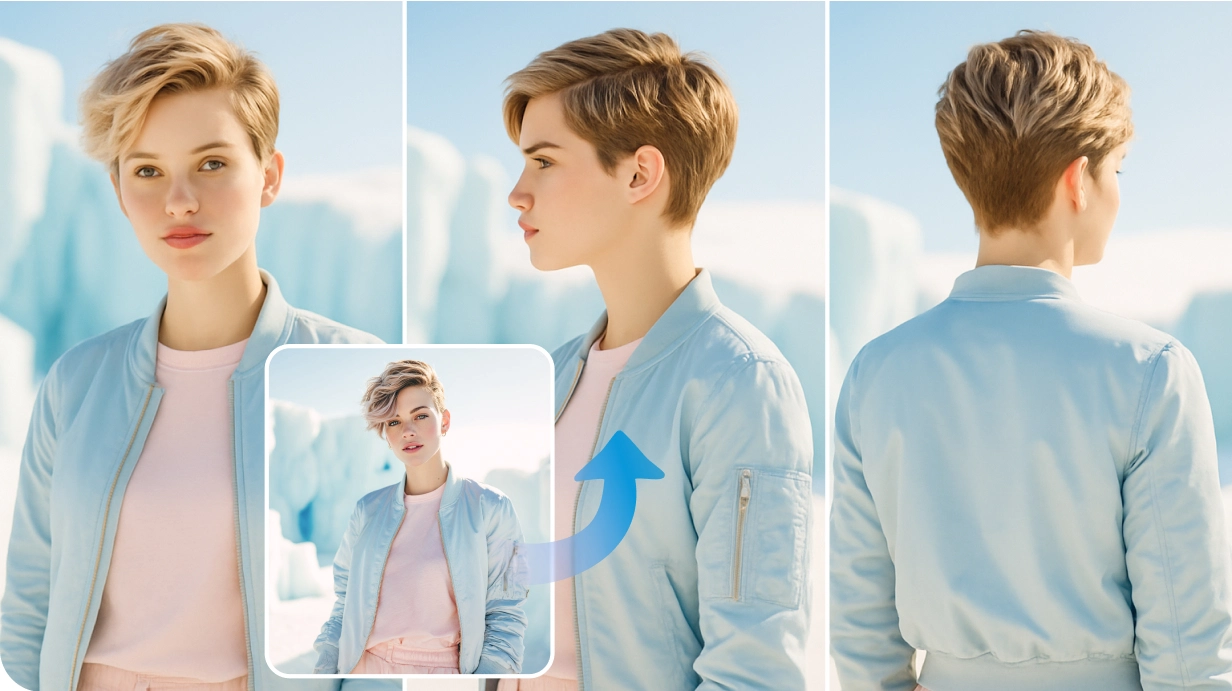
Virtual influencer teams and brand-mascot designers face the same production problem traditional character artists have always had: a single hero shot isn't enough. Downstream work — video-driving a character, briefing an animation team, or just keeping a consistent look across weeks of social posts — needs a turnaround sheet: front, three-quarter, profile, and back views of the same character. Seedream 5 Pro can generate each angle, but getting them to read as "the same character" takes a specific workflow, not just a good prompt.
Why Turnaround Sheets Matter for Virtual Characters
A character sheet is the reference document everything else gets built on. For a virtual influencer, that means the account's entire visual identity — face shape, outfit details, color palette — has to survive being redrawn from four or five different angles. Without a shared reference, a "profile view" generated on Monday and a "three-quarter view" generated on Friday can end up looking like two different people, which is obvious to any follower who's seen the character before.
Building a Character Sheet Without a seed Field
This is where Seedream 5 Pro's request body matters: the t2i endpoint takes only model, prompt, size, and output_format — there's no seed parameter anywhere in the schema, and no negative_prompt either. That means two runs of the identical prompt will not produce pixel-identical results, and locking a seed to "freeze" a character isn't an option here.
The practical workaround is to treat the prompt itself as the reference, not a seed value. Write one detailed character-description block — hair, face shape, outfit, palette, distinguishing features — and reuse that exact block verbatim across every angle, only changing the pose/view instruction. Generate a few candidates per angle and pick the closest match rather than expecting a single first-try result. For image-to-image work, the i2i endpoint's images array accepts a reference shot directly, which is a more reliable way to carry a look from one angle into the next than re-describing it from scratch each time.
Picking the Right Frame: Size and Aspect Ratio
The size field covers 16 enum values, built from 8 aspect ratios (1:1, 4:3, 3:4, 16:9, 9:16, 3:2, 2:3, 7:3) at two size tiers each. There's no separate aspect_ratio field — the ratio is baked into whichever size value is selected. For character sheets bound for Stories, Reels, or a mobile-first feed, the 9:16 or 3:4 options keep the full figure in frame without cropping; a 1:1 or 4:3 pick works better for a classic side-by-side turnaround layout meant to be viewed on a desktop reference board.
Developer Notes
For teams integrating directly: the model marketed here as "Seedream 5 Pro" is served through the endpoint IDs bytedance/seedream-5.0-pro-t2i-spicy for text-to-image and bytedance/seedream-5.0-pro-i2i-spicy for image-to-image. There's no separate non-Spicy Seedream 5.0 Pro endpoint in the current model pool — this is the only 5.0 Pro tier available, and the naming is disclosed here so nobody building against it mistakes it for a different, more restricted variant. It carries no adult-content framing in this context; the workflow above uses it strictly for original or licensed virtual-character art.
Pricing is a flat $0.045 per image for both t2i and i2i, unrelated to which size value is chosen — confirmed against the console pricing panel with no active discount. The t2i request body is just model, prompt, size, output_format (jpg or png); i2i adds one field, an images array for reference input.
Siray's console exposes both endpoints alongside the rest of the Seedream family — including Seedream 4.5, the previous generation, and a technical comparison of Seedream 4.5 Spicy vs. 5.0 Pro Spicy for teams weighing which tier fits their pipeline — through one API key, with no separate contract per model. Teams building an original or licensed virtual-influencer persona from scratch may also find the broader workflow notes in Siray's guide to AI avatars and virtual influencers useful as a companion piece to this one.
Create your free Siray account and generate a character turnaround sheet with Seedream 5 Pro now.
This workflow is intended for original, generic, or properly licensed virtual characters — not for imitating a real person's likeness or an existing brand's IP without authorization.