
Seedream X Spicy NSFW Face Swap & Outfit Edit Playbook

Most people show up expecting a single "swap face" button. Seedream X Spicy does not work that way, and the output is better for it. The engine rewards reference-role prompting: telling the model which image supplies the face, which supplies the outfit, and which supplies the light. This playbook hands over the exact prompt blocks for uncensored face swap, outfit edit, and identity-drift fixes. If a reader wants context first, here is how Seedream X Spicy stacks up against the alternatives.
TL;DRFace swap here is reference-role editing, not a one-click button.Face preservation (keep a face, change the scene) is the core strength.Outfit swap keeps identity, pose, and lighting intact.Drifting features? Feed 3 to 5 references of the same subject.Endpoints:bytedance/seedream-4.5-ref2iandbytedance/seedream-4.0-i2i.
What is Seedream X Spicy, and how does it edit?
"Seedream X Spicy" is a Siray-side label, not an official model name. "Spicy" refers to the uncensored routing tier of ByteDance Seedream 4.5, a unified generate-plus-edit model (around 12B parameters, output up to 4K on the 4.5 side). Those specs are documented on the fal.ai Seedream 4.5 Edit model page and in the BytePlus ModelArk reference. Uncensored output is deployment-dependent, a property of platform routing, not something baked into the base weights.
Editing runs through two named endpoints. These are two different endpoint versions, not a typo: bytedance/seedream-4.5-ref2i is the 4.5 reference-to-image build, and bytedance/seedream-4.0-i2i is the 4.0 image-to-image build, both real and currently exposed on Siray. The 4.5 reference-to-image endpoint pulls identity, outfit, or lighting from supplied reference frames and renders up to 4K; the 4.0 image-to-image endpoint handles direct edits. Both accept reference-image input. Face and outfit editing lives almost entirely in the reference-to-image lane.
How does face swap actually work here?
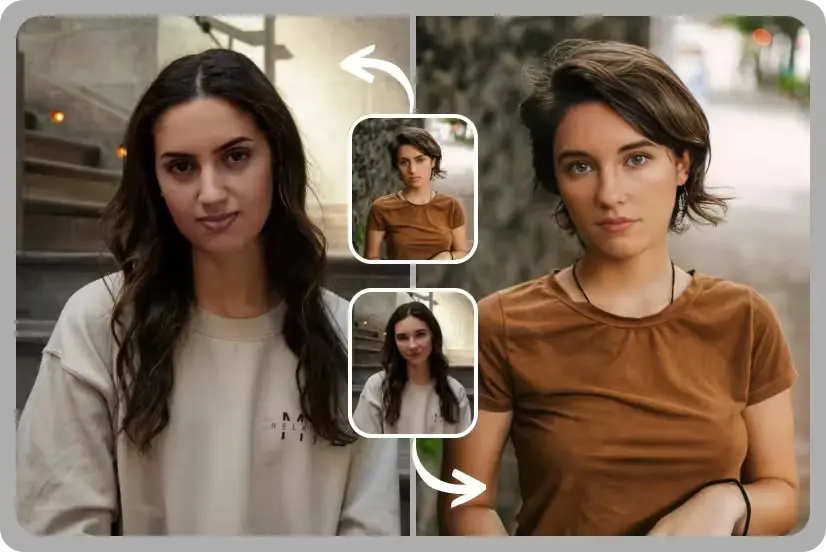
Face swap on Seedream X Spicy is a chain of role assignments, not a toggle. The model reads several reference images, assigns each a job, and composites the result. Get the roles right and identity holds; leave them vague and features blur. The next five blocks break the workflow into copy-paste pieces.
2.1 Assigning reference roles
Every reference image needs an explicit job. Tag the source of the face, the source of the light, and anything else being borrowed. Vague prompts let the model guess, and guessing is where likeness dies. Start each edit by naming roles directly:
use the face and hair from Image 1 (character reference), lighting from Image 2...
2.2 Face swap via multi-image references
A true B-face-onto-A-body swap is multi-image role assignment, not a filter. Seedream keeps distinct Face IDs across inputs, so it can merge subjects while holding each identity. Combine the subjects, then lock the face with concrete anchors so the target likeness survives the composite:
combine the characters from images 1, 2, and 3 into a single image
Add face anchors to hold the target likeness:
soft round jaw, medium bridge, slightly wide-set almond eyes, defined cupid's bow
2.3 Outfit / clothing swap
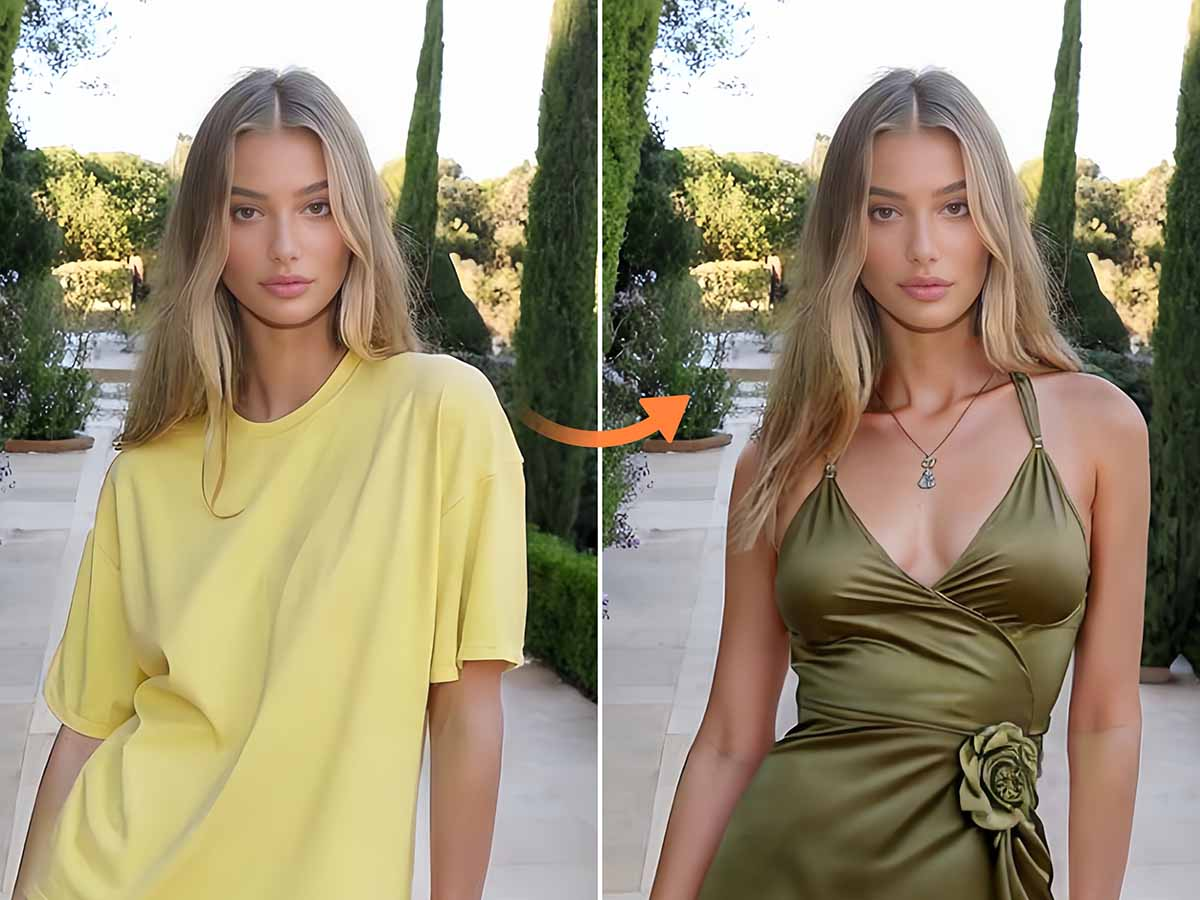
Outfit edit is the best-documented job on the model: change the clothes, keep everything else. The preservation clause is what protects identity, pose, and light while the wardrobe changes. This block re-dresses a subject without touching likeness:
replace the clothing and accessories in image 1 with the outfit from image 2, keeping the face, pose, body proportions, hairstyle, background, camera angle, and lighting of image 1 unchanged
For a parallel recipe, see the clothing-change on a sibling model.
2.4 Fixing identity drift
Drift happens when the model has too little to anchor to. The fix is volume and re-injection. Supply 3 to 5 identity references of the same subject shot at varied angles. If features still slide, re-inject the master shot as a low-weight secondary reference, a "facial checkpoint," to pull the likeness back on target.

2.5 One full worked example prompt
Here the pieces stack into a single copy-paste block. Label the inputs, name the roles, drop in the face anchors, then close with the preservation clause so nothing unintended shifts:
Image 1: character reference. Image 2: outfit reference. Image 3: lighting reference.
combine the characters from images 1, 2, and 3 into a single image, using the face and hair from Image 1 (character reference): soft round jaw, medium bridge, slightly wide-set almond eyes, defined cupid's bow.
replace the clothing and accessories with the outfit from Image 2. Apply the lighting from Image 3, keeping the face, body proportions, and hairstyle of Image 1 unchanged.
Face swap vs. face preservation, and when to use each
Two different jobs hide under one word. Face preservation keeps a single subject's likeness while the scene, outfit, or pose changes, and it is what Seedream does best. A true face swap moves one person's face onto another body through multi-image role assignment with distinct Face IDs. The table below splits the two jobs so the right lane is obvious at a glance.
| Job | What it preserves | When to use | Endpoint |
|---|---|---|---|
| Face preservation | One subject's likeness across new scene, outfit, or pose | Re-dressing and re-staging a single person | seedream-4.5-ref2i |
| Face swap | Two distinct Face IDs while merging subjects | When two source people must combine into one frame | seedream-4.5-ref2i (multi-image) |
Working in motion instead? See moving a face onto video.
Key TakeawaysName a role for every reference image before editing.Lock likeness with concrete face anchors, not adjectives.The preservation clause keeps pose, light, and body intact.Fix drift with 3 to 5 references plus a low-weight facial checkpoint.Route edits throughseedream-4.5-ref2iorseedream-4.0-i2i.
Conclusion
Reference-role thinking is the whole game. Stop hunting for a swap button, start assigning jobs to each input, and the model rewards the discipline with stable identity across faces, outfits, and scenes. Seedream X Spicy is live and available on Siray. Register at Siray to run these prompts.
NSFW Compliance Statement. Siray permits explicit content only when it depicts consenting adults aged 18 or older and complies with all applicable laws. Uncensored routing means lawful-only, never lawless. Siray maintains a zero-tolerance policy toward child sexual abuse material (CSAM) and any depiction of minors, and rejects non-consensual, deceptive, or otherwise illegal content, including any use of a real person's likeness without their rights and consent. Violations are removed and reported.