What Is Image-to-Video? How i2v APIs Work
Image-to-video (i2v) turns one still image into a short clip. Here is what an i2v API needs, how it bills you, and the submit-and-poll flow, with a tested example.
Image-to-video (i2v) is a type of AI video generation that turns one still image into a short clip. You send the image and a text prompt describing the motion, and the model animates that exact picture. On Siray AI, a 5-second 720p i2v clip costs $0.47 to $1.305, depending on the model.
Key takeaways
- The image is the first frame. The clip starts on your picture, so the face, product and lighting stay the same while the prompt adds motion.
- Some models also take a last frame. Kling 4.0 and Seedance 2.5 accept an optional
end_image, so you control where the clip ends. Kling 4.0 Flash does not. - Billing is per second of output. 5 seconds at 720p costs $0.47 on Kling 4.0 Flash, $0.785 on Kling 4.0 and $1.305 on Seedance 2.5 (November 19, 2026).
- The output takes the shape of your image. Our portrait rooftop photo gave an 836×1116 portrait clip. Seedance 2.5 rejected an explicit
9:16and neededadaptive. - i2v APIs are asynchronous. You submit a task, get a
task_idand poll until it finishes, which took about 3 to 5 minutes in our tests.
Image-to-video vs text-to-video vs reference-to-video
| Mode | What you send | What stays fixed | Typical use |
|---|---|---|---|
| Text-to-video (t2v) | A prompt | Nothing, the model invents the scene | Concept clips, b-roll, ideas |
| Image-to-video (i2v) | One image (plus an optional last frame) and a prompt | The first frame, exactly | Animating a product photo, portrait or artwork |
| Reference-to-video (ref2v) | Several reference images or videos and a prompt | The look of people or objects, not a fixed frame | Putting the same character or product into new scenes |
Choose i2v when you already have the exact picture you want to start from. Choose ref2v when you want the same subject in a new composition. Choose t2v when you have no image at all.
What you send to an image-to-video API
Most i2v endpoints on Siray AI share the same request shape. These fields come from the Siray AI API reference for each endpoint:
| Field | What it does | Kling 4.0 i2v | Kling 4.0 Flash i2v | Seedance 2.5 i2v |
|---|---|---|---|---|
image |
First frame, as a URL or data URL | Required | Required | Required |
prompt |
Describes the motion and camera | Required | Required | Required |
end_image |
Optional last frame | Yes | No | Yes |
duration |
Clip length in seconds | 3–30 | 3–20 | 4–30 |
size |
Output resolution | 720p, 1080p | 720p | 480p, 720p, 1080p |
aspect_ratio |
Output shape | auto or a fixed ratio |
auto or a fixed ratio |
adaptive (see below) |
| Audio | Sound in the clip | Always on in our tests | — | audio_enable true or false |
Write the prompt about motion, not appearance. The image already shows what things look like. Describe what moves, how the camera moves, and what must stay the same.
A tested example: first and last frame
We sent Kling 4.0's i2v endpoint two images of the same woman on a rooftop. The first shows her in a green wool coat. The last frame, which we edited from the first with Seedream 5.5, shows her without the coat, which is folded on the wall.
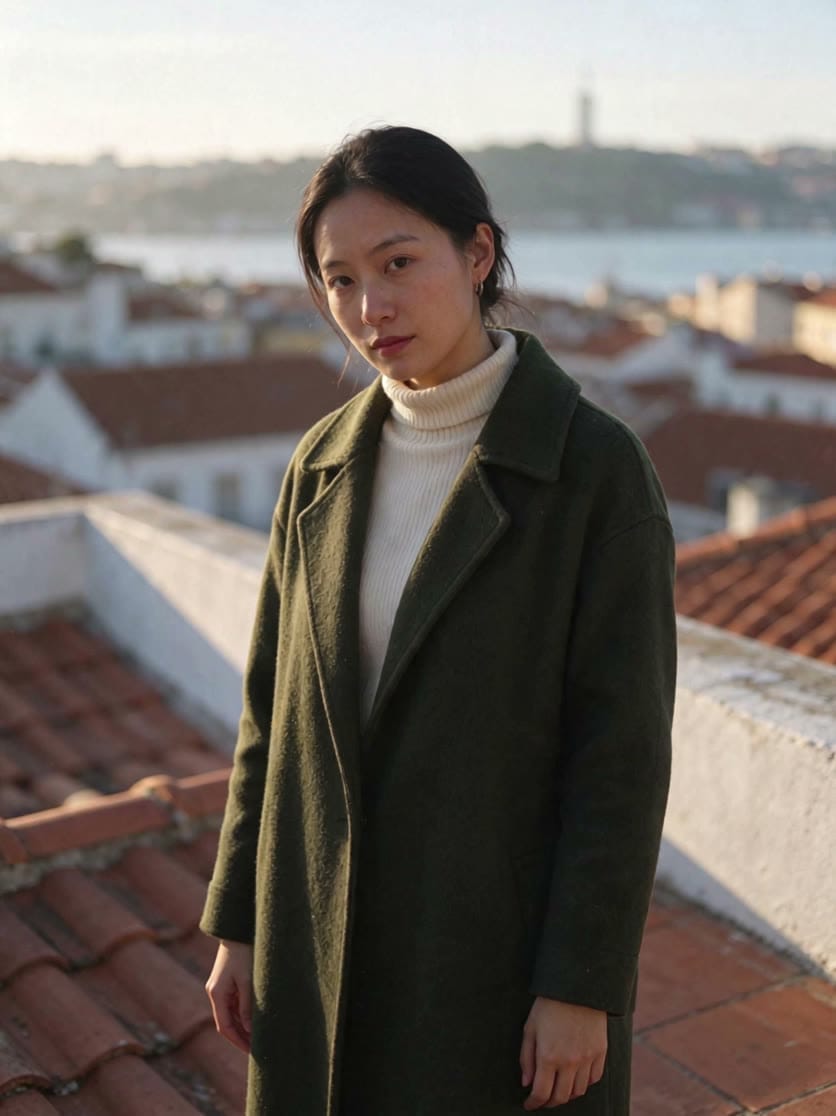
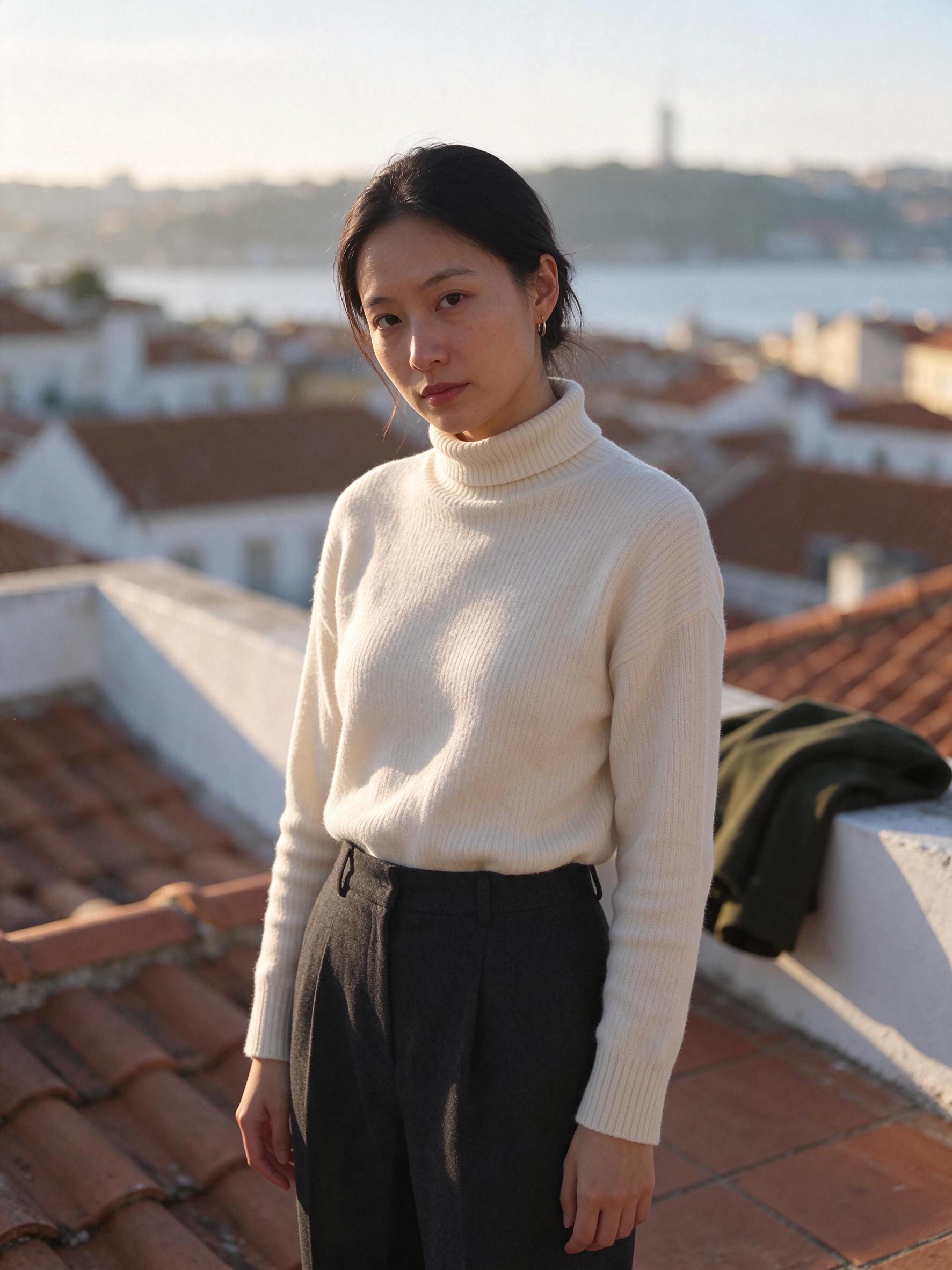
The woman on the rooftop slowly unbuttons her moss-green wool coat, slips it off her shoulders, folds it once and lays it on the white parapet wall to her right, leaving her in the cream turtleneck sweater and charcoal trousers. She then turns back toward the camera and settles into the same pose as the end frame. Warm golden-hour light, gentle breeze in her hair, steady handheld camera. Adult woman only, fully clothed. No text, no logos.
- Endpoint:
kling-4.0-i2vwithend_image, 5 s, 720p,aspect_ratio: auto - Time: 284 seconds · Cost: $0.785 · Output: 836×1116, the same shape as the input images
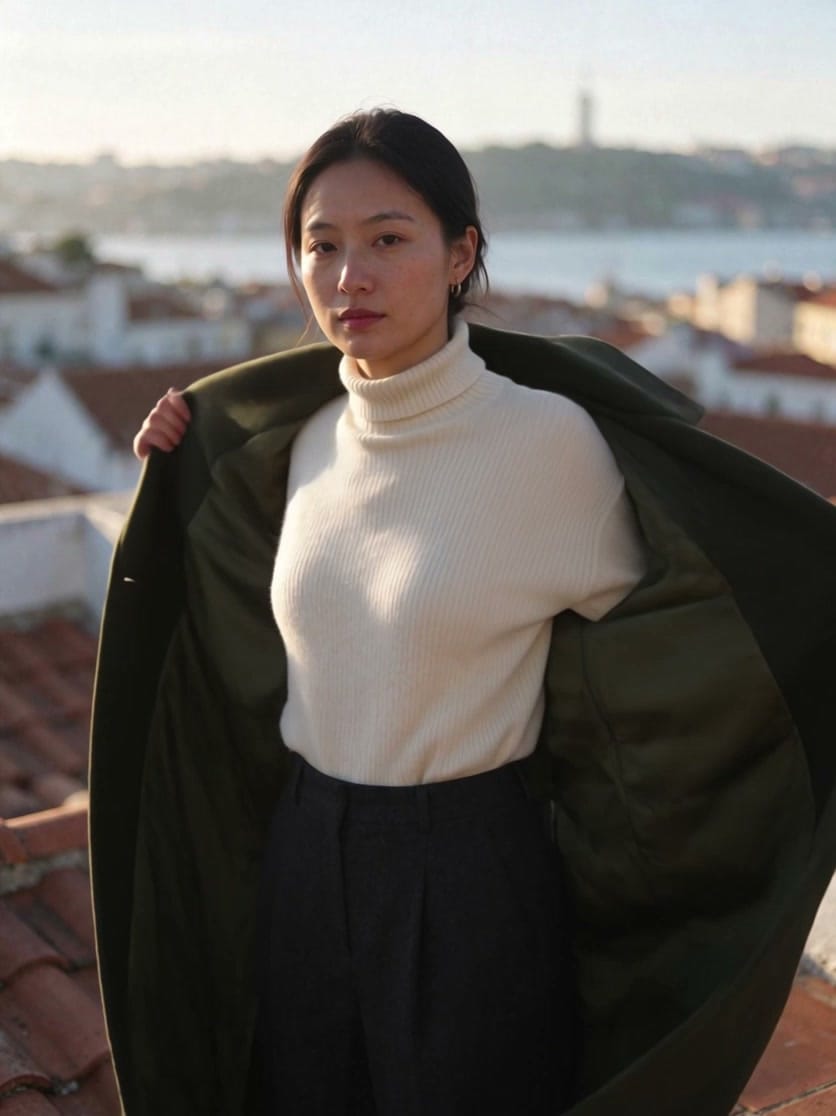
The clip opens on the first image and ends on the last one, with the same face, sweater, rooftop and light. In between, the model invents the action. For about a second the coat stands stiffly on the wall before it settles. The last frame should differ from the first in shape, not only in color. An earlier try with a same-cut blazer in another color looked like a color swap, not a coat coming off. The full test is in our Kling 4.0 API guide.
Why the output takes the shape of your image
An i2v clip starts on your picture, so most models keep its proportions:
- Kling 4.0 with
aspect_ratio: autoreturned an 836×1116 clip, matching the portrait shape of the input photos. - Seedance 2.5 rejected
aspect_ratio: "9:16"on a 9:16 photo with the error "For first-frame or first-last-frame generation, the output ratio follows the first-frame image." Withadaptiveit returned a 720×1280 clip. The API reference still lists9:16as a valid value, so useadaptivefor Seedance 2.5 i2v.
Crop or generate the image in the ratio you need before you call the API. A 9:16 photo gives a vertical clip for Reels and TikTok; a 16:9 photo gives a widescreen one. We used this with Seedance 2.5 in Black Friday Video Ads from One Product Photo.
How image-to-video pricing works
Siray AI bills i2v by the seconds of video you get back. The input image doesn't add length. Prices from the Siray AI pricing API on November 19, 2026:
| Model | 5 s at 720p | 10 s at 720p | Per second at 720p |
|---|---|---|---|
| Kling 4.0 Flash i2v | $0.47 | $0.94 | ≈ $0.094 |
| Kling 4.0 i2v | $0.785 | $1.57 | ≈ $0.157 |
| Seedance 2.5 i2v | $1.305 |
$2.61 |
≈ $0.261 |
Seedance 2.5 showed a 10% discount at time of writing (list price crossed out). Its price is calculated from tokens: height × width × (input duration + output duration) × 24 / 1024, at $0.012038 per 1K tokens. A still image has no duration, so only the output counts. A 720×1280 clip of 5 seconds is 108,000 tokens, about $1.30.
Two practical rules:
- Draft cheap, finish expensive. Test motion at 480p or on a Flash tier, then re-run the take you like at full quality.
- Length costs more than you expect. 10 seconds costs twice as much as 5. Many ads only need 5.
Check the live prices on the Siray AI console before a batch.
How the async API flow works
Video generation takes minutes, so i2v APIs don't make you wait on one HTTP request. They work in two steps.
1. Submit the task
curl -X POST https://api.siray.ai/v1/video/generations \
  -H "Authorization: Bearer $SIRAY_API_KEY" \
  -H "Content-Type: application/json" \
  -d '{
    "model": "kuaishou/kling-4.0-i2v",
    "image": "https://your-cdn.example.com/rooftop-coat.jpg",
    "end_image": "https://your-cdn.example.com/rooftop-no-coat.jpg",
    "prompt": "The woman on the rooftop slowly unbuttons her moss-green wool coat...",
    "duration": 5,
    "size": "720p",
    "aspect_ratio": "auto"
  }'
The response contains a task_id. In our tests it came back at the top level of the response, not under data as the API reference shows, so read both.
2. Poll until it finishes
curl https://api.siray.ai/v1/video/generations/<task_id> \
  -H "Authorization: Bearer $SIRAY_API_KEY"
Check every 3 to 5 seconds. data.status moves through NOT_START, SUBMITTED, QUEUED and IN_PROGRESS to SUCCESS or FAILURE. On success, data.outputs holds the MP4 URL. Download it soon, and store your own copy.
Retries without paying twice:
- Don't resubmit a slow task. If your script times out, keep polling the same
task_id. A new submit is a new paid job. - Judge success by
statusonly. We sawfail_reasonfilled with the output URL on successful tasks. - Read the error before retrying. A
FAILUREcaused by a parameter (like the Seedance9:16case) fails again until you change the request. Siray AI's pricing note says failed requests are not billed. - Submit several tasks in parallel. Three Seedance 2.5 tasks we sent together finished in 177–181 seconds each.
Common image-to-video mistakes
- Describing the picture instead of the motion. "A woman in a green coat" adds nothing. "She slips off the coat and folds it" gives the model a job.
- Asking for too much in 5 seconds. One action and one camera move per clip works best.
- Text in the image. Small labels and signs can blur or change as things move. Add text in your editor afterwards.
- A last frame that only changes color. Change the shape or position so the model has a real transition to show.
- Mismatched ratio. If the image is square, the clip is square. Crop first.
FAQ
What is image to video in AI?
Image-to-video (i2v) is AI video generation that starts from a still image. The model uses your image as the first frame and animates it according to a text prompt, keeping the subject and lighting from the picture.
What is the difference between image to video and text to video?
Text-to-video creates the whole scene from a prompt. Image-to-video starts from your exact image, so the subject, framing and colors stay fixed while the prompt adds motion.
How much does an image to video API cost?
On Siray AI, a 5-second 720p clip costs $0.47 with Kling 4.0 Flash, $0.785 with Kling 4.0 and $1.305 with Seedance 2.5 (prices checked November 19, 2026). The input image adds nothing to the price.
Can I control the last frame of an image to video clip?
Yes, on endpoints with an end_image field, such as Kling 4.0 i2v and Seedance 2.5 i2v. Kling 4.0 Flash i2v has no last-frame option.
How long does image to video generation take?
In our tests, 5-second clips took 177 to 284 seconds from submit to finish, depending on the model. The API is asynchronous, so you poll a task ID instead of waiting on one request.
Try image-to-video on Siray AI
One API key gives you the Kling 4.0, Kling 4.0 Flash and Seedance 2.5 i2v endpoints, billed per second with no subscription. Start from the Kling 4.0 i2v model page, or compare video APIs in Runway API Alternatives for Developers.
Sources
- Siray AI API reference: Kling 4.0 i2v, Kling 4.0 Flash i2v, Seedance 2.5 i2v, accessed November 19, 2026.
- Siray AI pricing API,
GET /v1/models/pricing/{model}, November 19, 2026. - Siray AI test runs: Kling 4.0 i2v on November 18, 2026; Seedance 2.5 i2v on November 19, 2026.