
Black Friday Video Ads from One Product Photo with AI
One product photo, three 5-second vertical ads: the Seedance 2.5 image-to-video workflow we ran for a Black Friday gift, with prompts, timings and exact costs.
Black Friday video ads don't need a video shoot. With ByteDance's Seedance 2.5 image-to-video model on Siray AI, one product photo becomes a set of 5-second vertical clips for Reels, TikTok and Shorts. In our test, each 720p clip cost $1.305 and took about three minutes, and three different ad shots came from the same photo.
Key takeaways
- One photo, three ads: a push-in, a camera orbit and a hands-on unboxing, all from the same 9:16 product photo.
- Cost: $0.035 for the product photo plus $1.305 per 5-second 720p clip, so the full set of three ads cost $3.95.
- Speed: each clip finished in 177–181 seconds, and all three ran at the same time.
- Set
aspect_ratiotoadaptive: Seedance 2.5 i2v rejected9:16and takes the shape of your photo instead. Make the photo vertical and the video follows. - Silent by default: with
audio_enable: falsethe MP4 has no audio track at all, which suits ads where you add licensed music in the editor.
The workflow at a glance
- Get one clean product photo in 9:16. Use a real packshot, or generate one (we used Seedream 5.5).
- Write one prompt per shot. Describe a single camera move and say what must not change.
- Submit all shots in parallel to
bytedance/seedance-2.5-i2vwith the same photo asimage. - Poll, download and edit: add your offer text, music and logo in a video editor, not in the prompt.
Seedance 2.5 is ByteDance's model, available on Siray AI through its unified API. ByteDance Seed describes it as "a next-generation audio-video joint generation model, built for 30-second storytelling", with smoother motion and more realistic visuals than earlier versions.
Step 1: the product photo
We generated a fictional product so the ad has no real brand in it: an amber glass perfume bottle with a gold cap in an open black gift box, with holiday lights behind it.
Vertical product photograph for a holiday ad. A rectangular amber glass perfume bottle with a brushed gold cap stands upright inside an open matte black gift box lined with crumpled ivory tissue paper. The box lid leans against the back of the box, and a loose satin ribbon in deep burgundy drapes over the front edge. The box sits on a warm white marble counter. Soft key light from the upper left, a gentle rim light behind the bottle so the amber glass glows, shallow depth of field, out-of-focus warm string lights in the background as round bokeh. The bottle and box are fully in frame with clear space above the bottle. Clean commercial studio look, photorealistic. No people, no hands. The bottle and box have no label and no printing. No text, no letters, no numbers, no logos, no watermark.
- Endpoint:
bytedance/seedream-5.5-t2i-spicy,size: 1584x2816,output_format: jpg - Time: 31 seconds · Cost: $0.035 · Output: 1536×2730 (slightly smaller than the requested size, still 9:16)
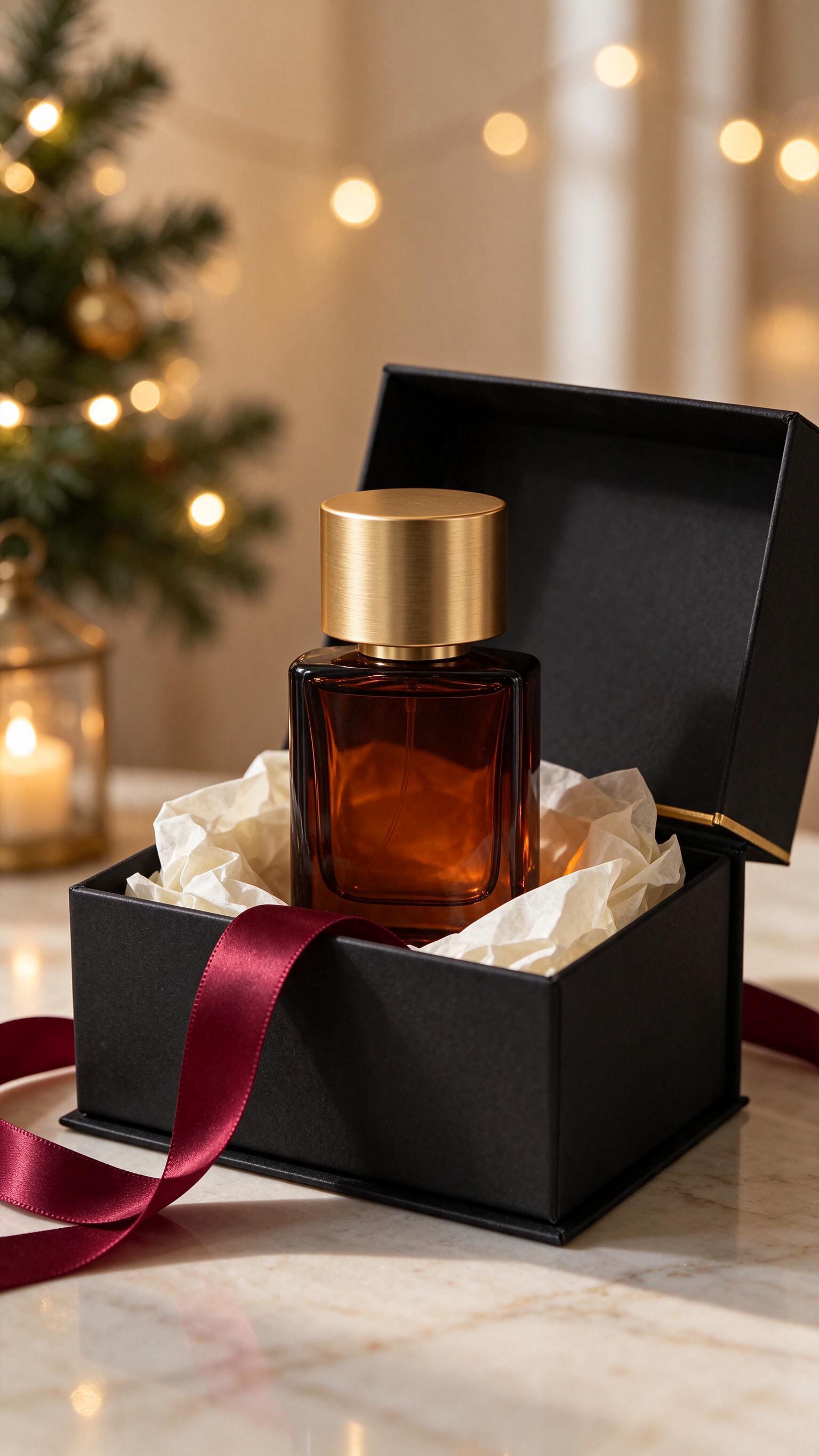
Seedream 5.5 is listed on Siray AI only as Spicy endpoints, but the prompt and the result are a plain product shot. If you already have a packshot, skip this step and use your own photo. Leave room above and around the product. Every camera move in step 2 needs space to move into.
Step 2: three ad shots from the same photo
We ran all three prompts on November 19, 2026 with the same request settings. Times are from submit to finish. Costs are Siray AI's price for a 5-second 720p clip.
{
  "model": "bytedance/seedance-2.5-i2v",
  "image": "<URL or data URL of the product photo>",
  "prompt": "<one of the prompts below>",
  "duration": 5,
  "size": "720p",
  "aspect_ratio": "adaptive",
  "audio_enable": false
}
Shot 1: slow push-in (the hero shot)
Slow, smooth dolly push-in toward the amber glass perfume bottle in the open black gift box. The camera moves straight forward from a medium shot to a close-up of the bottle and its brushed gold cap. A soft highlight glides across the gold cap and the amber glass glows from the rim light behind it. The warm string lights in the background twinkle gently as out-of-focus bokeh. The bottle, the box, the tissue paper and the burgundy ribbon stay still and keep their exact shape. Premium commercial look, steady camera, no shake. No people, no text appears.
- Endpoint:
seedance-2.5-i2v, 5 s, 720p,aspect_ratio: adaptive - Time: 181 seconds · Cost: $1.305 · Output: 720×1280, 24 fps, no audio track
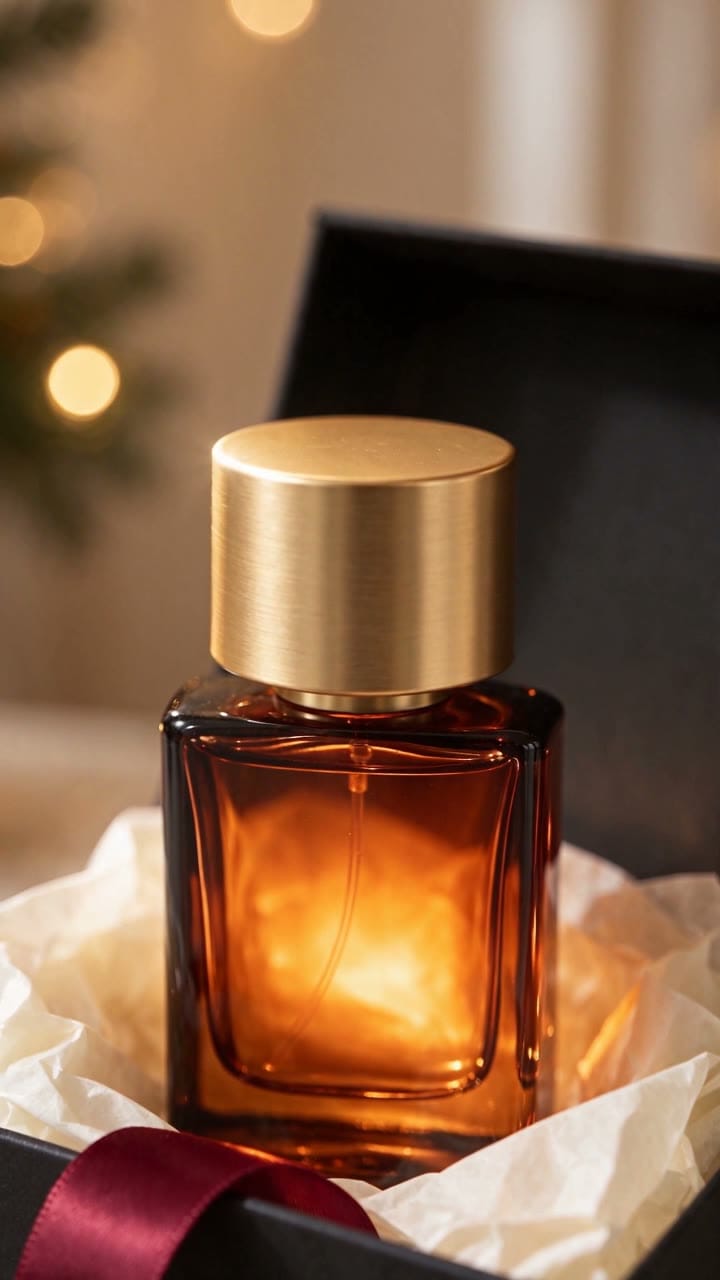
The camera moved straight in from the full box to a close-up of the bottle, with no drift or shake. About halfway through, a small star-shaped glint flashed on the cap, and the glass grew brighter as the camera got closer. The bottle kept its shape and stayed free of text. This is the shot to put first in a Black Friday ad.
Shot 2: camera orbit (show the product from more than one side)
The camera orbits slowly around the open black gift box from left to right, about 60 degrees, staying at the height of the perfume bottle and always keeping the bottle centered. As the angle changes, the rim light moves across the amber glass and the reflection on the brushed gold cap shifts. The marble counter and the out-of-focus holiday lights slide past in parallax. The bottle, the box, the tissue paper and the burgundy ribbon do not move and keep their exact shape. Smooth gimbal move, premium product commercial. No people, no text appears.
- Endpoint:
seedance-2.5-i2v, 5 s, 720p,aspect_ratio: adaptive - Time: 181 seconds · Cost: $1.305 · Output: 720×1280, 24 fps, no audio track
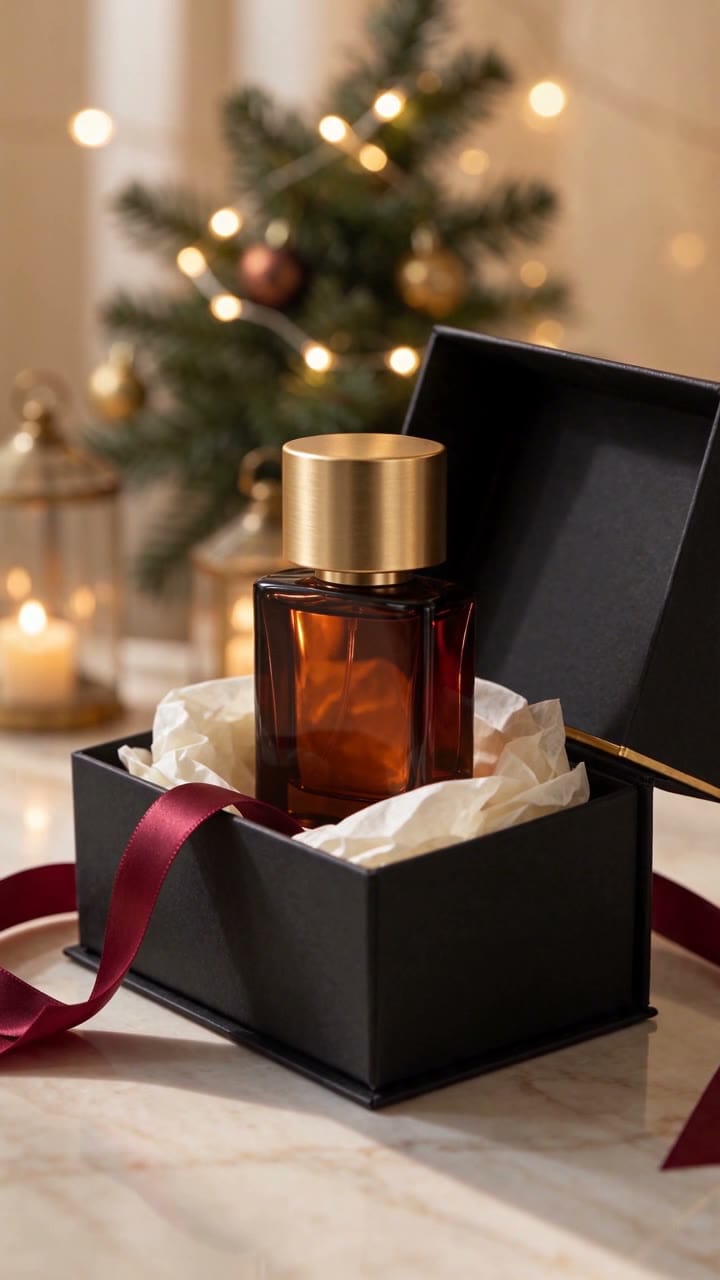
The move was smaller than we asked for. Instead of 60 degrees, the camera made a short arc to the right, closer to 15–20 degrees. The parallax still sells it: the tree, ornaments and lanterns behind the box come into view while the bottle stays centered. To get a wider turn, ask for a full side-on view as the end point, or use the first-and-last-frame option with a second photo (see the tips below).
Shot 3: hands-on unboxing
Unboxing shot. A pair of adult woman's hands, about 30 years old, with a neat nude manicure, enter from the bottom of the frame. They gently lift the amber glass perfume bottle out of the ivory tissue paper, raise it slightly toward the camera, and slowly turn it a quarter turn so the gold cap catches the light. The tissue paper rustles softly as the bottle leaves the box. The camera stays locked off at the same framing. Only the hands are visible, no face. Realistic hand anatomy with five fingers on each hand. The bottle keeps its exact shape and has no label. Warm holiday bokeh in the background. Premium commercial look. No children, teenagers, babies or minors. No text appears.
- Endpoint:
seedance-2.5-i2v, 5 s, 720p,aspect_ratio: adaptive - Time: 177 seconds · Cost: $1.305 · Output: 720×1280, 24 fps, no audio track
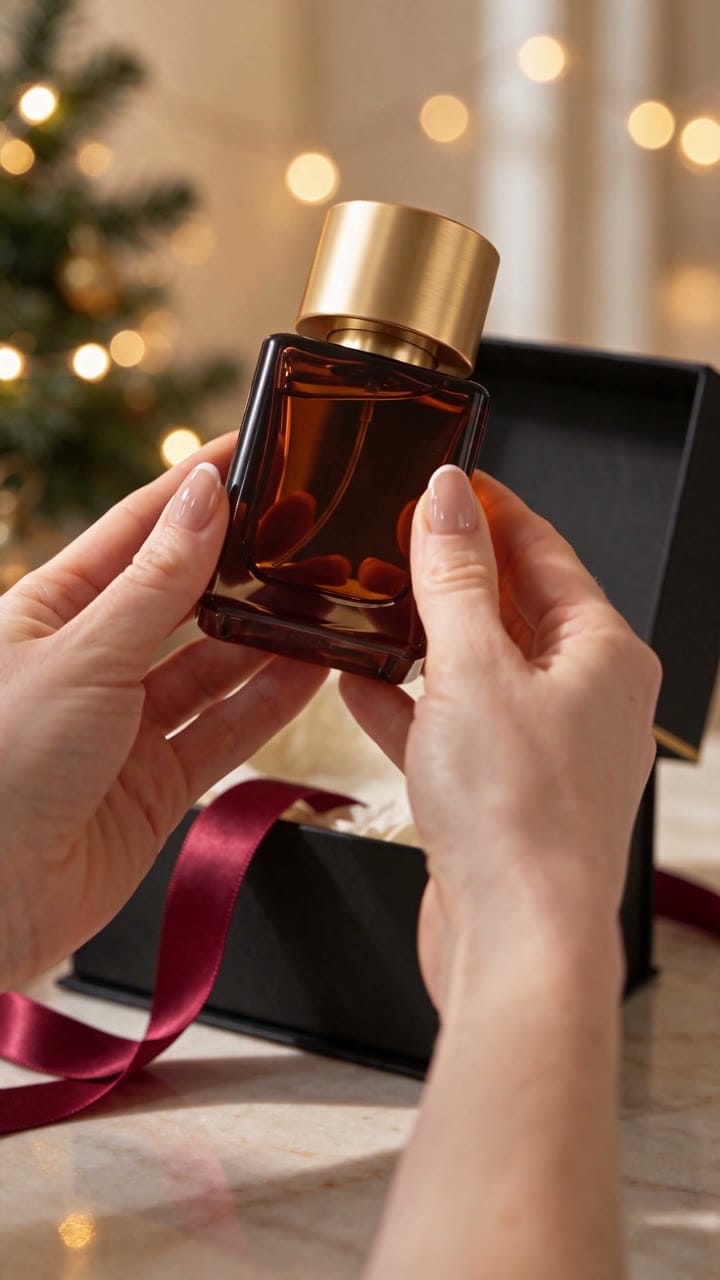
This was the shot we expected to break, and it held up. Both hands came in from the bottom, with five fingers each in the frames we checked. They lifted the bottle out of the tissue and tilted it toward the camera. The bottle kept its square shape and gold cap. The "quarter turn" became more of a tilt. Saying "only the hands are visible, no face" kept the frame on the product.
What it costs to make Black Friday video ads this way
Seedance 2.5 i2v is billed by output size and length. Prices from the Siray AI pricing API on November 19, 2026, with a 10% discount at time of writing (list price crossed out):
| Duration | 480p | 720p | 1080p |
|---|---|---|---|
| 5 seconds | $0.603 |
$1.305 |
$3.199 |
| 10 seconds | $1.206 |
$2.61 |
$6.397 |
| 15 seconds | $1.809 |
$3.915 |
$9.596 |
| Per second | ≈ $0.12 | ≈ $0.261 | ≈ $0.64 |
Siray AI's pricing note gives the formula: tokens = height × width × (input duration + output duration) × 24 / 1024, at $0.012038 per 1K tokens. For our 720×1280, 5-second clip that is 108,000 tokens, or about $1.30.
Worked examples:
- Our test set (one photo and three 5-second 720p ads): $0.035 + 3 × $1.305 = $3.95.
- Drafting at 480p first: three 5-second drafts cost $1.81. Re-run only the ones you like at 720p or 1080p.
- Ten products, three shots each, at 720p: 30 × $1.305 = $39.15, before any retakes.
Check the Seedance 2.5 i2v model page for live prices before you plan a batch.
Quickstart: submit and poll
Generation is asynchronous. Submit a task, then poll every 3–5 seconds until the status is SUCCESS.
1. Submit
curl -X POST https://api.siray.ai/v1/video/generations \
  -H "Authorization: Bearer $SIRAY_API_KEY" \
  -H "Content-Type: application/json" \
  -d '{
    "model": "bytedance/seedance-2.5-i2v",
    "image": "https://your-cdn.example.com/perfume-gift-box.jpg",
    "prompt": "Slow, smooth dolly push-in toward the amber glass perfume bottle...",
    "duration": 5,
    "size": "720p",
    "aspect_ratio": "adaptive",
    "audio_enable": false
  }'
image accepts a public URL or a data URL. We sent our 240 KB JPEG as a base64 data URL.
2. Poll
curl https://api.siray.ai/v1/video/generations/<task_id> \
  -H "Authorization: Bearer $SIRAY_API_KEY"
When data.status is SUCCESS, data.outputs holds the MP4 URL. Read the task_id from both the top level and data of the submit response; our earlier Siray AI tests found it at the top level. To make three shots, send three requests with the same image and different prompts. They run in parallel.
Prompting tips for product video ads
- Use
adaptiveand shape the photo, not the request. The API reference lists9:16as a validaspect_ratio, but all three of our first requests with9:16failed withTaskTypeConstraint: "For first-frame or first-last-frame generation, the output ratio follows the first-frame image." Those tasks ended asFAILUREwithout producing a video, and resubmitting withadaptiveworked on the first try. - One camera move per clip. "Push-in", "orbit" and "locked-off" each gave a clean, readable motion. Leave multi-shot editing to your editor.
- List what must not move. "The bottle, the box, the tissue paper and the burgundy ribbon stay still and keep their exact shape" kept the product geometry stable in all three clips.
- Ask for a bigger move than you need. Our "60 degrees" orbit came out as roughly 15–20 degrees. For a wide turn, add an
end_imagewith the product from the side. - Keep offer text out of the prompt. Put "Black Friday −30%" or a price in your editor, so you can change it without paying for a new clip. Model-written text often comes out garbled.
- For hands, describe them precisely. Adult hands, a manicure, "five fingers on each hand", and "only the hands are visible" gave natural results.
When to use this workflow (and when not to)
Good fit:
- Turning an existing packshot catalog into short social ads before a sale.
- Testing several ad openings (hero, orbit, unboxing) on the same product before paying for a shoot.
- Gift products with clear shapes: bottles, boxes, gadgets, jewelry.
Not the best fit:
- Ads with on-screen prices or legal copy. Add those in post.
- Products with fine printed labels. i2v can blur or rewrite small text as it moves. Shoot the label as a still frame instead.
- Cheaper drafts: Kling 4.0 image-to-video costs $0.785 for 5 seconds at 720p, and Kling 4.0 Flash costs $0.47, on Siray AI. Seedance 2.5 at 480p is $0.603.
For more product ad ideas without the holiday angle, see AI Product Video Ads: Turn Product Photos into Scroll-Stopping Video. For how Seedance 2.5 handles film-style scenes, see Seedance 2.5 for Film & TV Production. For the faster Seedance tier, see the Seedance 2.5 Flash Spicy API guide.
FAQ
How much does a 5-second AI product video ad cost with Seedance 2.5?
$1.305 at 720p on Siray AI, or $0.603 at 480p and $3.199 at 1080p (prices checked November 19, 2026, with a 10% discount at time of writing). A 9:16 720p clip uses about 108,000 billable tokens.
Can I make vertical 9:16 video ads from a product photo?
Yes. Use a 9:16 photo and set aspect_ratio to adaptive. Seedance 2.5 image-to-video keeps the shape of the input photo. In our test, sending 9:16 explicitly was rejected.
How long does Seedance 2.5 take to turn a photo into a video?
Our three 5-second 720p clips took 177 to 181 seconds each, from submit to finish, while running at the same time.
Does Seedance 2.5 add music or sound to product videos?
It can generate audio when audio_enable is true. We set it to false. The files then had no audio track, so we could add licensed music in the editor.
Can I put my Black Friday discount text in the prompt?
You can, but we don't recommend it. Generated text is often misspelled. Add prices and offer text in your editor, so one clip works for several promotions.
Make your Black Friday video ads on Siray AI
Upload one product photo, run the three prompts above, and you have a hero shot, an orbit and an unboxing for under $4. Start with the Seedance 2.5 i2v model page, or open the Siray AI console to get an API key.
Sources
- ByteDance Seed, Seedance 2.5, accessed November 19, 2026.
- Siray AI API reference, Seedance 2.5 i2v, accessed November 19, 2026.
- Siray AI API reference, Seedream 5.5 t2i Spicy, accessed November 19, 2026.
- Siray AI pricing API,
GET /v1/models/pricing/{model}, November 19, 2026.