MOSS Image API on Siray AI: Pricing, Features and Prompt Examples

The MOSS Image API gives developers OpenMOSS's open-source text-to-image model through a standard REST call. On Siray AI it costs $0.02 to $0.08 per image, depending on size. It suits posters, infographics and other images that need readable English or Chinese text and controlled layout. This guide covers pricing, a quickstart and four tested prompts.
Key takeaways
- One endpoint on Siray AI: text-to-image only,
moss/moss-image-t2i. The model has no reference-image or editing input. - Three price tiers: $0.02 at
1k, $0.04 at1.5kand $0.08 at2k. - Quick turnaround in our tests: six tasks took 41 to 72 seconds, and each returned one image.
- Bilingual text held up: every English and Chinese line on our eight-line menu was correct.
- JSON layouts work through the
promptfield: all three elements of our test poster landed where we placed them.
What is MOSS Image?
MOSS Image is an open-source text-to-image model family from the OpenMOSS team, released on October 16, 2026. It is OpenMOSS's model, available on Siray AI through a unified API. The weights are released under Apache-2.0.
OpenMOSS describes these core capabilities:
- Text rendering. Chinese and English text can appear as part of a scene, including headings, paragraphs, handwritten notes and board writing.
- Layout control. A JSON prompt can define objects, visible text and their bounding boxes.
- Long prompts. The model family accepts prompts of up to 4K tokens.
- Varied styles. OpenMOSS shows anime, photorealistic images, sketches and graphic design.
- A compact backbone. The family is built on a 5B-parameter model, with Base and SFT variants. SFT is fine-tuned from Base on curated data.
OpenMOSS also reports its own benchmark results. On LongLongTextBench, a benchmark its technical report introduces, MOSS Image reached 96.3% mean text coverage, ranking first among the open-weight models evaluated. Coverage was 97.1% for the longest English texts and 92.4% for the longest Chinese texts. In end-to-end design comparisons on RealLayoutArena, its system ranked second. These are the authors' figures, and we did not reproduce them.
The project is also clear about its limits:
- No image input. The technical report says the backbone "does not directly condition on reference images or support image editing."
- Prompt quality matters. The report's prompt enhancer depends on external language models, whose errors can reduce quality.
- Layouts are experimental. The official user guide labels layout prompts "Experimental."
MOSS Image endpoint on Siray AI
Siray AI offers one MOSS Image endpoint:
| Model ID | Task | Required inputs |
|---|---|---|
moss/moss-image-t2i |
Text-to-image | prompt, size, aspect_ratio |
It accepts these values:
| Parameter | Values |
|---|---|
size |
1k, 1.5k, 2k |
aspect_ratio |
1:1, 1:2, 2:1, 1:3, 3:1, 2:3, 3:2, 3:4, 4:3, 4:5, 5:4, 9:16, 16:9, 9:21, 21:9 |
output_format (optional) |
jpg, png, webp |
The Siray AI reference lists no fields for negative prompts, seeds, steps or guidance. It also does not say whether the endpoint runs the Base or SFT variant, so do not assume either.
MOSS Image pricing on Siray AI
The price depends on the size you request:
size |
Listed price per image |
|---|---|
1k |
$0.02 |
1.5k |
$0.04 |
2k |
$0.08 |
Two worked examples:
- 100 drafts at
1k: 100 × $0.02 = $2.00. - 20 finals at
2k: 20 × $0.08 = $1.60.
Prices were read from the Siray AI pricing API on November 5, 2026, with no discount active. Our test costs below use these listed prices. Check the MOSS Image model page for live prices. For broader context, see our AI image and video API cost breakdown.
Quickstart: call the MOSS Image API
Generation is asynchronous. You submit a task, get a task_id, then poll every 3–5 seconds until the status is SUCCESS. The image URL is in data.outputs.
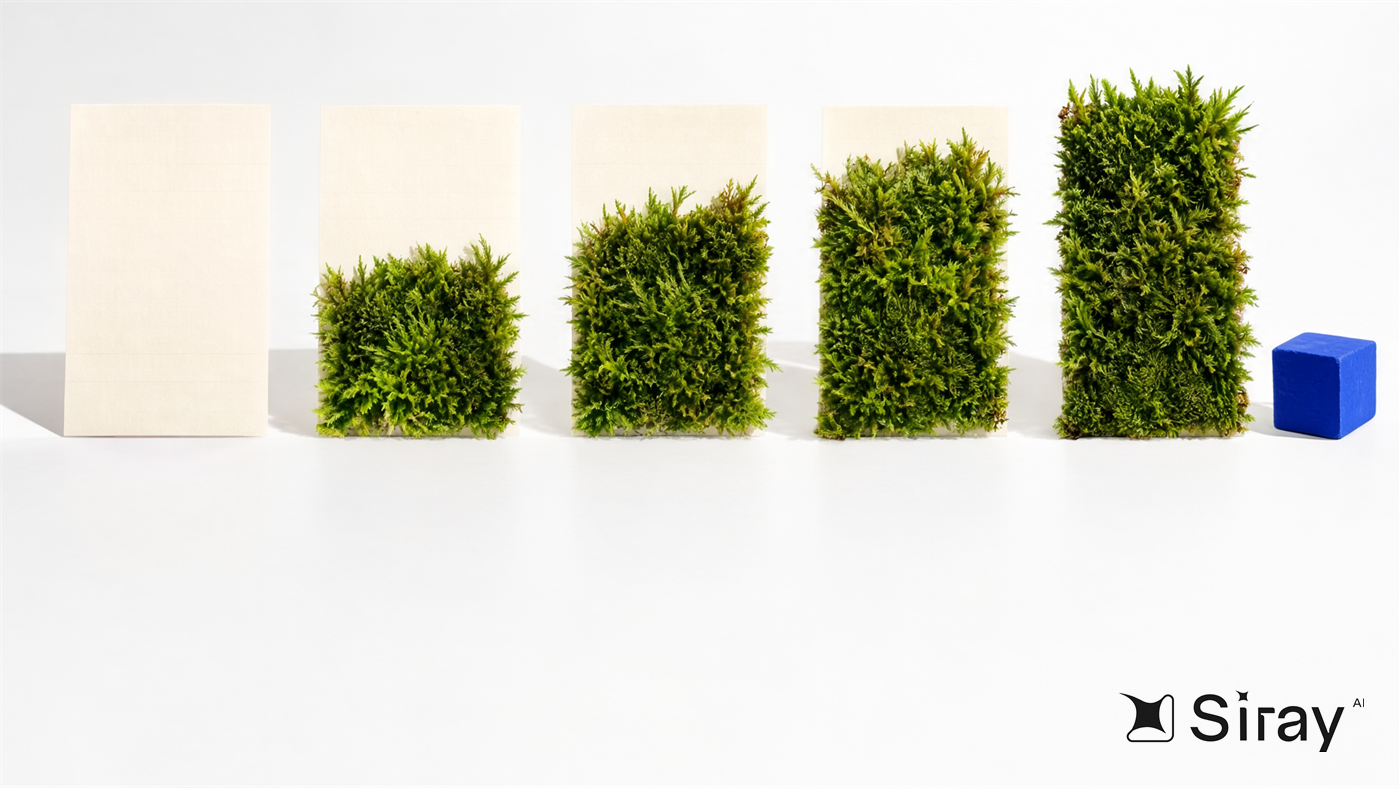
Illustration generated with MOSS Image on Siray AI.
1. Submit a task
curl -X POST https://api.siray.ai/v1/images/generations/async \
  -H "Authorization: Bearer $SIRAY_API_KEY" \
  -H "Content-Type: application/json" \
  -d '{
    "model": "moss/moss-image-t2i",
    "prompt": "Anime background art of a small seaside railway station at dusk, with no people. A single-track platform with a weathered wooden bench and a round clock runs along a calm ocean. A two-car local train waits with its windows glowing warm yellow, overhead wires cut across a violet and peach sky, and a white station sign on two posts reads exactly \"SHIOMI\". Hand-painted gouache texture, soft cel shading, detailed clouds, and gentle reflections on the wet platform.",
    "size": "1k",
    "aspect_ratio": "3:2",
    "output_format": "png"
  }'
2. Poll for the result
curl https://api.siray.ai/v1/images/generations/async/$TASK_ID \
  -H "Authorization: Bearer $SIRAY_API_KEY"
Two things we noticed while integrating:
sizeis a tier, not a pixel count. The output depends on the ratio, so read the real dimensions from the file.- Do not time out early. Progress reached about 73–87%, then jumped to
SUCCESS. Our slowest task took 72 seconds.
Output sizes from our six tasks:
size |
aspect_ratio |
Output |
|---|---|---|
1k |
1:1 |
1024×1024 |
1k |
3:2 |
1248×832 |
1.5k |
3:4 |
1328×1760 |
1.5k |
16:9 |
2048×1152 |
2k |
16:9 |
2720×1536 |
Status details are in the image task status API.
MOSS Image prompt examples (tested)
We ran every prompt below through the Siray AI API on November 5, 2026, one at a time. Timings include queueing and were measured by a client polling every 5 seconds. Each result is the single unedited output from its task.
1. Bilingual menu with exact text
A photograph of a black chalkboard menu hanging on the white-painted brick wall of a small neighborhood cafe, soft morning window light from the left, a potted fern on a wooden shelf below the board. The menu is hand-lettered in white chalk, with neatly aligned rows, and reads exactly, line by line:
"MORNING MENU
早餐菜单
Oat Milk Latte  燕麦拿铁  $5.50
Sesame Toast  芝麻吐司  $4.00
Soft Boiled Eggs  溏心蛋  $3.50
Jasmine Cold Brew  茉莉冷萃  $6.00
Open daily 7:30 to 15:00
每天营业 7:30 至 15:00"
Every word is sharp and legible, the English and Chinese are on the same row, and the prices line up in a right-hand column.
Settings: size 1.5k, aspect_ratio 3:4, 41 seconds, $0.04, 1328×1760.
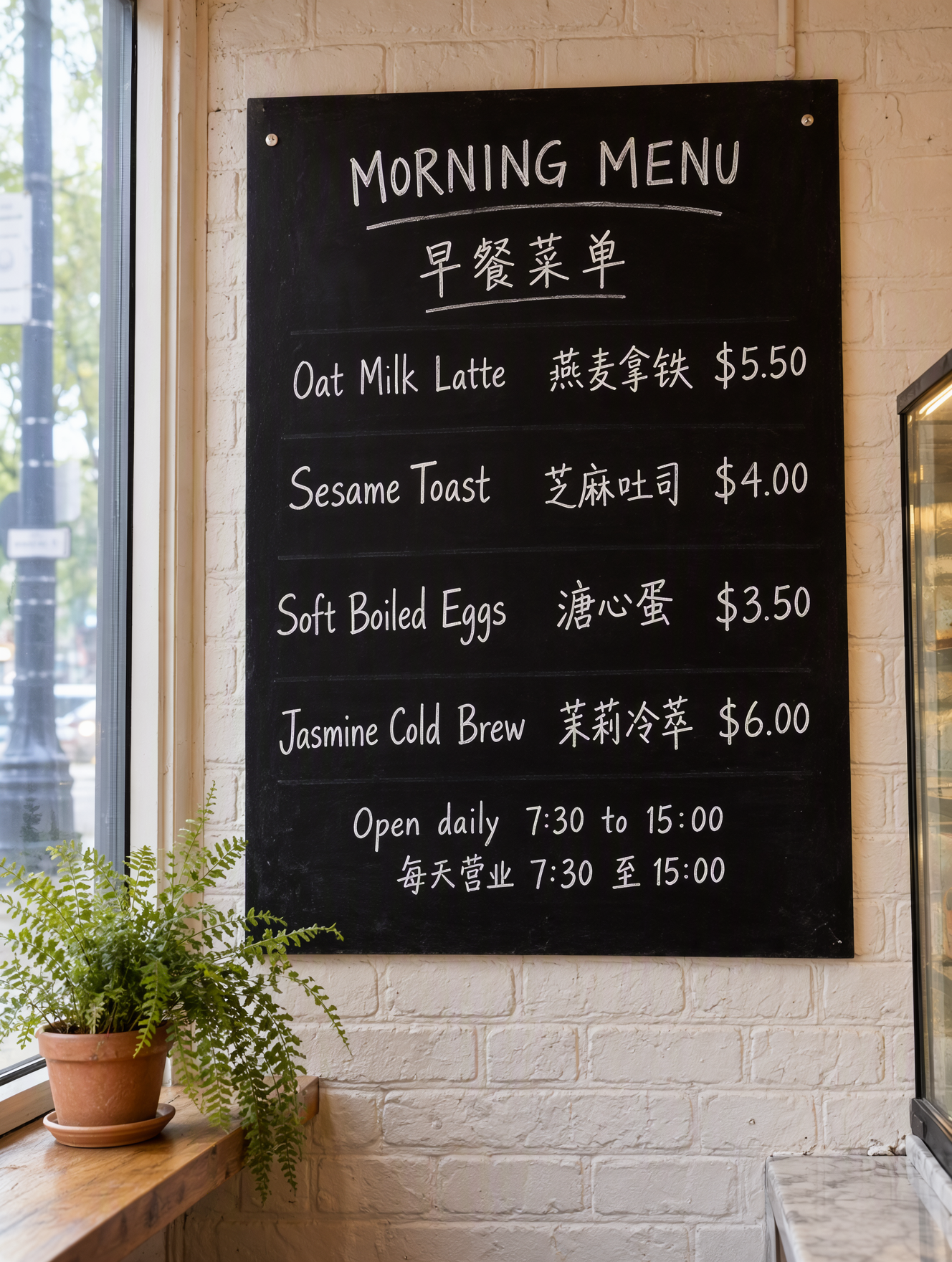
Every line, price and time is correct, and the rows and price column line up. The model added chalk underlines and row rules we did not request, and the "O" in "MORNING" is smaller than its neighbors. This is the strongest result of our tests.
2. Poster from a JSON layout
{"summary":{"meta":["poster"],"canvas":"single","caption":"A minimalist botanical exhibition poster with a warm cream background, a flat deep-green fern illustration in the center, a large serif title at the top, and a small date line at the bottom."},"items":[{"label":"text","caption":"Large deep-green serif uppercase title centered at the top.","text":"QUIET GREEN","bbox":[-432,-384,-304,384]},{"label":"object","caption":"A flat deep-green fern illustration with a single curved frond, centered.","bbox":[-224,-256,272,256]},{"label":"text","caption":"Small deep-green sans-serif date line centered near the bottom.","text":"Botanical Prints, 12 to 28 March","bbox":[352,-320,416,320]}],"bbox_coord_space":"abs_centralized","bbox_format":"yxyx"}
Settings: size 1k, aspect_ratio 1:1, 41 seconds, $0.02, 1024×1024. Pass the whole JSON object as the prompt string.
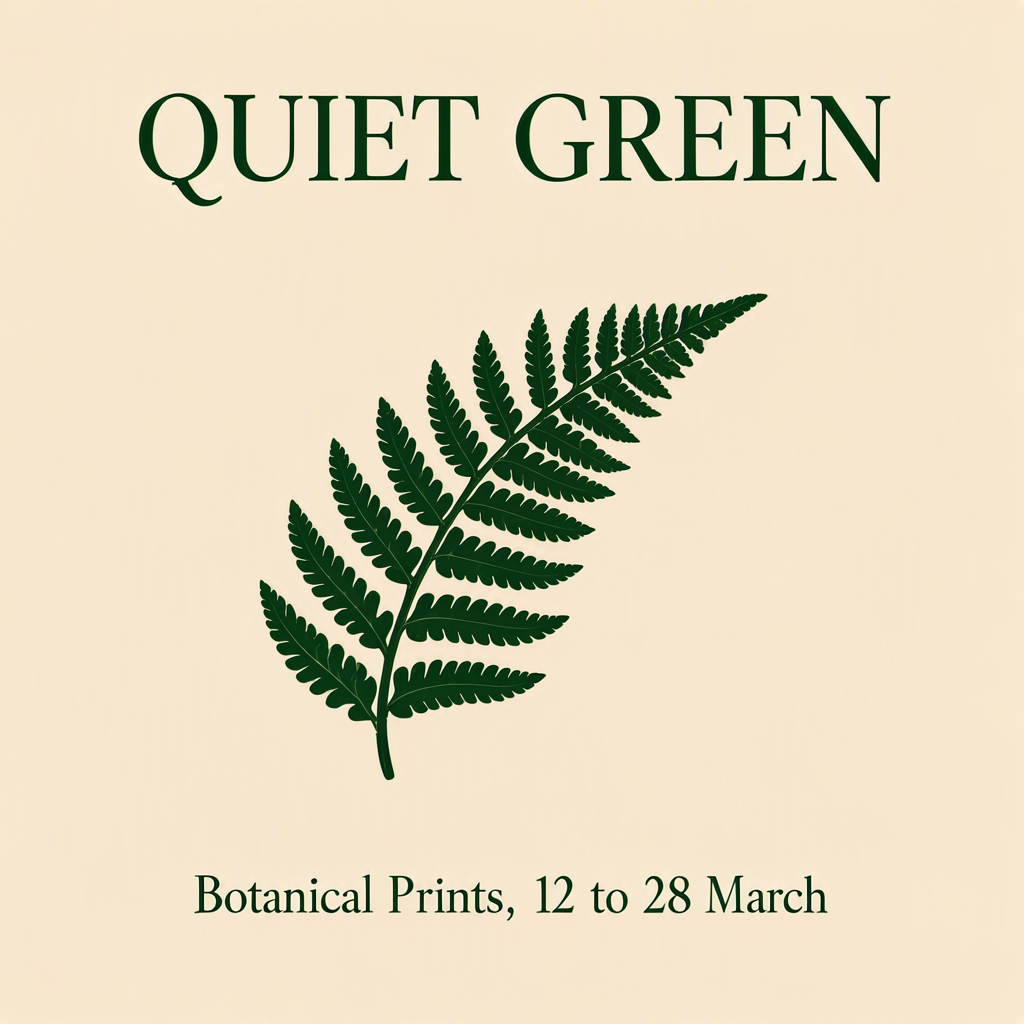
By visual check, the title, fern and date line all sit very close to their boxes, and both text strings are correct. One miss: the date line came out in a serif face, although its caption asked for sans-serif. This is a single simple layout, so test denser designs yourself.
3. Photorealistic person and hands
A photorealistic wide shot of a ceramic workshop on a rainy afternoon. A potter in her sixties with short gray hair and a clay-stained canvas apron sits at a wheel, shaping a tall vase with both hands. Wooden shelves behind her hold rows of unglazed bowls. Soft overcast daylight comes through a large steel-framed window streaked with rain, leaving gentle shadows and a cool, muted palette with warm terracotta accents. Shot on a 35mm lens at f/2.8, shallow depth of field, natural skin texture, realistic wet clay on her fingers.
Settings: size 2k, aspect_ratio 16:9, 57 seconds, $0.08, 2720×1536.

The face, wet clay and rainy window follow the prompt well, and the visible hand looks natural. The shelves have dark metal uprights instead of being fully wooden, and the foreground buckets and back wall look smeared at full size. Review backgrounds before using this at large sizes.
4. Anime scene with a short sign
Anime background art of a small seaside railway station at dusk, with no people. A single-track platform with a weathered wooden bench and a round clock runs along a calm ocean. A two-car local train waits with its windows glowing warm yellow, overhead wires cut across a violet and peach sky, and a white station sign on two posts reads exactly "SHIOMI". Hand-painted gouache texture, soft cel shading, detailed clouds, and gentle reflections on the wet platform.
Settings: size 1k, aspect_ratio 3:2, 41 seconds, $0.02, 1248×832.

The sign is spelled correctly, and the palette and painted look match the prompt. But silhouetted passengers appear in the train windows, despite "with no people." The endpoint has no negative prompt field, so check exclusions like this one by eye.
Prompting tips for MOSS Image

Illustration generated with MOSS Image on Siray AI.
- Set line breaks yourself. The official guide says the model can break lines automatically, "but the result may not always match your expectations." Our menu used real line breaks inside quotes and came out correct.
- Describe the scene in English. OpenMOSS recommends English because it has the most training data. Our menu used an English scene description with Chinese visible text.
- Match layout coordinates to the output.
abs_centralizedmeasures pixels from the canvas center, andyxyxmeans[y_min, x_min, y_max, x_max].1kat1:1gave us 1024×1024, so each axis ran from −512 to +512. - Be specific in long prompts. The technical report found that detailed content and design instructions improved human preference over concise requests.
- Do not rely on exclusions. "With no people" failed in our anime test. Describe a composition that leaves no room for the thing you want to avoid.
- Draft at
1k, then scale up. A2kimage costs four times as much as1k. There is no seed field in the docs, so a re-run at a larger size may not match your draft.
When to use MOSS Image (and when not to)
Good fit:
- Posters, menus and signs with exact English or Chinese text.
- Graphics where elements must sit in planned positions.
- Anime and photographic concepts, reviewed by a person.
- High-volume drafts at $0.02 per
1kimage.
Consider another model when:
- You need to change an existing image. MOSS Image has no image input, so see the Qwen Image 3 Edit API guide.
- You need text on real packaging. See GPT Image 2.5 Flare for packaging localization.
- You want a specific print style with composition checks. See FLUX Kontext Pro woodcut posters.
- You need negative prompts or fixed seeds. The Siray AI endpoint does not list them.
FAQ
How much does the MOSS Image API cost per image?
Siray AI lists MOSS Image at $0.02 for 1k, $0.04 for 1.5k and $0.08 for 2k. Prices were checked on November 5, 2026, with no discount active.
Is MOSS Image available via API?
Yes. On Siray AI, use moss/moss-image-t2i through the async image endpoint with one API key.
Does MOSS Image support image editing or reference images?
No. The technical report says the current backbone does not condition on reference images or support image editing, and the Siray AI endpoint is text-to-image only.
Can MOSS Image render Chinese and English text?
Yes. OpenMOSS lists both, and our eight-line bilingual menu came out correct. OpenMOSS's own benchmark shows lower coverage for its longest Chinese texts (92.4%) than for its longest English texts (97.1%).
How do I use JSON layouts with the MOSS Image API?
Pass the layout JSON as the prompt string. Use the official summary and items format, with bounding boxes that match the output dimensions. OpenMOSS labels this feature experimental.
How long does MOSS Image take to generate an image?
Our six tasks took 41 to 72 seconds, including queue time. The 2k task took 57 seconds, and the 1k tasks took 41 seconds.
Try MOSS Image on Siray AI
Create an account, get an API key and run the chalkboard menu prompt above. Open the MOSS Image model page on Siray AI to start.
Sources
- MOSS-Image model page, MOSS, accessed November 5, 2026.
- OpenMOSS/MOSS-Image repository, GitHub, accessed November 5, 2026.
- MOSS-Image user guide, OpenMOSS, accessed November 5, 2026.
- MOSS-Image Technical Report, arXiv, accessed November 5, 2026.
- Moss Image t2i API reference, Siray AI docs, accessed November 5, 2026.
- Image task status API, Siray AI docs, accessed November 5, 2026.
- Siray AI model pricing API (
GET /v1/models/pricing/{model}), queried November 5, 2026.