
Seedream 5.5 API on Siray AI: Pricing, Transparent Output and Tested Prompts

The Seedream 5.5 API gives you ByteDance's newest image model for text-to-image and multi-round editing. On Siray AI it costs $0.02 per 1K image and $0.028 per 2K image — less than the model it follows, Seedream 5.0 Pro. It is built for edits that do not drift: change one thing, keep the rest. This guide covers the endpoints, pricing, a quickstart and seven images we generated end to end.
Key takeaways
- Cheaper than 5.0 Pro, not just newer. $0.028 for a 2K image here versus $0.045 for a 1K image on 5.0 Pro. A 2K image costs 38% less than 5.0 Pro's 1K tier.
- Fast. In our tests every image finished in 19–40 seconds, and we ran three at once with no queueing. The same 2K size on 5.0 Pro took about 70 seconds.
- Transparent PNG works, but only if you ask for it. Pass
"background": "transparent"explicitly."output_format": "png"alone returns a 24-bit RGB image with a white background. - Three-round edit chain held up. We changed the background, then the clothing, then added an object, using each output as the next input. Faces, jewellery and unchanged regions stayed put.
- Dense small text came out exact. An eight-line café menu with prices reproduced every character.
What is Seedream 5.5?
Seedream 5.5 is a closed image creation and editing model from ByteDance's Seed team, announced on the Seed blog on November 9, 2026. In ByteDance's lineup it sits at the top of the Seedream 5.x family for now — and the company says a Pro version is still to come.
ByteDance highlights four areas:
- Editing that holds across many rounds. The model is described as preserving unedited regions "at the pixel level" and eliminating colour shifts in those areas, which is what "supports continued work on the same image across 100 rounds of editing" rests on. The demo chains 100 edits on one portrait and still resolves rings and eyeglass frames.
- Native transparency. It generates images with an alpha channel directly, "including full and partial transparency", so output can be used as a standalone asset without a background-removal pass.
- Realism. Better lighting, materials and skin texture, and per ByteDance it "reduces excessive gloss and overexposure".
- Dense text. ByteDance reports severe text corruption of 0.4% and minor corruption of 1.7% across Chinese and English tests, including densely arranged small text.
ByteDance's own evaluation is favourable but comparative: against Seedream 5.0 Pro, both quality and usability scores improved across six production categories, and in film/TV and office productivity "usability rates were more than twice those of the previous version". Treat those as vendor numbers.
What ByteDance does not say. The announcement has no failure-mode section and no stated limits. It does not publish a maximum output resolution, and the "100 rounds" figure is a capability claim, not a tested ceiling. We tested three rounds, not a hundred.
Seedream 5.5 endpoints on Siray AI
Siray AI offers Seedream 5.5 through two endpoints. Both are Spicy versions, meaning they allow mature and boundary-pushing creative themes that many platforms block. They handle everyday commercial work normally; every example in this guide is a standard image. Use them in line with Siray AI's terms and your local laws.
| Model ID | Task | Required inputs | Notes |
|---|---|---|---|
bytedance/seedream-5.5-t2i-spicy |
Text-to-image | prompt, size |
Optional output_format (jpg/png), background |
bytedance/seedream-5.5-i2i-spicy |
Image editing and compositing | prompt, size, images (1–10) |
Each image is a URL or a data URL |
There is no standard (non-Spicy) Seedream 5.5 endpoint on Siray AI, and no separate aspect_ratio parameter — you pick the ratio by choosing a size.
Supported size values (the same for both endpoints):
| Tier | Sizes |
|---|---|
| 1K | 1024x1024, 1152x864, 864x1152, 1424x800, 800x1424, 1248x832, 832x1248, 1568x672 |
| 2K | 2048x2048, 2368x1776, 1776x2368, 2816x1584, 1584x2816, 2496x1664, 1664x2496, 3136x1344 |
Seedream 5.5 pricing on Siray AI
Pricing depends only on the tier. Every 1K size costs the same, and every 2K size costs the same.
| Endpoint | 1K image | 2K image |
|---|---|---|
| Text-to-image | $0.02 | $0.028 |
| Image-to-image | $0.02 | $0.028 |
No discount was active when we checked on November 11, 2026, and the pricing API reported no surcharge for additional input images on the editing endpoint.
Worked examples:
- 1,000 product thumbnails at 1K: 1,000 × $0.02 = $20.
- A 20-round editing session on one 2K image: 20 × $0.028 = $0.56.
- The same 20-round session on Seedream 5.0 Pro at 2K: 20 × $0.09 = $1.80.
Prices were read from the Siray AI pricing API on November 11, 2026. Check the Seedream 5.5 model page for live prices. For how Siray's flat per-image billing compares with per-megapixel billing elsewhere, see our AI image and video API cost breakdown.
Quickstart: call the Seedream 5.5 API
Generation is asynchronous. Submit a task, get a task_id, then poll every 3–5 seconds until the status is SUCCESS. The image URLs are in data.outputs.

1. Submit a task
curl -X POST https://api.siray.ai/v1/images/generations/async \
  -H "Authorization: Bearer $SIRAY_API_KEY" \
  -H "Content-Type: application/json" \
  -d '{
    "model": "bytedance/seedream-5.5-t2i-spicy",
    "prompt": "Studio product photograph of a matte stoneware pour-over coffee set, soft even light, isolated subject, gentle contact shadow",
    "size": "2368x1776",
    "output_format": "png",
    "background": "transparent"
  }'
2. Poll for the result
curl https://api.siray.ai/v1/images/generations/async/$TASK_ID \
  -H "Authorization: Bearer $SIRAY_API_KEY"
The status moves through SUBMITTED and IN_PROGRESS to SUCCESS or FAILURE. On failure, read data.fail_code and data.fail_reason. For editing, switch the model to bytedance/seedream-5.5-i2i-spicy and add an images array. Full parameter details are in the Seedream 5.5 t2i Spicy API reference.
Two things we found in testing that the reference does not spell out:
background: "transparent"is required for alpha. The field is documented as optional, and it has no stated default. Omitting it while still requestingoutput_format: "png"produced a 24-bit RGB image with a white backdrop and no alpha channel at all. Re-running the identical prompt with"background": "transparent"returned a 32-bit ARGB image with fully transparent corners.fail_reasonis populated on success too. It carried the output URL rather than an error. Judge success bystatus, not by whetherfail_reasonis non-empty.
Seedream 5.5 prompt examples (tested)
We ran every prompt below through the Siray AI API on November 11, 2026. Timings include queueing. All seven images cost $0.028 each, $0.196 in total — six are shown, and the seventh was the white-background run from example 3 that we replaced.
1. Editorial portrait with real skin texture
Editorial portrait photograph of a 32-year-old woman standing in a quiet bookstore aisle, three-quarter view, wearing a moss-green wool coat over a cream turtleneck, dark hair pulled back, faint freckles, visible skin texture and small pores, soft window light from camera left, shallow depth of field, 85mm lens look, subtle film grain, matte skin with no gloss or overexposure, hands relaxed at her sides, warm natural color. Adult woman in her thirties. No children, teenagers, babies or minors. No text, no letters, no numbers, no logos, no watermark.
Settings: text-to-image, 1776x2368 (2K), about 33 seconds, $0.028.
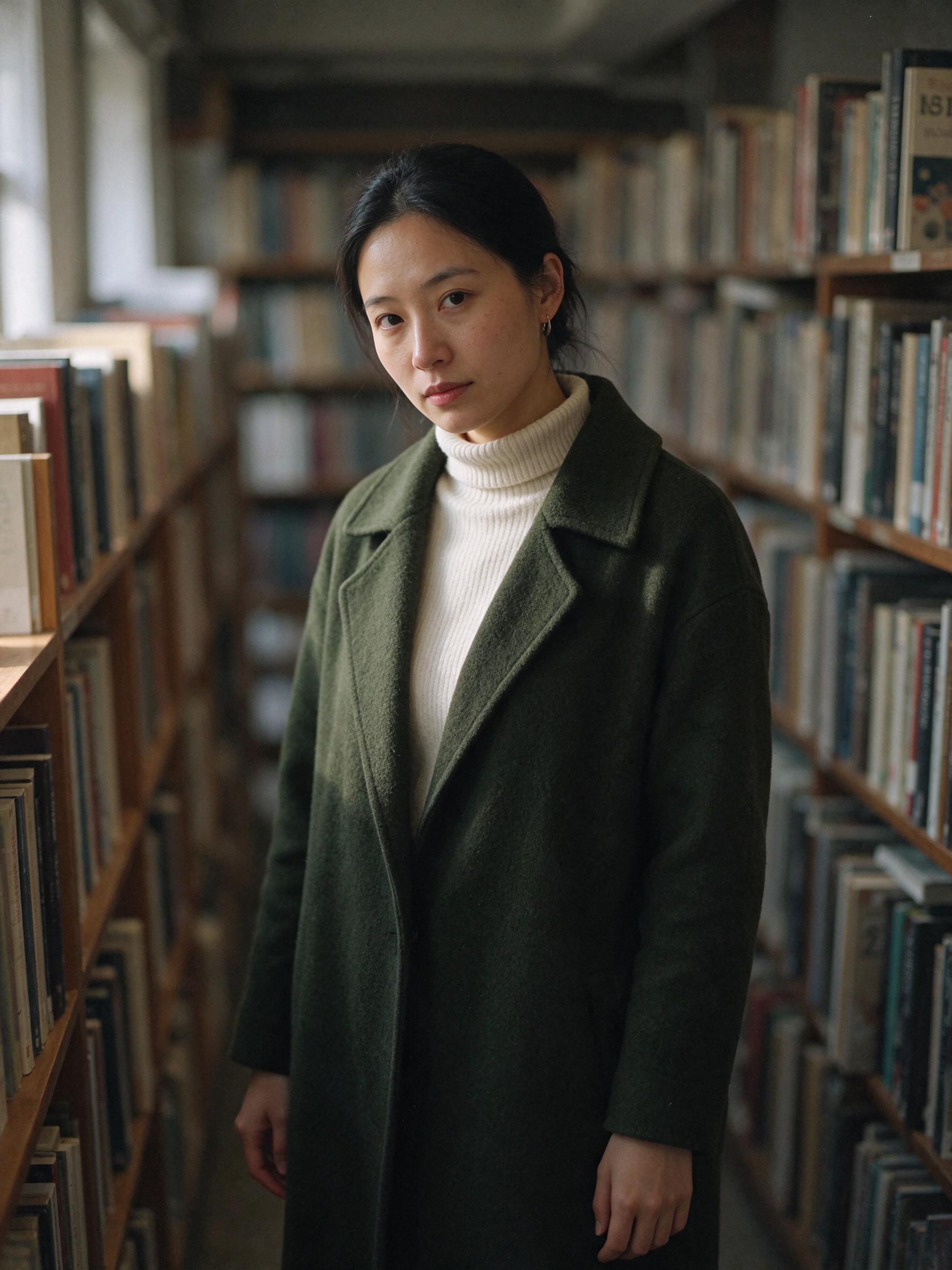
ByteDance's claim about "reducing excessive gloss" holds up here. The face has visible pores and a matte finish rather than the waxy highlight common in AI portraits, and the coat's wool nap reads as real fabric. This image is also the starting point for the edit chain in examples 4–6.
2. Dense small text on a chalkboard menu
Photograph of a coffee shop chalkboard menu shot straight on, landscape orientation. The board is filled with dense hand-lettered small text in tidy rows. Header in large chalk capitals: "SEASONAL POUR BAR". Below it eight drink lines in small even lettering, each with a short name and a price on the right, reading exactly: "ETHIOPIA GUJI 4.50", "COLOMBIA HUILA 4.25", "KENYA KIRINYAGA 5.00", "GUATEMALA ANTIGUA 4.75", "RWANDA NYAMASHEKE 5.25", "BURUNDI KAYANZA 4.50", "COSTA RICA TARRAZU 5.50", "PANAMA GEISHA 9.00". A thin chalk rule separates the drinks from a footer in small capitals: "ASK ABOUT OUR SINGLE ORIGIN FLIGHTS · CUPPING EVERY SATURDAY 9AM". Consistent letterforms, even baseline alignment, no misspellings, warm side light from the right, faint chalk dust, worn dark wood frame, shallow shadow at the frame edge.
Settings: text-to-image, 2368x1776 (2K), about 33 seconds, $0.028.
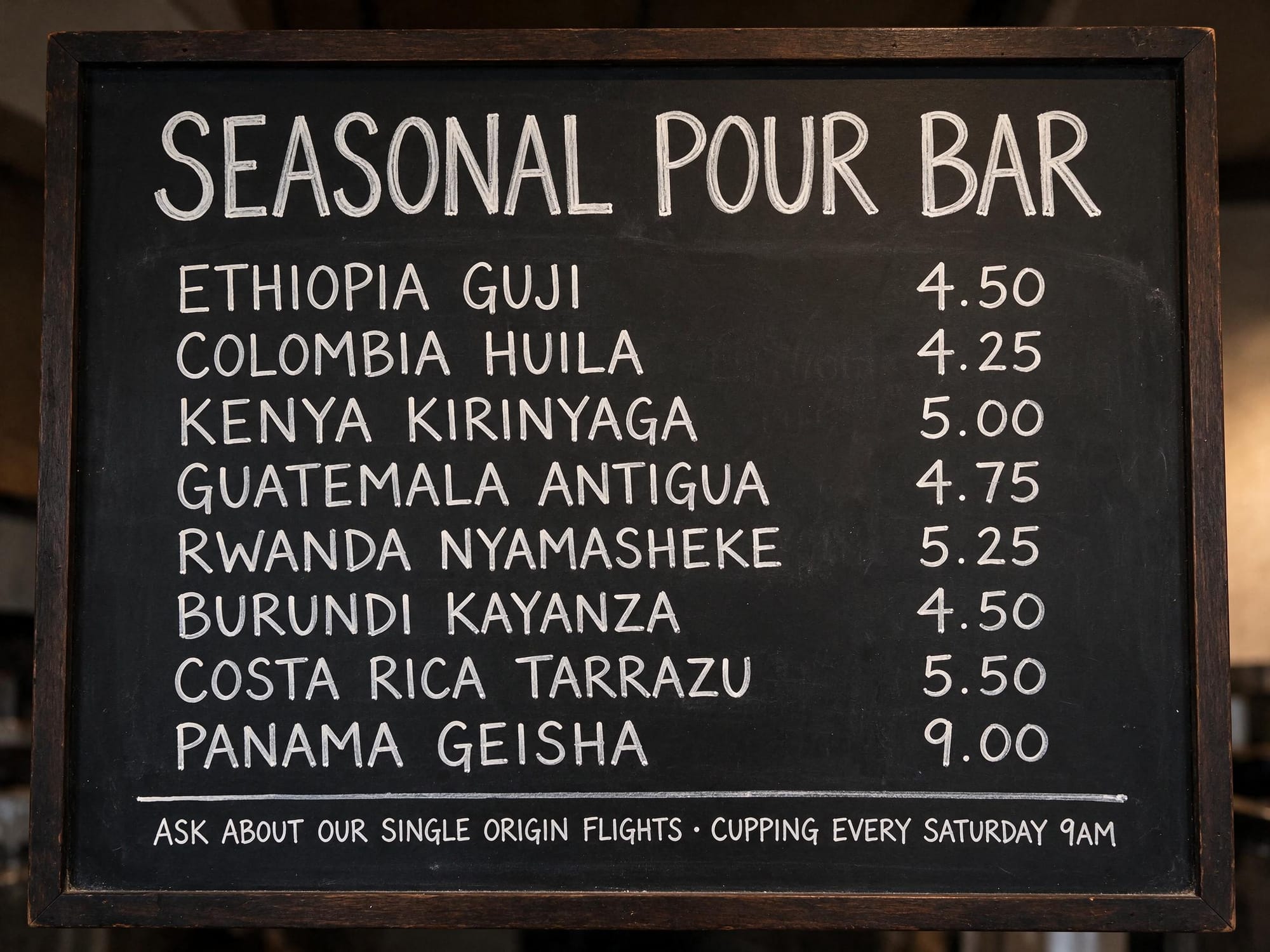
All eight drink names, all eight prices and the footer line came back character-perfect, with consistent letterforms across rows. One image is not a corruption rate, so we are not claiming ByteDance's 0.4% figure — but this is a much harder test than a two-line poster headline, and it passed cleanly.
3. Transparent product asset
Studio product photograph of a small ceramic pour-over coffee set: a matte stoneware dripper sitting on a matching carafe with a thin brass collar, three-quarter view, soft even studio light, crisp clean edges, centered composition, isolated subject with nothing behind it, gentle contact shadow only directly under the base.

No text, no letters, no numbers, no logos, no watermark.
Settings: text-to-image, 2368x1776 (2K), output_format: "png", background: "transparent", 19 seconds, $0.028.
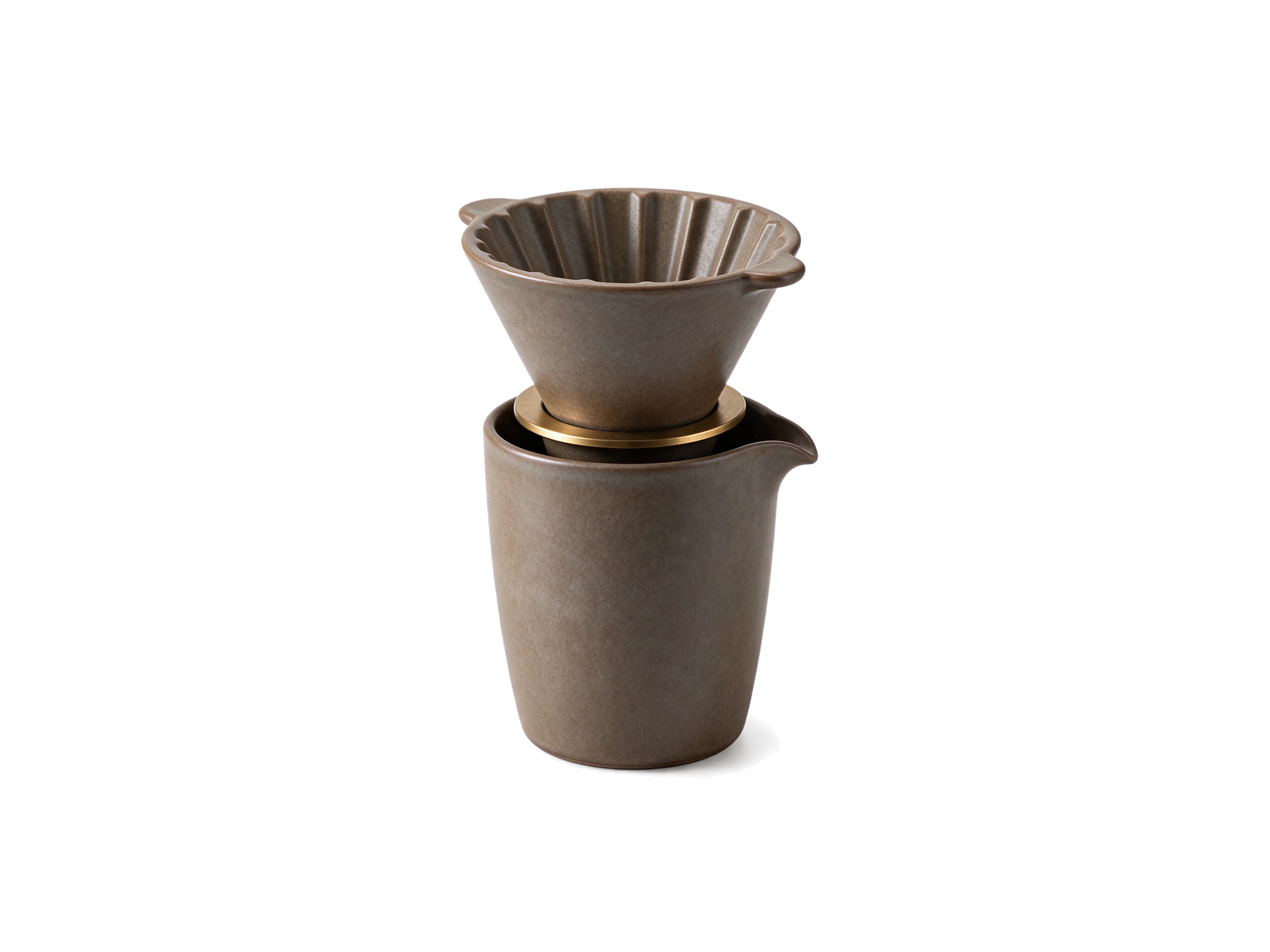
The alpha channel is real: the corners of the file report alpha 0. Two practical notes. First, the object keeps a soft contact shadow under its base, which helps it sit in a layout but means it is not a sterile cutout. Second, the edges are clean enough to drop straight into a page — no halo, no leftover background fringe. This is the one feature that genuinely removes a step from a production pipeline.
4–6. A three-round edit chain
These three use bytedance/seedream-5.5-i2i-spicy with one input image each time: the output of the previous round. This is the realistic way to test a model that advertises long editing sessions — each round starts from the last, not from the original.
Round 1 — replace the background.
Keep the woman, her face, hair, pose, coat and the light falling on her exactly as they are. Change only the background: replace the bookstore aisle with a sunlit Lisbon rooftop at golden hour, terracotta tiles, low whitewashed parapet, distant river and city roofs softly out of focus. Match the direction and warmth of the existing key light on her face to the new scene. Keep her unedited at the pixel level.
Settings: image-to-image, 1776x2368, 19 seconds, $0.028.
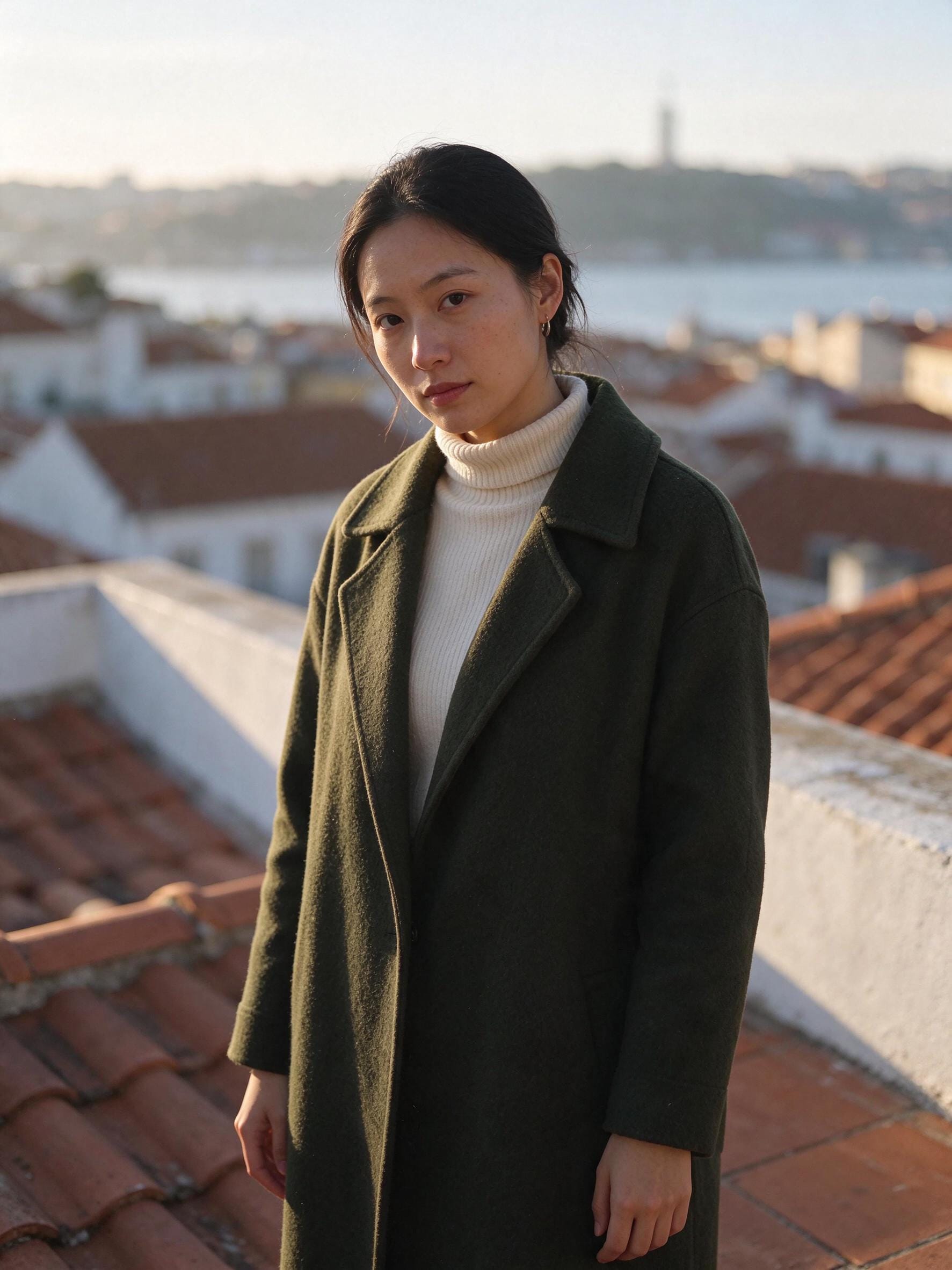
Face, hair, earring and turtleneck all survived. The model also relit her to match the warmer scene rather than pasting her in unchanged, which is the harder half of a background swap.
Round 2 — replace the coat.
Change only her outer garment: replace the moss-green wool coat with a navy blue linen blazer, same cut and length, keeping the cream turtleneck underneath. Her face, hair, skin texture, pose, hands and the rooftop background must stay exactly as they are. Do not shift the color of any area outside the coat.
Settings: image-to-image, 1776x2368, 31 seconds, $0.028.
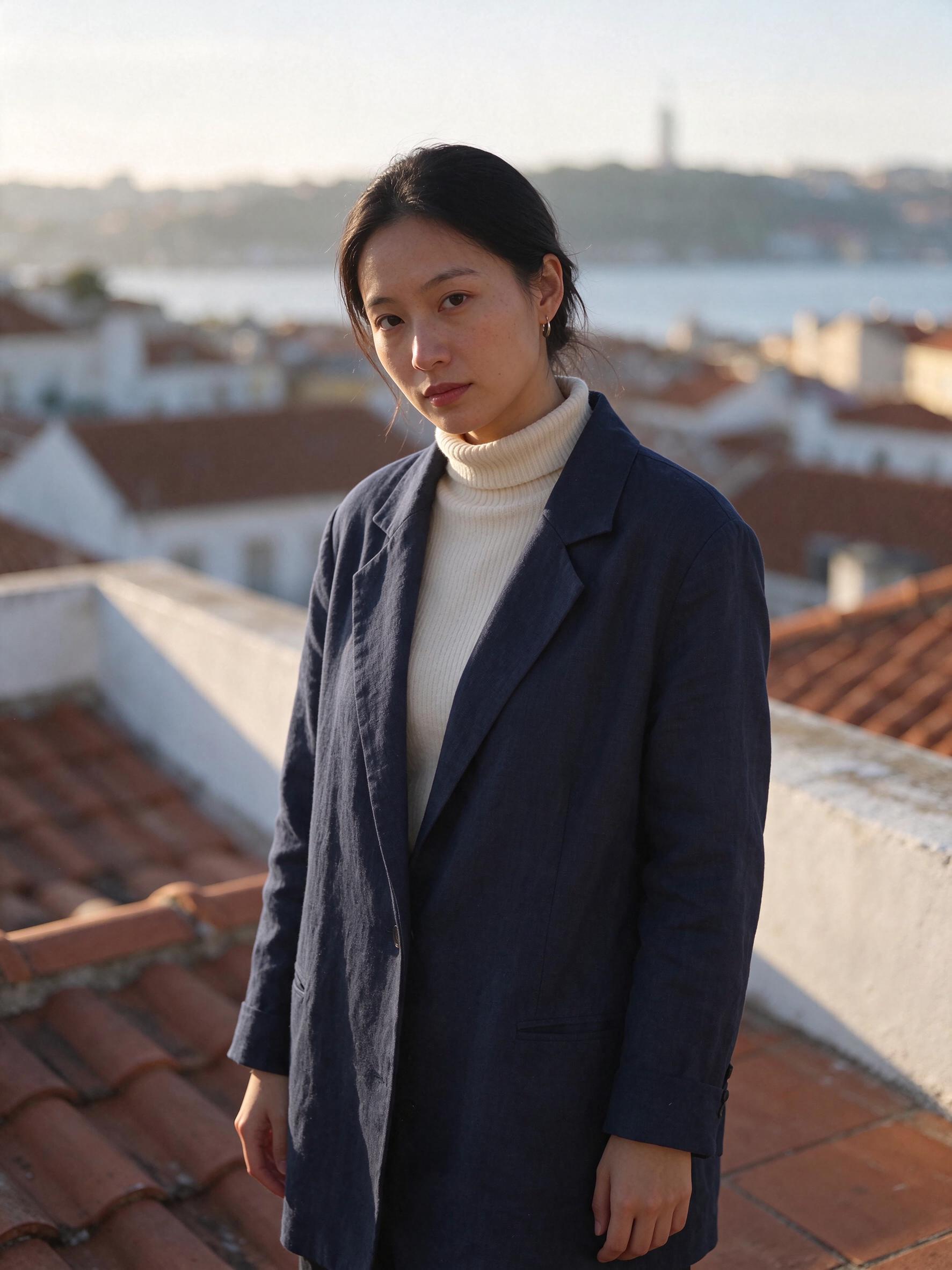
The garment changed and nothing else moved — no drift in the face, no colour shift in the sky or the roofline. The linen creases replace the wool nap convincingly.
Round 3 — add one object.
Add one object only: a small potted olive tree in a terracotta pot at the lower left edge of the frame. Everything else must remain identical, with no change to her face, hair, blazer, hands, the parapet, the rooftops or the sky.
Settings: image-to-image, 1776x2368, 31 seconds, $0.028.
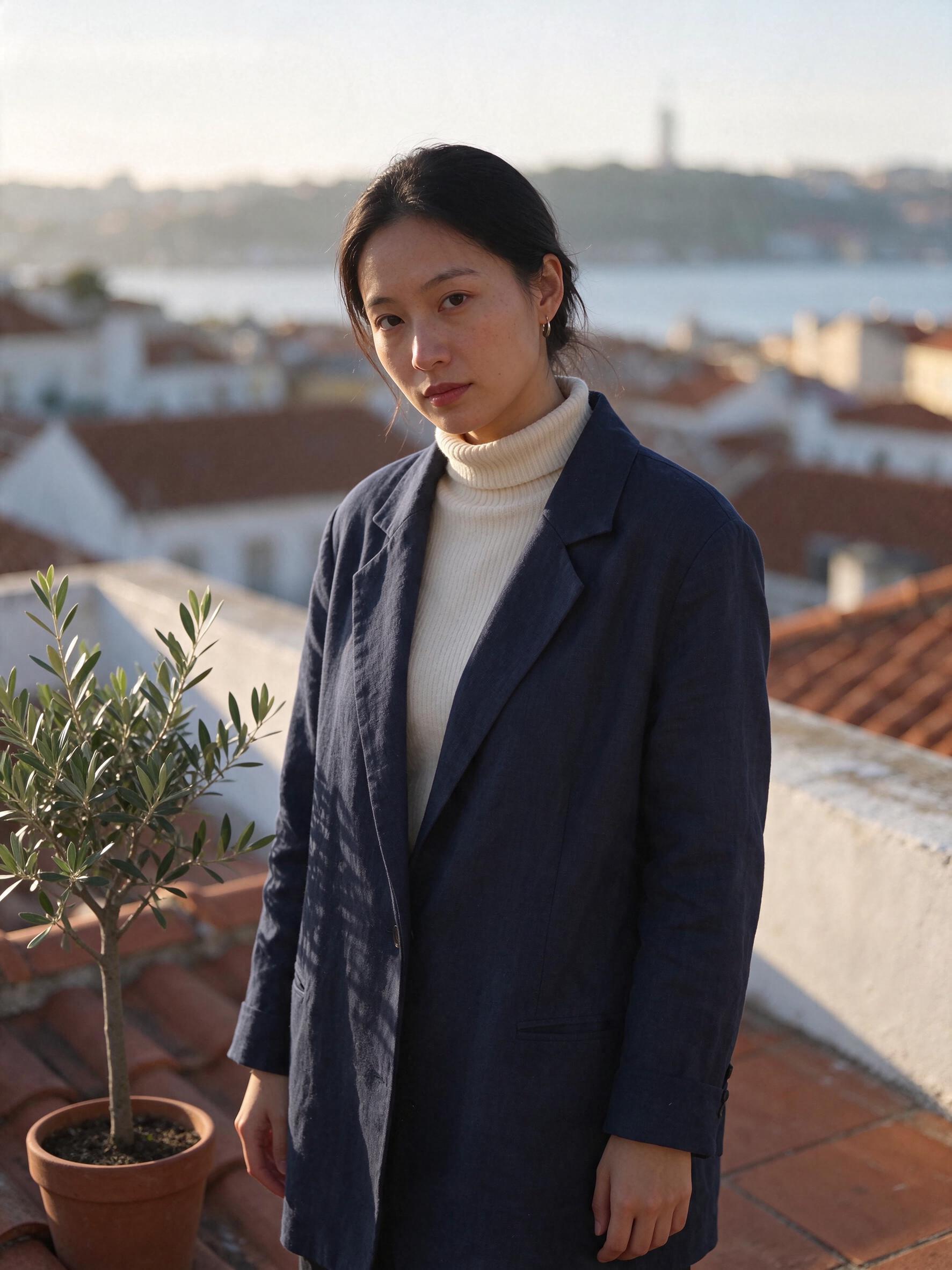
The pot arrived with a correct contact shadow on the tiles, and the rest of the frame is unchanged. Three rounds produced no visible degradation. That is evidence the chain is stable over a short session; it is not evidence about round 100.
Prompting tips for Seedream 5.5
- Name what must not change, not just what should. "Keep her face, hair, pose and the light exactly as they are" did more for edit stability than describing the new background in more detail.
- One change per round. Each of our successful edits asked for exactly one thing. Bundling a background swap and a wardrobe change into one request makes it harder to tell which part failed.
- Pass the previous output, not the original. That is what the multi-round claim is about. Re-using the first image each time tests something else entirely.
- Request transparency with
background, not withoutput_format.output_format: "png"only picks the container;background: "transparent"produces the alpha channel. - Quote exact text and say where it goes. Putting each drink line in quotation marks, in order, with the price attached, is what kept the menu correct.
- Use "reduces gloss" language for portraits. Asking for "matte skin with no gloss or overexposure" leans into what ByteDance tuned this version for.
When to use Seedream 5.5 (and when not to)

Illustration generated with Seedream 5.5 on Siray AI.
Good fit:
- Iterative editing where you keep refining one image — product shots, campaign art, character work.
- Transparent assets for design and e-commerce, where a separate cutout step used to be mandatory.
- High volume. At $0.02 for 1K, generating 50 variations to pick one is cheaper than thinking hard about the prompt.
- Menus, labels, posters and signage with dense real copy.
Consider another model when:
- You need the absolute top quality tier. ByteDance says "a Pro version of the Seedream 5.5 series will follow". If the image is a hero asset and you can wait, that is worth knowing before you build a pipeline.
- You need packing-shot e-commerce consistency at scale. See how Seedream 5 Pro handled lifestyle product shots.
- You want photo sets that look like one shoot. Our Seedream 5.0 Pro Spicy workflow for photo sets covers the relay approach in more depth.
- You need no-reference character consistency across many scenes. Reference-based character consistency is a different problem from editing one image repeatedly.
- You are doing wardrobe changes on a fixed model. Our outfit-change walkthrough goes further into that specific task.
FAQ
How much does the Seedream 5.5 API cost per image?
On Siray AI, $0.02 per 1K image and $0.028 per 2K image, regardless of aspect ratio. Prices were checked on November 11, 2026, with no discount active. That is less than Seedream 5.0 Pro, which costs $0.045 for 1K and $0.09 for 2K.
Does Seedream 5.5 support transparent backgrounds?
Yes, through the API. Set "background": "transparent" on the request. You also need "output_format": "png" — a PNG requested without the background field comes back as a 24-bit RGB image with a white background and no alpha channel.
Does Seedream 5.5 support image editing?
Yes. Use bytedance/seedream-5.5-i2i-spicy with 1 to 10 input images, passed as URLs or data URLs, plus a prompt describing the edit. To edit the same image repeatedly, feed each output back in as the next input.
How many rounds of editing can Seedream 5.5 do?
ByteDance claims up to 100 consecutive edits on one image without degrading fine detail. We tested three rounds in a single chain and saw no visible drift, but we have not verified the 100-round claim.
What resolutions does Seedream 5.5 support?
Sixteen fixed sizes in two tiers. The 1K tier goes up to 1568x672, and the 2K tier includes 2048x2048, 2816x1584 (16:9) and 3136x1344 (21:9). There is no aspect-ratio parameter; you choose the ratio by picking a size.
How long does Seedream 5.5 take to generate an image?
In our tests on Siray AI, every image finished in 19–40 seconds including queue time, for both text-to-image and editing. Three tasks submitted at once ran concurrently without an obvious queue penalty.
Try Seedream 5.5 on Siray AI
Create a free account, get an API key and run the transparent-product prompt above for two cents. Open the Seedream 5.5 model page on Siray AI to start.
Sources
- More Realistic Images, More Stable Editing Across 100 Rounds: Introducing Seedream 5.5, ByteDance Seed, published November 9, 2026, accessed November 11, 2026.
- Seedream 5.5 product page, ByteDance Seed, accessed November 11, 2026.
- Seedream 5.5 t2i Spicy API reference, Siray AI docs, accessed November 11, 2026.
- Seedream 5.5 i2i Spicy API reference, Siray AI docs, accessed November 11, 2026.
- Siray AI model pricing API (
GET /v1/models/pricing/{model}), queried November 11, 2026.