
Flux Kontext Editing Prompts: The 5 Instruction Types

Flux Kontext's image-editing endpoints take four required fields and one optional one: model, prompt, image, aspect_ratio, and seed. There is no mask. There is no strength slider, no guidance scale, and no negative prompt. Even inside Black Forest Labs' own catalog that is unusual: flux-1.1-pro and flux-1.1-pro-ultra expose a safety_tolerance integer, and the four Kontext endpoints expose nothing of the kind. So when a Kontext edit comes back too strong, too weak, or in the wrong place, there is no parameter to turn. The fix is always the sentence.
Key Takeaways
- The entire i2i surface is model, prompt, image, aspect_ratio and an optional seed. No mask, no strength, no guidance, no negative_prompt.
- aspect_ratio is required and has no default. The i2i endpoints accept match_input_image; the t2i endpoints do not.
- image takes a single string, not an array. Kontext is single-reference editing by design.
The Entire Control Surface
All four Kontext endpoints share one request body, and pro and max differ only in the model string. Calls are asynchronous: POST /v1/images/generations/async, then poll GET /v1/images/generations/async/{task_id}.
Field | Required | Notes |
model | yes | flux-kontext-{t2i,i2i}-{pro,max} |
prompt | yes | the edit instruction, and the only control you have |
image | yes (i2i) | a single string: data URL or image URL |
aspect_ratio | yes | no default; omit it and the call errors |
seed | no | −1 to 9999999999, so edits are reproducible |
What is not there matters more: no mask, strength, guidance, negative_prompt, safety_tolerance, n or output_format. Neither the spec nor the Playground form has them. Any guide telling you to mask a region or dial down strength is describing different software.
Type 1 — Replace
Name both the thing leaving and the thing arriving. A one-sided instruction leaves the model guessing.Replace the wooden chair with a black leather armchair, same position and same camera angle.
Weak version: make it a leather armchair. With no mask, Kontext often reinterprets the whole seating area.
Type 2 — Insert
Additions need a location, because there is no mask to point with. Put the spatial relationship in the sentence.Add a glass of water on the table to the right of the laptop, casting a soft shadow toward the camera.
Naming the shadow direction anchors the new object to the existing light, which is what stops an insert from looking pasted on.
Type 3 — Remove
Removals are the hardest without a mask. Localize the target by description, not position alone, then say what fills the gap.Remove the red car parked at the left edge; continue the brick wall and sidewalk behind it.
If you do not say what fills the gap, the model chooses, and it frequently chooses another object.
Type 4 — Restyle
Restyling overruns most often, because "make it cinematic" licenses the model to change composition too. Separate what changes from what holds.Restyle as a 1970s film photograph with warm grain and slightly faded blacks; keep the composition, framing and subject pose unchanged.
Type 5 — The Preserve Clause
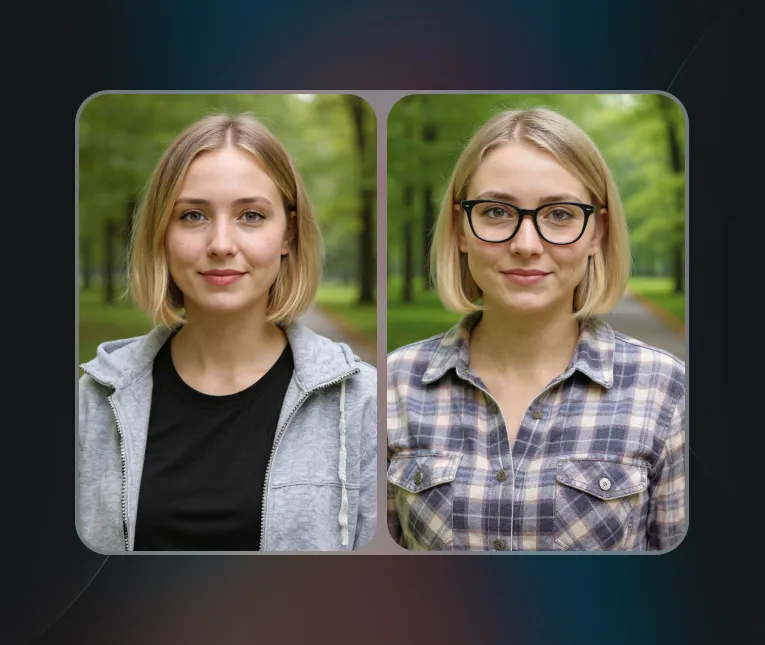
This is the one that does real work. With no mask available, a preserve clause is how you scope an edit: you describe the boundary in words instead of drawing it.Change the model's jacket to red. Keep the face, hair, hands, background and lighting exactly as they are.
Three rules make it hold. Name specific things rather than "keep everything else the same" — faces and hands every time. Put the clause after the instruction. Keep it short; one longer than the edit itself competes with it.
Append it to any of the four types above. It is a standard second sentence, not an occasional fix.
The aspect_ratio Trap
aspect_ratio is required on every Kontext call and has no default value. The i2i endpoints expose 14 values including match_input_image; the t2i endpoints expose 13 and do not include it.
match_input_image is the Playground's default for a reason: pass a fixed ratio like 16:9 against a portrait input and Kontext recomposes the frame to fit. The edit still happens, but the crop moves, so it reads as a failed edit when it is really a reframe. Unless you specifically want a new aspect ratio, send match_input_image.
Reproducibility and Cost
seed accepts −1 to 9999999999, so a Kontext edit can be re-run exactly. That is not universal — the Seedream family exposes no seed at all — and it turns the five types into something you can A/B properly: fix the seed, change one clause, compare.
Both editing endpoints carried a 20% off badge when checked on 2026-09-18: flux-kontext-i2i-pro at $0.032 per output image and flux-kontext-i2i-max at $0.064. That is a promotional rate rather than a fixed one, so re-check it before budgeting a batch. At those prices a seed-locked sweep of ten phrasings on pro costs $0.32. For the tier choice see Flux Kontext pro vs max; for the text-to-image side of the family, Flux 1.1 Pro workflow.
Developer Notes
Kontext i2i | Qwen Image 3 edit | Seedream 5.0 Pro Spicy i2i | |
Reference images | 1 (single string) | images, 1–3 | images, 1–10 |
seed | yes | yes | no |
negative_prompt | no | no | no |
aspect_ratio | required, no default | required, no default | not exposed |
If your job needs several references held at once, that is a different endpoint, not a different prompt — see Qwen Image 3 vs Flux Kontext for product editing. Z-Image product mockups is the cheapest way to produce the input image.
Generate with Flux Kontext now — available through Siray.ai, with faster generation and lower per-image cost than the premium paid editors.
Create your free Siray account and run one preserve clause against one of your own images.