
MiniMax H3 ref2v: Batch Social Video Content Variants

Key Takeaways
- MiniMax H3's ref2v endpoint takes images, videos, and audios arrays in a single call, so several social-platform cuts can come from one reference kit instead of a rewritten prompt each time.
- The first 5 reference images per call are free; each one after that adds $0.40, regardless of resolution — batching heavy reference sets gets expensive fast.
- H3 has no seed field anywhere in the family, so a winning take can't be replayed exactly — new variants come from changing the reference combination, not re-rolling a locked seed.
Introduction
This is not the launch-hero playbook. MiniMax H3 for E-commerce: A Product Launch Video Playbook covers one polished narrative cut built around a single product story. This piece covers the opposite job: producing several social-content variants — different platform crops, different pacing, different tone — from one shoot, using MiniMax H3's ref2v endpoint.
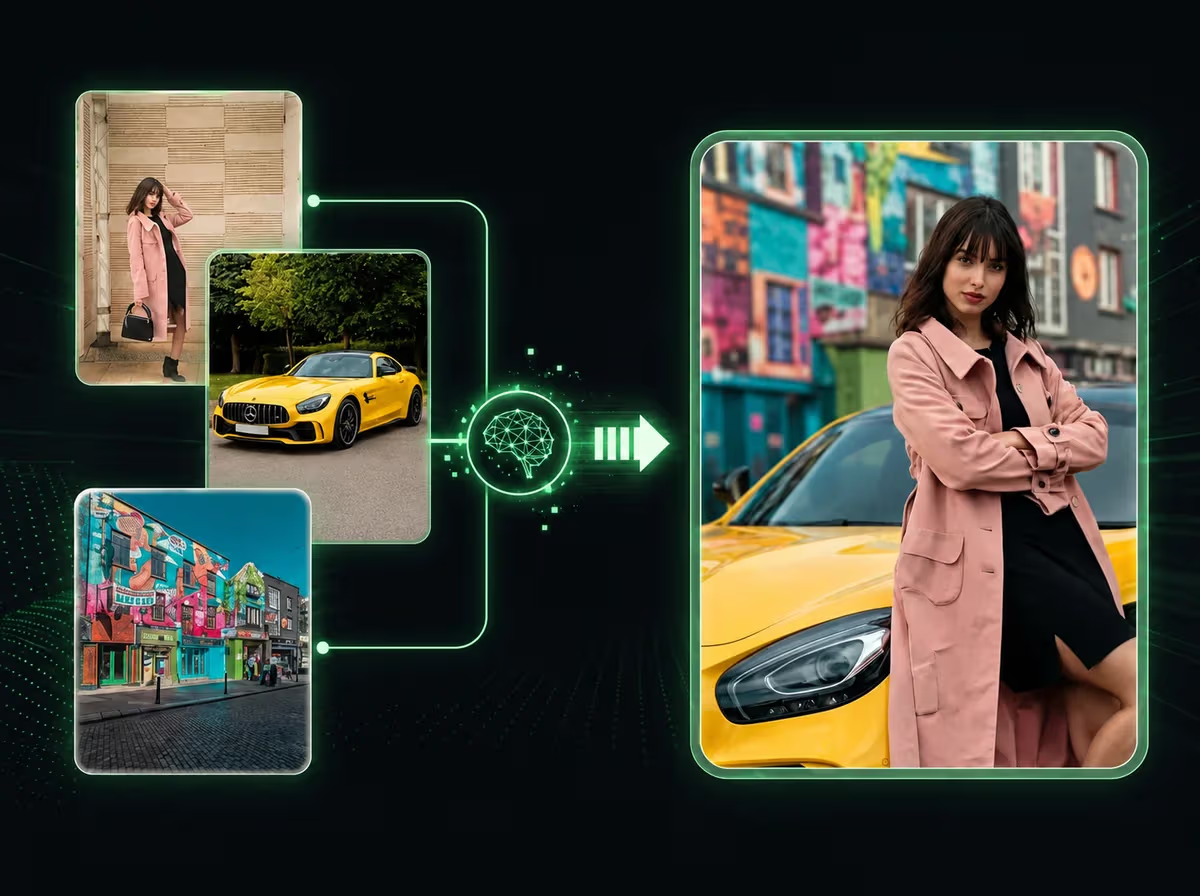
The mechanism: the same reference kit, recombined. A product shot, a creator clip, and a background track go into ref2v's images, videos, and audios arrays. Swapping which assets go into each call — not rewriting the prompt — turns one shoot into several usable cuts.
Why ref2v Fits Variant Batching
minimax/minimax-h3-ref2v accepts reference images, video clips, and audio in the same call, with native stereo audio baked into the result. That matters for batching: no separate audio pass per variant — sound generates alongside video every time.
Testing across reference combinations shows the real lever isn't prompt text — it's which assets go in. Drop the creator clip, keep the product shot plus audio, and the output tilts product-forward. Swap the background track against the same visuals, and tone shifts without touching a word of the prompt.
Building Variants from One Kit
Start with aspect_ratio, required by ref2v — 21:9, 16:9, 4:3, 1:1, 3:4, or 9:16 covers everything from a widescreen cutdown to a vertical Shorts crop. Pick the platform, then generate.
Each call needs duration, and the enum runs 5-15 whole seconds only — no 2-second teaser, no 30-second cut. That range fits a hook or short scene, not a multi-beat story in one generation.
From there, vary the reference set per call: a vertical Shorts cut might lean on the creator clip and audio and drop the product still; a square feed cut might do the reverse. Each combination is a separate ref2v call against the same kit, not a new production.
What Extra Reference Images Actually Cost
Reference images aren't free past five. ref2v bills the first 5 images per call at no extra charge; the 6th and each one after adds $0.40, regardless of size. Base pricing runs linear, no volume tiers: 768p $0.08/s, 2k $0.13/s, 4k $0.16/s.
Stacking eight reference images into one 5-second 768p call runs about $1.60 — four times the cost of the same call at five images or fewer, and more than a same-length single-reference 4k call. Batching stays affordable when each call reuses a lean subset of the kit, not every asset.
No Seed Means No Replay
None of the three H3 endpoints expose a seed, a prompt_expansion_enable flag, or a negative_prompt field. That's a real constraint for a variants workflow — no way to lock a favorite output and regenerate it exactly later.
In practice, treat a good result as a reference source for the next call, not a seed to reuse. Feed the clip that worked back in, adjust the combination, and let the next generation build on what's already proven — reference reuse does the job seed-locking does elsewhere.
Developer Notes
MiniMax H3 runs through the same Siray API key as every other model on the platform. Teams already generating with other models — see One API for Multiple AI Models — can point existing code at ref2v without a separate account. For the full spec rundown, see MiniMax H3 (Hailuo 3.0), Explained.
Summary
Batching social video variants with MiniMax H3 comes down to one reference kit, recombined per call through ref2v — not a rewritten prompt for every platform cut. The cost model rewards lean reference sets, and the missing seed field means variants build forward from a good result instead of replaying one.
Get Started
Create your free Siray account and start batching social video variants with MiniMax H3's ref2v endpoint.