
Nano Banana Pro API: Batch a Holiday Catalog in Python
A Python pipeline that turns a CSV of product photos into finished holiday catalog cards with the Nano Banana Pro API: $0.098 per 2K image, four tested SKUs, and the two API quirks that break naive pollers.
The Nano Banana Pro API turns a CSV of product photos into finished catalog cards at $0.098 per 2K image on Siray AI. This tutorial builds a Python pipeline that reads the CSV, submits image-to-image tasks three at a time, resumes from a saved task_id instead of paying twice, caps the spend before the first request, and names every file by SKU.
We ran the same four requests end to end: four SKUs, four seconds of setup, 80.5 seconds of wall time and $0.392 in spend, four cards out with character-exact captions.
Key takeaways
- $0.098 per card at 1K and 2K, $0.168 at 4K. Input images are free, so a two-reference edit costs the same as a one-reference edit. A 250-SKU catalog at 2K is $24.50.
- Four SKUs, four successes, 80.5 s at concurrency 3. Individual jobs finished in 26.7–50.2 s from submit to downloaded file.
- Submission, not generation, is what serialises. The first POST took 1.4 s; the fourth took 12.8 s. Plan the worker count around that, not around the render time.
fail_codeis empty on real failures. A task that fails on a badsizevalue returnsFAILUREwith an emptyfail_codeand the explanation infail_reason. OnSUCCESS,fail_reasoninstead contains the media URL. Pollers that printfail_reasonas an error, or branch onfail_code, misreport both cases.- Never resubmit to retry. Log the
task_idthe moment you get it and re-poll it. A re-poll of a finished task returned the same output URL and cost nothing.
What this pipeline does

Illustration generated with Nano Banana Pro on Siray AI.
Four stages, one script:
- Read a CSV row per SKU: source photo, product name, headline, subline.
- Submit one
google/nano-banana-pro-i2itask per row with the photo as adata:URL. - Poll the tasks concurrently, writing each
task_idto a state file before the first poll. - Download each output and name it
<SKU>.png.
The state file is the important part. It turns a crashed run into a resume instead of a duplicate bill.
What the Nano Banana Pro API gives a catalog workflow
Nano Banana Pro is Google's product name for Gemini 3 Pro Image, announced on the Google blog on November 20, 2025. Three of its properties matter for a catalog:
- Text inside the image. Google calls it "the best model for creating images with correctly rendered and legible text directly in the image." Catalog cards need a headline and a subline that are spelled right, which rules out most of the field.
- Up to 14 reference images per request. Google's announced limit is "up to 14 images", and Siray bills them at no extra cost — the price is per generated image, not per input. A product photo plus a logo plus a brand reference is still $0.098.
- Edits are priced like generations. The
-i2iendpoint costs exactly what the-t2iendpoint costs, so reworking a card is no more expensive than making one.
Two limits to design around. Google's announcement publishes no error rates or latency figures and no failure modes at all, and every output carries an imperceptible SynthID watermark. And the model draws layouts more reliably than it counts — in our earlier test of the same model, a timeline chart came back beautifully typeset with bar lengths that contradicted their own labels. For product cards that does not matter; for a "compare our three sizes" infographic it does.
For the full model picture — endpoints, aspect ratios, 4K behaviour — see Nano Banana Pro on Siray AI: pricing, 4K output and tested prompts.
Step 1 — Put the products in a CSV
Four columns are enough when the prompt template lives in the code:
sku,name,source_image,headline,subline
NBP-PERFUME-01,Amber Perfume Gift Box,photos/perfume.jpg,THE AMBER NO. 5 SET,50 ml eau de parfum · gift boxed
NBP-TEA-02,Jasmine Silver Needle Tea Tin,photos/tea-tin.jpg,JASMINE SILVER NEEDLE,Spring harvest · 100 g tin
NBP-BOOTS-03,Tobacco Suede Ankle Boots,photos/boots.jpg,THE DESERT BOOT,Tobacco suede · sizes 36-46
NBP-MUG-04,Olive Stoneware Mug,photos/mug.jpg,THE MORNING MUG,Olive glaze · 350 ml
Keep the SKU in its own column even if your product names are unique. The SKU becomes the filename, and a filename is the only thing that reliably survives a re-run, a partial failure or a directory of 250 PNGs.
Source photos should be at least 1024 px on the long side. Flatten them to JPEG before base64-encoding: our 1024 px JPEGs encoded to roughly 150–250 KB, while a full-size PNG from the camera roll would have been 10–30× that in every request body.
Step 2 — Submit image-to-image tasks
Install two packages and set the key:
pip install requests pillow
export SIRAY_API_KEY="sk-..."      # PowerShell: $env:SIRAY_API_KEY = "sk-..."
The endpoint is POST https://api.siray.ai/v1/images/generations/async. Five fields are required, and the image-to-image reference lists no optional ones:
| Field | Type | Values |
|---|---|---|
model |
string | google/nano-banana-pro-i2i |
prompt |
string | free text |
images |
array | 1–14 entries, each a data URL or an image URL |
size |
string | 1k, 2k, 4k |
aspect_ratio |
string | 1:1, 2:3, 3:2, 3:4, 4:3, 4:5, 5:4, 9:16, 16:9, 21:9 |
There is no output_format, seed, num_images or negative_prompt field on either Nano Banana Pro endpoint, and each request returns exactly one image. The aspect ratio comes from aspect_ratio, not from the size string — 2k is a resolution tier, not a shape.
import base64, csv, io, json, os, pathlib, time
from concurrent.futures import ThreadPoolExecutor

import requests
from PIL import Image

BASE = "https://api.siray.ai/v1/images/generations/async"
MODEL = "google/nano-banana-pro-i2i"
SIZE = "2k"
RATIO = "1:1"
UNIT_PRICE = 0.098            # USD per 2K image; pricing API, 2026-11-25
SPEND_CAP = float(os.environ.get("SPEND_CAP", "5"))
WORKERS = 3

HEADERS = {
    "Authorization": f"Bearer {os.environ['SIRAY_API_KEY']}",
    "Content-Type": "application/json",
}
STATE = pathlib.Path("state.jsonl")
OUT = pathlib.Path("out")

PROMPT = """Holiday catalog card for {name}. Keep the exact product from the
reference photo: same shape, material, colour and label. Place it on a warm
cream seamless backdrop with one soft window light from the left and a subtle
contact shadow, centred on a light oak surface, with generous empty space at
the bottom for a caption block. Add crisp typeset text at the bottom, exact
spelling: headline "{headline}" in a spaced condensed sans in deep charcoal,
and below it "{subline}" in a smaller light sans. Product photography, no
props, no watermark, no price tag."""


def load_rows(path="products.csv"):
    with open(path, newline="", encoding="utf-8") as f:
        return list(csv.DictReader(f))


def data_url(path, max_side=1024, quality=82):
    im = Image.open(path).convert("RGB")
    im.thumbnail((max_side, max_side))
    buf = io.BytesIO()
    im.save(buf, "JPEG", quality=quality)
    return "data:image/jpeg;base64," + base64.b64encode(buf.getvalue()).decode()


def submit(row):
    body = {
        "model": MODEL,
        "prompt": PROMPT.format(
            name=row["name"], headline=row["headline"], subline=row["subline"]
        ),
        "images": [data_url(row["source_image"])],
        "size": SIZE,
        "aspect_ratio": RATIO,
    }
    r = requests.post(BASE, headers=HEADERS, json=body, timeout=120)
    r.raise_for_status()
    payload = r.json()
    if payload.get("fail_code"):
        raise RuntimeError(f"submit rejected: {payload['fail_code']} {payload.get('message')}")
    return payload["data"]["task_id"]
One thing the schema does not tell you: submit returning a task_id does not mean the request was valid. During testing we posted "size": "8k", which is not in the enum. The API answered 200 with a task_id, and the task only failed a few polls later, at execution time. Treat the submit response as an acknowledgement, not a validation.
Step 3 — Poll concurrently, resuming by task id
Polling is GET https://api.siray.ai/v1/images/generations/async/{task_id}. The documented lifecycle is NOT_START, SUBMITTED, QUEUED, IN_PROGRESS, and then FAILURE or SUCCESS. On success the image URLs arrive in data.outputs as a list; there is always exactly one.
DONE = {"SUCCESS", "FAILURE"}


def poll(task_id, interval=4, timeout=420):
    deadline = time.time() + timeout
    url = f"{BASE}/{task_id}"
    while time.time() < deadline:
        data = requests.get(url, headers=HEADERS, timeout=60).json()["data"]
        if data["status"] in DONE:
            return data
        time.sleep(interval)
    raise TimeoutError(f"task {task_id} still running after {timeout}s")


def read_state():
    done = {}
    if STATE.exists():
        for line in STATE.read_text(encoding="utf-8").splitlines():
            rec = json.loads(line)
            done[rec["sku"]] = rec
    return done


def append_state(rec):
    with STATE.open("a", encoding="utf-8") as f:
        f.write(json.dumps(rec) + "\n")
The state file is append-only JSON lines, so a crash mid-write loses at most the last line and the next run still knows which SKUs already have a task_id.
Two behaviours here are drawn from what we saw, not from the docs:
fail_codeis not the field to branch on. Our deliberately invalidsizeproducedstatus: "FAILURE"withfail_code: ""and the explanation infail_reason. Readfail_reasonand log it.fail_reasonis populated before the task fails, and repurposed after it succeeds. While the bad task was stillIN_PROGRESS,fail_reasonalready held the upstream error. And in theSUCCESSresponse we re-polled,fail_reasonheld the media URL. Onlystatusis trustworthy.
Then the worker, which is where the resume rule lives:
def run(row, known):
    prev = known.get(row["sku"], {})

    if prev.get("status") == "SUCCESS" and prev.get("file"):
        return {"sku": row["sku"], "file": prev["file"], "submitted": False}

    task_id = prev.get("task_id")
    submitted = task_id is None
    if submitted:
        task_id = submit(row)
        append_state({"sku": row["sku"], "task_id": task_id, "status": "SUBMITTED"})

    data = poll(task_id)
    if data["status"] == "FAILURE":
        append_state({"sku": row["sku"], "task_id": task_id,
                      "status": "FAILURE", "reason": data.get("fail_reason", "")})
        return {"sku": row["sku"], "file": None, "submitted": submitted}

    url = data["outputs"][0]
    OUT.mkdir(exist_ok=True)
    path = OUT / f"{row['sku']}{pathlib.Path(url).suffix or '.png'}"
    path.write_bytes(requests.get(url, timeout=180).content)
    append_state({"sku": row["sku"], "task_id": task_id,
                  "status": "SUCCESS", "file": str(path)})
    return {"sku": row["sku"], "file": str(path), "submitted": submitted}
Re-running the script after a failure re-polls the surviving task_id. It does not submit a second task for the same SKU, which is the difference between a $0.098 retry and a $0.098 duplicate.
Step 4 — Cap the spend before the first request
A spend guard is two lines of arithmetic, and it has to run before anything is submitted:
def main():
    rows = load_rows()
    known = read_state()
    pending = [r for r in rows if known.get(r["sku"], {}).get("status") != "SUCCESS"]
    estimate = len(pending) * UNIT_PRICE

    if estimate > SPEND_CAP:
        raise SystemExit(
            f"{len(pending)} cards would cost about ${estimate:.2f}; "
            f"SPEND_CAP is ${SPEND_CAP:.2f}"
        )

    print(f"{len(rows)} rows · {len(pending)} to run · estimate ${estimate:.2f}")

    with ThreadPoolExecutor(max_workers=WORKERS) as pool:
        results = list(pool.map(lambda r: run(r, known), rows))

    billed = sum(UNIT_PRICE for r in results if r["submitted"] and r["file"])
    ok = sum(1 for r in results if r["file"])
    print(f"{ok}/{len(rows)} files · ${billed:.3f} spent this run")


if __name__ == "__main__":
    main()
Two details that matter once the catalog is real:
- Estimate only what is pending. Excluding SKUs already marked
SUCCESSmeans a resume run of 240 finished cards and 10 new ones is checked against $0.98, not $24.50, so the first cap you hit is a real one. - Count spend from submissions, not from files. A failed task produced no file. Billing on files would under-report a run where tasks were submitted and then failed, and over-report nothing on a pure resume, where zero dollars moved.
What our four-SKU test returned
We ran the pipeline on four real product photos, size: "2k", aspect_ratio: "1:1", three workers. Every card came back 2048×2048 and 3.7–4.6 MB as PNG, because there is no output-format field to talk you down to JPEG.
| SKU | Submit latency | Wall time | Status | Cost |
|---|---|---|---|---|
| NBP-PERFUME-01 | 1.4 s | 26.7 s | SUCCESS | $0.098 |
| NBP-BOOTS-03 | 1.7 s | 39.4 s | SUCCESS | $0.098 |
| NBP-TEA-02 | 11.2 s | 41.5 s | SUCCESS | $0.098 |
| NBP-MUG-04 | 12.8 s | 50.2 s | SUCCESS | $0.098 |
| Total | 80.5 s | 4/4 | $0.392 |
Four cards in 80.5 seconds is not four times better than one card in 45. The POSTs themselves slowed from 1.4 s to 12.8 s as the pool filled, so most of the parallelism you pay for is spent on upload, not on rendering. At 250 SKUs that argues for a pool of 4–6 and a longer submission timeout, not for 20 workers.
Caption accuracy. All four headlines came back character-exact, including the · separator and the mixed caps in "Jasmine Silver Needle". The model also re-typeset the tea tin's own label copy — "MORNING HARBOR TEA CO." and "Steep 3 minutes at 80°C" — correctly from the reference photo.
One template break. The mug card came back inset, with white margins on three sides, while the other three were full-bleed. It is the same template and the same prompt, so this is framing variance, not a prompt bug. If a catalog must have pixel-identical gutters, generate the product layer with Nano Banana Pro and composite the caption band yourself.

SKU NBP-PERFUME-01, 2K, 1:1, 26.7 s, $0.098.
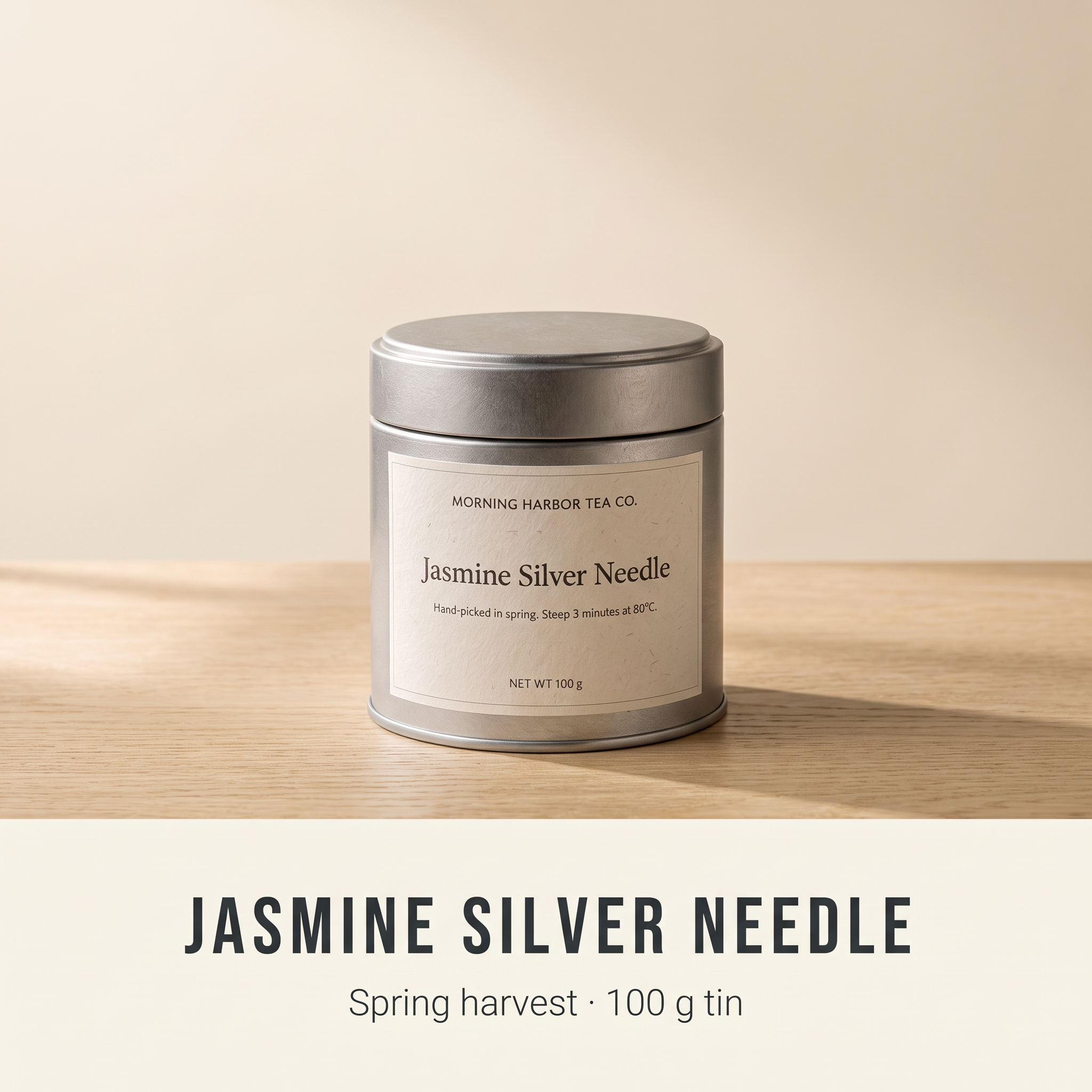
SKU NBP-TEA-02, 2K, 1:1, 41.5 s, $0.098.
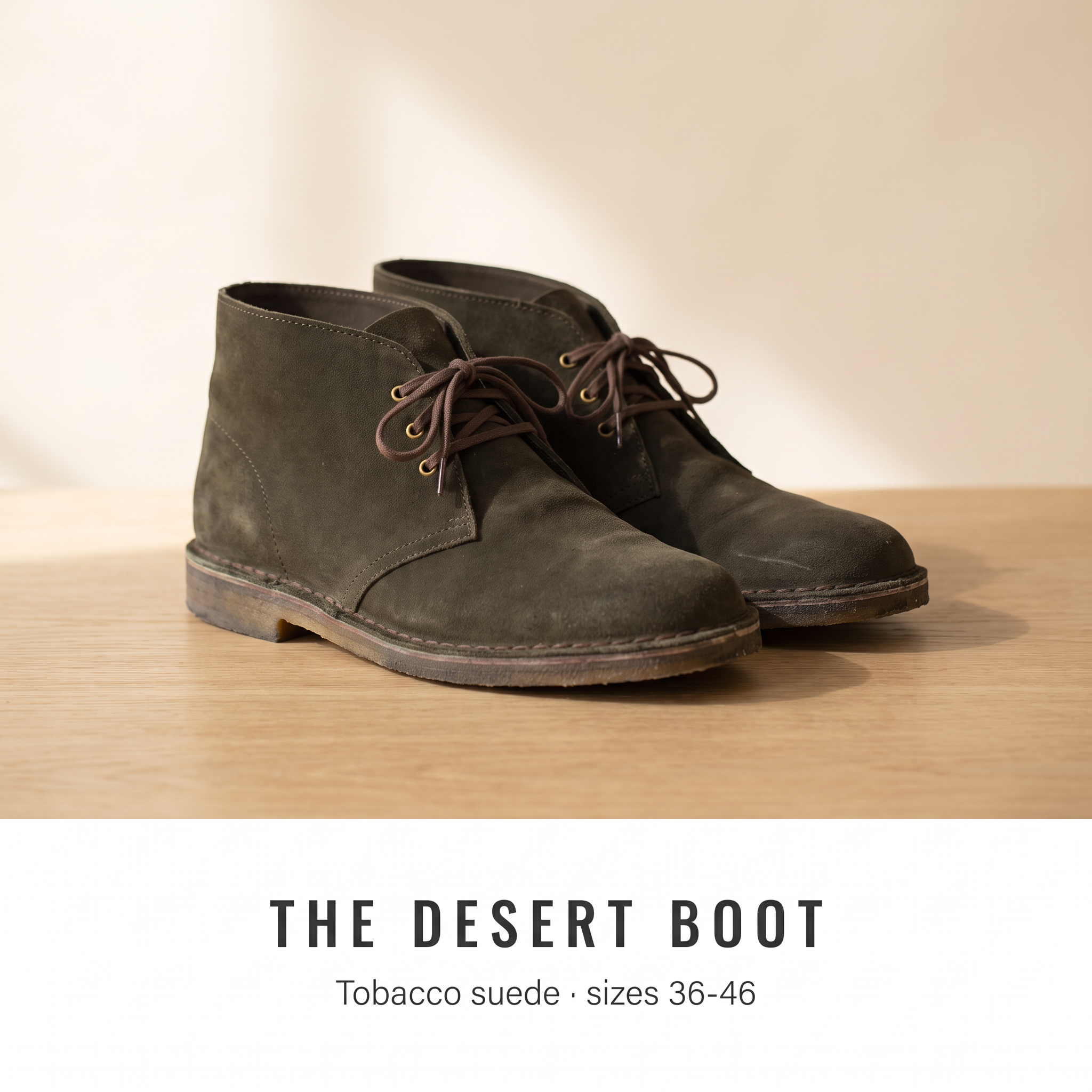
SKU NBP-BOOTS-03, 2K, 1:1, 39.4 s, $0.098.

SKU NBP-MUG-04, 2K, 1:1, 50.2 s, $0.098 — the one card that broke the full-bleed template.
Nano Banana Pro pricing on Siray AI
| Tier | Price | List price |
|---|---|---|
| 1K | $0.098 | |
| 2K | $0.098 | |
| 4K | $0.168 |
Prices read from the Siray AI pricing API on November 25, 2026. A 30% discount was active at time of writing, and the -t2i and -i2i endpoints cost the same. Check the Nano Banana Pro model page for live prices.
Worked examples for a holiday drop:
- 250 SKUs at 2K: 250 × $0.098 = $24.50.
- The same 250 at 4K: 250 × $0.168 = $42.00, with files 4–6× larger.
- Our four-SKU test: $0.392.
- One rejected SKU and one retry: $0.098, because the retry re-polls the same task.
That last line is the whole economic argument for the state file. A naive script that resubmits on every failure turns a rejected SKU into two billed tasks; at 250 SKUs with 5% failures, that is a silent 5% overrun.
Before you ship: the QA pass

Illustration generated with Nano Banana Pro on Siray AI.
Text-heavy output invites trust. Check three things, in this order:
- Read the captions. Not the layout — the words. This model is the strongest we have tested at paragraph-length type, but "strongest tested" is not "guaranteed", and a swapped currency symbol is a legal problem, not a design one.
- Check the frame. Our mug card landed inset. If your grid needs identical gutters, verify bleed on every file, or composite the caption band yourself.
- Compare the product against the source. Shapes and materials held across all four SKUs here, but a label that was re-typeset instead of reproduced is the failure mode to look for — if a SKU's packaging carries a certification mark, a batch of 250 is not the place to discover the model replaced it.
For a holiday campaign that also needs motion, the same product photos can feed video models; what 100 product videos cost across 14 models prices that side of the job from $20.30.
When to use this pipeline — and when not to
Use it when the catalog is text-heavy, when you have one decent photo per SKU, and when the cards need to look like one set rather than like 250 renders. Fixed per-image pricing with free references also makes it the cheapest way to add a logo or a brand sheet to every card.
Look elsewhere when:
- You need per-reference pricing to work in your favour. Qwen Image 3 edit is built for keeping a look consistent across a batch and costs less per edit when you only pass one reference.
- You are generating the product shot itself, not restyling one. Seedream 5.5 is the better text-to-image choice for pure product photography at a lower per-image price when you have no reference.
- You need a diagram with numbers in it. Do not use this model for charts or size comparisons; use it for the card and draw the chart in code.
FAQ
How much does the Nano Banana Pro API cost per image?
$0.098 per 1K or 2K image and $0.168 per 4K image on Siray AI, as read from the pricing API on November 25, 2026. -t2i and -i2i cost the same, and up to 14 input images are included at no extra charge.
Can Nano Banana Pro generate several images in one request?
No. Both Siray endpoints return exactly one image per task and expose no num_images field, so batch generation means one task per SKU and one task_id to track per row.
How do I retry a failed batch image task without paying twice?
Store the task_id as soon as the submit call returns it, then re-poll that id instead of submitting again. A GET on a finished task returns the same outputs URL and does not create a new task.
Why is fail_code empty when a Nano Banana Pro task fails?
In our tests the failure code was empty and the explanation lived in fail_reason, with status set to FAILURE. Read fail_reason, and ignore it when status is anything else — on SUCCESS the field can contain the media URL.
Does Nano Banana Pro charge extra for reference images?
No. The price is per generated image. A one-reference edit and a fourteen-reference composite both cost $0.098 at 2K.
What resolution is a 2K catalog card?
In our test, size: "2k" with aspect_ratio: "1:1" returned 2048×2048 PNG files of 3.7–4.6 MB each. Output is always PNG, since neither endpoint has an output_format field.
Start generating
Grab a key from the Siray AI console, put four rows in a CSV, and run the script once with SPEND_CAP=1 — that is enough to fill one row of the grid and confirm the template before you commit to 250.
Sources
- Google, "Nano Banana Pro" announcement, November 20, 2025 — accessed November 25, 2026.
- Siray AI docs, Nano Banana Pro image-to-image reference — accessed November 25, 2026.
- Siray AI docs, task status schema (
/api-reference/openapi-spec/task-status.json) — accessed November 25, 2026. - Siray AI pricing API,
GET /v1/models/pricing/google/nano-banana-pro-i2iand...-t2i, November 25, 2026.