
Topaz Labs API on Siray AI: Upscale, Denoise and Restore
All 15 Topaz Labs endpoints on Siray AI in one place: what each one does, how block and per-second pricing works, and four tested image and video results.
The Topaz Labs API on Siray AI gives you 15 enhancement endpoints from Topaz Labs: image upscaling, denoise, sharpen, restore and color adjust, plus video upscaling, denoise, deblur, frame interpolation and SDR to HDR. Image endpoints cost $0.08 per output pixel block. Video endpoints are billed per output second, from $0.008. They enhance files you already have; they do not generate new scenes.
Key takeaways
- 15 endpoints, 2 routes: 8 image endpoints and 7 video endpoints. Only
modelplusimageorvideois required. - Image price is per block: $0.08 per block, with blocks from 2M pixels (Creative) to 24M (Precision). A 4x upscale of a 1000 × 1000 image costs $0.08 on Precision and $0.64 on Creative.
- Video price is per output second: at 24 fps 1080p, Upscale Video Precision is $0.016 and Starlight is $0.096.
- In our test, Precision upscaled a 5-second clip from 720p to 1080p in 51 seconds; Starlight Precise 2.6 took 123 seconds.
- No prompt needed. Only two endpoints accept an optional
prompt.
What is Topaz Labs?
Topaz Labs makes photo and video enhancement software (Topaz Photo, Topaz Video and Topaz Gigapixel). Siray AI serves its model families through the Siray API. Two families matter most:
- Wonder 4 (image) arrived in Topaz's November 2026 product update. Topaz says it "upscales, denoises, and sharpens any image in just one click", and describes a "Mixture of Experts" design that "splits an image into areas, analyzes them, then reliably performs multiple enhancements at once". On Siray AI it is the
Wonder 4variant oftopaz/topaz-upscale-image-generative. - Starlight Precise 2.6 (video) is Topaz's diffusion-based upscaler. Topaz targets it at "AI-generated footage that already has strong composition and structure but appears soft or slightly artificial" and at "most videos 480p and up". Version 2.6 adds sharpness control, fixes a flicker bug and runs up to 15% faster than 2.5. On Siray AI it is the
Starlight Precise 2.6variant oftopaz/topaz-upscale-video-generative.
Topaz lists no limitations for either model.
Topaz Labs endpoints on Siray AI
Image endpoints take a URL or data URL in image; video endpoints take a URL in video. Variants are from each docs.siray.ai page.
Image endpoints
| Model ID | What it does | model_variant options |
|---|---|---|
topaz/topaz-upscale-image-precision |
Faithful upscale that keeps existing detail | Standard V2, High Fidelity V3, High Fidelity V2, Low Resolution V2, CGI, Text Refine, Faces |
topaz/topaz-upscale-image-generative |
Upscale very low resolution images by generating detail | Wonder 4, Wonder 3.5, Wonder 3, Wonder 2, Wonder, Recover 3, Standard MAX, Redefine, Recovery V2, Recovery |
topaz/topaz-upscale-image-creative |
Creative upscale that can reimagine plausible detail | Bloom 2, Bloom, Bloom Realism |
topaz/topaz-upscale-image-transparent |
Upscale PNGs and keep the alpha channel | none |
topaz/topaz-denoise-image |
Remove noise from JPEG, scanned and low-light images | Normal, Strong, Extreme, Denoise Max |
topaz/topaz-sharpen-image |
Fix soft focus, lens blur and motion blur | Standard, Strong, Lens Blur V2, Motion Blur, Natural, Refocus, Wildlife, Portrait, Auto Sharpen, Super Focus V3, Super Focus V2 |
topaz/topaz-restore-image |
Repair damaged or degraded photos | Recover 3, Dust-Scratch V2 |
topaz/topaz-adjust-image |
Color, white balance and lighting fixes | Adjust V2, White Balance, Colorize |
Upscalers take upscale_factor from 1 to 4. Precision and Generative also have face enhancement, subject_detection (All, Foreground, Background) and denoise / sharpen sliders. output_format is jpg or png.
Video endpoints
| Model ID | What it does | model_variant options |
|---|---|---|
topaz/topaz-upscale-video-precision |
Faithful upscale that keeps existing detail | 21 variants, including Proteus, Proteus Natural, Iris, Artemis, Gaia 2, Rhea and Theia |
topaz/topaz-upscale-video-generative |
Diffusion upscale for low-resolution and AI-generated video | Starlight Precise 2.6, Starlight HQ, Starlight Mini, Starlight Sharp, Starlight Fast 2 |
topaz/topaz-upscale-video-creative |
Creative upscale with creativity, realism and optional prompt |
none |
topaz/topaz-denoise-video |
Remove noise from low-light or high-ISO footage | Nyx, Nyx Fast, Nyx XL, Nyx HF |
topaz/topaz-deblur-video |
Reduce motion and camera blur | none |
topaz/topaz-interpolate-video |
Raise frame rate (24 to 120 fps) or create slow motion | Apollo, Chronos, Aion |
topaz/topaz-sdr-to-hdr-video |
Convert standard dynamic range video to HDR | none |
Video upscalers take upscale_factor from 1 to 4 and fps of 24, 30, 48 or 60. Set h264_output: true if you need an H.264 file; the default codec is different.
Topaz Labs API pricing on Siray AI
Prices come from the Siray AI pricing API on November 24, 2026; check the console model page before a large batch. No discounts were listed.
Image pricing: $0.08 per output block
Every image endpoint costs $0.08 per block of output pixels, and a partial block counts as a full one. Block size differs by endpoint:
| Endpoint | Block size | Output pixels per $0.08 |
|---|---|---|
| Upscale Image Precision | 24M px | up to about 4900 × 4900 |
| Upscale Image Transparent | 24M px | up to about 4900 × 4900 |
| Denoise Image | 24M px (20M for Denoise Max) | up to about 4900 × 4900 |
| Sharpen Image | 24M px (20M for Super Focus V2 / V3) | up to about 4900 × 4900 |
| Adjust Image | 24M px | up to about 4900 × 4900 |
| Restore Image | 4M px (24M for Dust-Scratch V2) | up to 2000 × 2000 |
| Upscale Image Generative | 4M px (8M for Wonder 3 / 3.5) | up to 2000 × 2000 |
| Upscale Image Creative | 2M px | up to about 1400 × 1400 |
Worked examples:
- A 1000 × 1000 image upscaled 4x (16M pixels): $0.08 on Precision, $0.32 on Generative with Wonder 4, $0.64 on Creative.
- A 4000 × 3000 photo upscaled 2x (48M pixels): $0.16 on Precision, $0.96 on Generative with Wonder 4.
Video pricing: per output second
The rate depends on output resolution, frame rate and sometimes the variant:
| Endpoint | 24 fps 720p | 24 fps 1080p | 24 fps 4K | 60 fps 1080p | 60 fps 4K |
|---|---|---|---|---|---|
| Upscale Video Precision | $0.008/s | $0.016/s | $0.048/s | $0.04/s | $0.12/s |
| Upscale Video Generative (Starlight Fast 2) | $0.048/s | $0.048/s | $0.104/s | $0.12/s | $0.26/s |
| Upscale Video Generative (other Starlight variants) | $0.096/s | $0.096/s | $0.208/s | $0.24/s | $0.51/s |
| Upscale Video Creative | $0.24/s | $0.24/s | $0.40/s | $0.60/s | $1.00/s |
Among the upscalers, only Precision has a cheaper 720p tier. The other endpoints:
- Denoise Video: at 30 fps input, Nyx Fast is $0.02/s at 1080p and $0.06/s at 4K; the other Nyx variants are $0.04/s at 1080p and $0.12/s at 4K.
- Deblur Video: $0.02/s at 30 fps 1080p, $0.06/s at 30 fps 4K.
- Interpolate Video: priced by output
fps, variant andslowmo. With Apollo or Chronos, 60 fps output is $0.06/s and 120 fps is $0.12/s; Aion is $0.10/s and $0.20/s. 4K and slow motion multiply the rate. - SDR to HDR Video: $0.48/s at 30 fps 1080p and $1.02/s at 30 fps 4K. Interpolate Video tops it only at extreme settings: Aion at 120 fps, 4K and 8x slow motion is $5.44/s.
Worked examples:
- A 10-second 24 fps clip upscaled from 720p to 1080p costs $0.16 on Precision, $0.48 on Starlight Fast 2, $0.96 on Starlight Precise 2.6 and $2.40 on Creative.
- The same clip taken to 4K costs $0.48 on Precision and $2.08 on Starlight Precise 2.6.
Upscale later or generate at 1080p?
Our PixVerse V6 test clip cost $0.203 for 5 seconds at 720p; 1080p is $0.405. Upscaling the 720p clip with Precision adds about $0.08, for $0.28. We did not compare quality against native 1080p, so draft at 720p and upscale only the clips you keep. Our AI video cost breakdown covers other video models.
Quickstart: call the Topaz Labs API with Siray
Every Topaz endpoint is async. You submit a task and get a task_id. Poll every 3 to 5 seconds until status is SUCCESS, then download the file from data.outputs.
This is the request from test 3 below, with your own video URL in video:
curl -X POST https://api.siray.ai/v1/video/generations \
  -H "Authorization: Bearer $SIRAY_API_KEY" \
  -H "Content-Type: application/json" \
  -d '{
    "model": "topaz/topaz-upscale-video-precision",
    "video": "https://example.com/your-clip-720p.mp4",
    "model_variant": "Proteus",
    "upscale_factor": 1.5,
    "fps": 24,
    "h264_output": true
  }'
Poll the task with its ID:
curl https://api.siray.ai/v1/video/generations/$TASK_ID \
  -H "Authorization: Bearer $SIRAY_API_KEY"
Image endpoints use the same pattern. Submit to POST /v1/images/generations/async, pass image as a URL or a data URL, and poll GET /v1/images/generations/async/{task_id}:
curl -X POST https://api.siray.ai/v1/images/generations/async \
  -H "Authorization: Bearer $SIRAY_API_KEY" \
  -H "Content-Type: application/json" \
  -d '{
    "model": "topaz/topaz-upscale-image-generative",
    "image": "https://example.com/watch-384.jpg",
    "model_variant": "Wonder 4",
    "upscale_factor": 4,
    "output_format": "png"
  }'
Video endpoints have no output_resolution field; upscale_factor sets the output size.
Tested examples on Siray AI
Our four Topaz requests used no prompt, so each lists its fields. Costs are list prices.
Both inputs are AI-generated: a wristwatch photo from GPT Image 2.6 Flare ($0.047), saved as a low-quality 384 × 384 JPEG, and a 5-second 720p vinyl record clip from PixVerse V6 text-to-video ($0.203).
1. Rescue a 384px watch photo with Wonder 4
- Endpoint:
topaz/topaz-upscale-image-generative - Fields:
model_variant: "Wonder 4",upscale_factor: 4, no prompt - Input → output: 384 × 384 JPEG → 1536 × 1536 PNG (2.4M pixels, 1 block)
- Time / cost: 23 seconds, $0.08
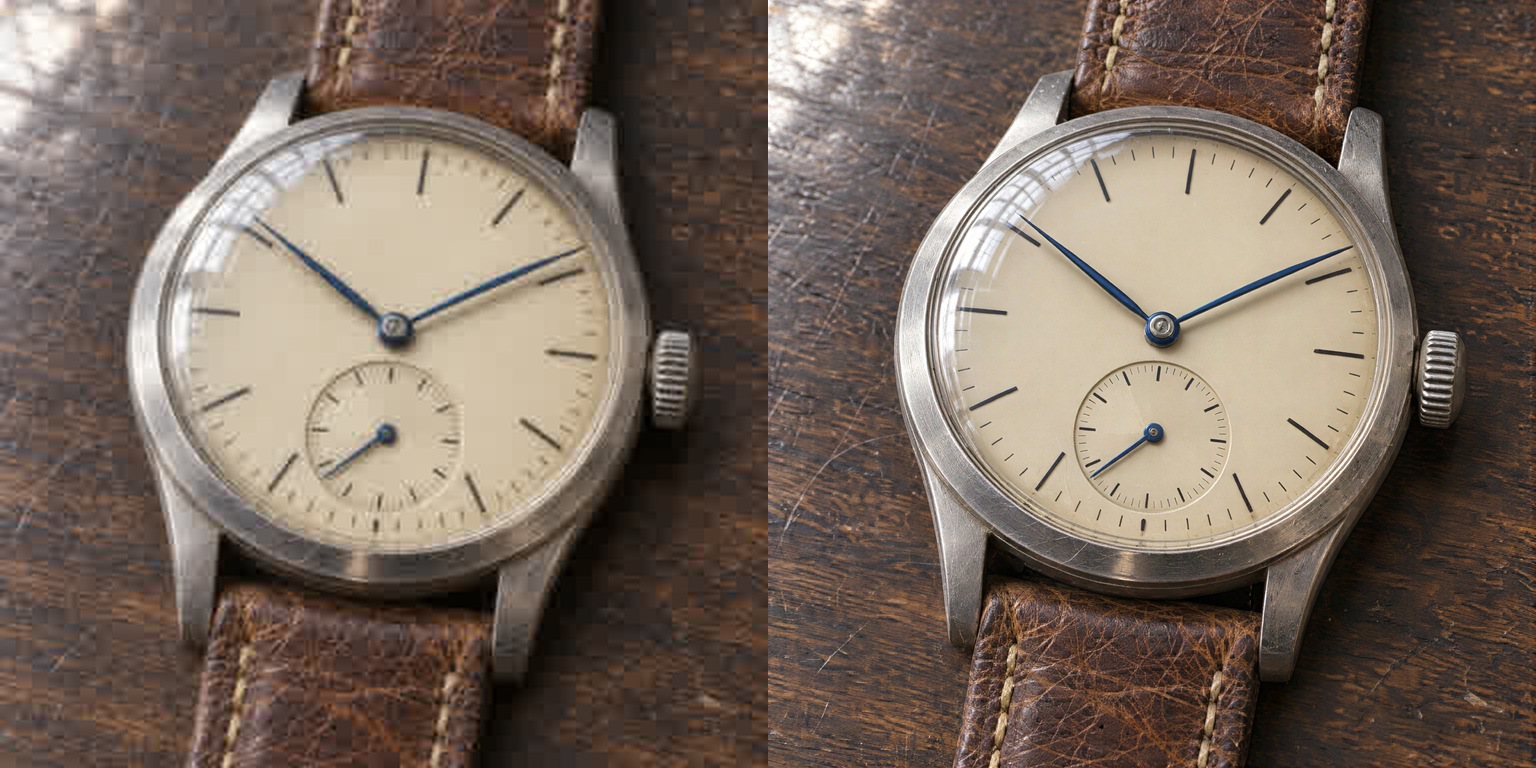
Left: the 384px input, enlarged with Lanczos. Right: Wonder 4 output at 4x.
Wonder 4 redrew clean minute ticks and sharp hands, and added leather cracks, case scratches and wood grain that the 384px file does not contain. The fine circular pattern on the original seconds dial did not come back. Treat new texture as invented, not recovered.
2. Clean JPEG artifacts with Denoise Image
- Endpoint:
topaz/topaz-denoise-image - Fields:
model_variant: "Normal",output_format: "png", image sent as a data URL - Input → output: the same 384 × 384 JPEG → 384 × 384 PNG
- Time / cost: 27 seconds, $0.08
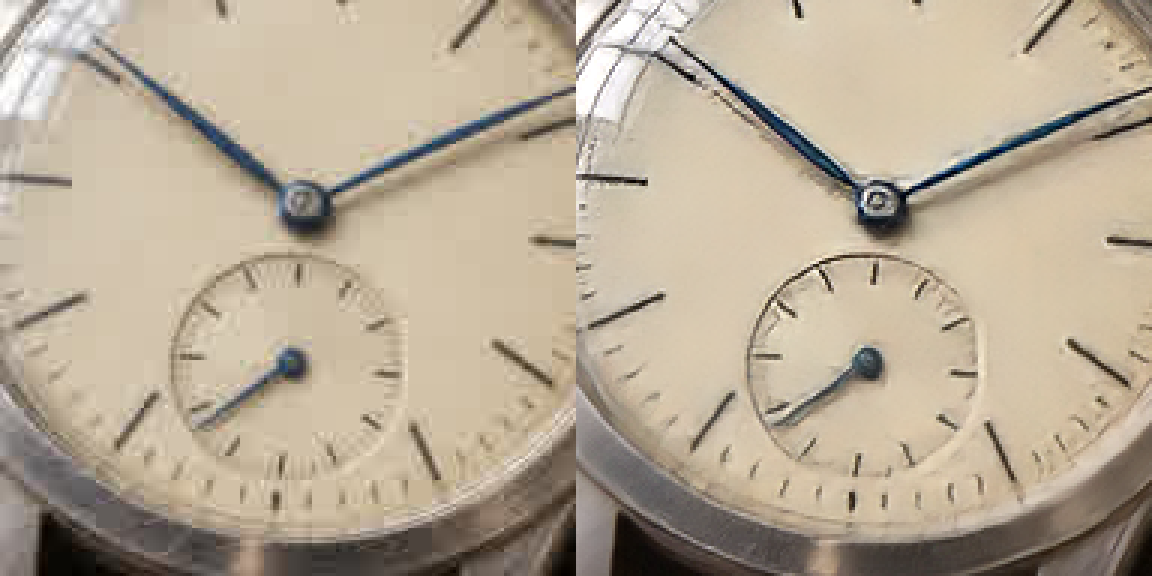
The center 192px crop. Left: input. Right: Denoise Image, Normal variant. Both enlarged 3x with nearest-neighbor scaling.
The JPEG blocks around the hands and marks are gone, but so is the dial's faint paper texture. Denoise keeps the pixel count; pair it with an upscaler if you need size.
3. Upscale a 720p turntable clip to 1080p with Precision
- Endpoint:
topaz/topaz-upscale-video-precision - Fields: the Quickstart request above (
Proteus,upscale_factor: 1.5,fps: 24,h264_output: true) - Input → output: the 5.04-second PixVerse V6 clip, 720 × 1280 at 24 fps → 1080 × 1920 at 24 fps, H.264
- Time / cost: 51 seconds, about $0.08 (5.04 s × $0.016)
Watch the 720p source · Watch the Precision clip
Proteus kept the motion, light and framing, with slightly crisper grooves and tonearm edges and no new texture. The file is 7.2 MB.
4. Same clip with Starlight Precise 2.6
- Endpoint:
topaz/topaz-upscale-video-generative - Fields:
model_variant: "Starlight Precise 2.6",upscale_factor: 1.5,fps: 24,h264_output: true - Input → output: the same clip → 1080 × 1920 at 24 fps, H.264
- Time / cost: 123 seconds, about $0.48 (5.04 s × $0.096)
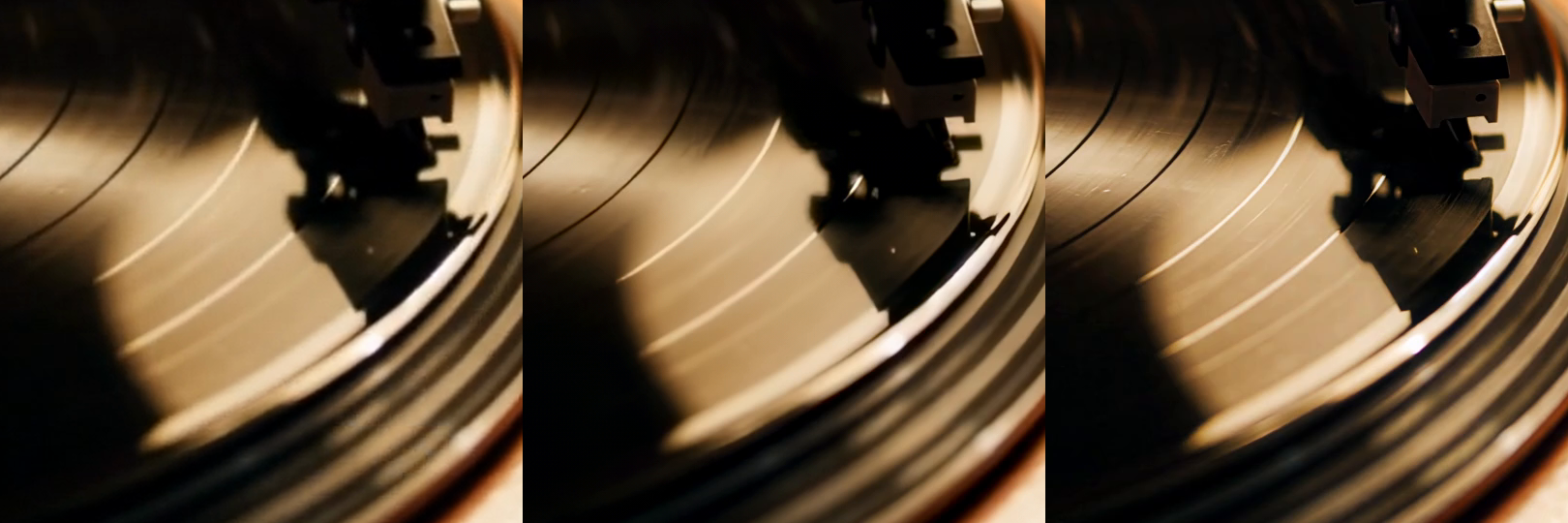
The same 540px crop at 2.5 seconds. Left: source scaled with Lanczos. Middle: Precision (Proteus). Right: Starlight Precise 2.6.
Starlight separated more grooves and added small dust specks; Precision looks like a sharper copy of the source. Starlight took 2.4x as long and cost 6x as much (file: 5.7 MB). For this clip, Precision was enough. Use Starlight on soft or plastic-looking sources, and check the specks it adds.
Tips for the Topaz Labs API
- Request only the output size you need. Billing is on output, so a 4x upscale you later shrink is paid at full size.
- Check block size first. Creative's 2M-pixel blocks can make the same output 8x pricier than Precision.
- Use fractional
upscale_factor. 1.5x took our 720 × 1280 clip straight to 1080 × 1920. - Set
h264_output: truefor web players. The default codec is not H.264. - Denoise heavily compressed images before a big upscale, so JPEG blocks are not enlarged as detail.
When to use Topaz on Siray AI (and when not to)
Good fits:
- Taking approved AI video drafts from 720p to 1080p or 4K.
- Old, small or compressed product photos for listings.
- Frame rate changes and slow motion with Interpolate Video.
- HDR deliverables from SDR footage.
Poor fits:
- Changing what is in the frame. Use an editing model such as Nano Banana 2.1, which we tested for photo restoration, when you want objects removed or replaced.
- Creating new scenes. Generate them with Kling 4.0 or Seedance 2.5, then upscale.
- Images where every detail must be real, such as evidence or documents. Generative and Creative upscalers invent texture; use Precision with Text Refine for text.
FAQ
Is there a Topaz Labs API?
Yes. Siray AI serves 15 Topaz Labs endpoints, 8 for images and 7 for video, through one API key.
How much does Topaz image upscaling cost per image?
It costs $0.08 per block of output pixels. A 1000 × 1000 image upscaled 4x costs $0.08 on Precision, $0.32 on Generative with Wonder 4 and $0.64 on Creative (November 24, 2026).
How much does Topaz video upscaling cost per second?
At 24 fps 1080p, Precision costs $0.016 per second, Starlight Fast 2 $0.048 and other Starlight variants $0.096.
Can Topaz upscale video to 4K through the API?
Yes. The video upscalers accept upscale_factor from 1 to 4, so a 1080p source at 2x gives 4K.
Does the Topaz API need a prompt?
No. Only Upscale Image Generative and Upscale Video Creative accept an optional prompt.
Which Topaz model should I use for AI-generated video?
Start with Precision for clean clips: $0.08 and 51 seconds on our 5-second test. Use Starlight Precise 2.6 for clips that look soft or plastic.
Try the Topaz Labs API on Siray AI
Test one image or a 5-second clip before you batch. Start with Upscale Video Precision or Upscale Image Generative, or browse all models on Siray AI.
Sources
- November 2026 Product Updates: Wonder 4, Topaz Labs, accessed November 24, 2026
- Starlight Precise 2.6, Topaz Labs, accessed November 24, 2026
- Topaz Upscale Image Generative API reference, Siray AI docs, accessed November 24, 2026
- Topaz Upscale Video Precision API reference, Siray AI docs, accessed November 24, 2026
- Topaz Upscale Video Generative API reference, Siray AI docs, accessed November 24, 2026
- Topaz Denoise Image API reference, Siray AI docs, accessed November 24, 2026
- Siray AI pricing API,
GET /v1/models/pricing/topaz/*for all 15 endpoints, fetched November 24, 2026 at 14:33