
PixVerse API Alternatives: V6, C1 and Siray AI
PixVerse has its own developer platform and publishes a per-minute API price. Here is what V6 and C1 cost there and on Siray AI, how the two request formats differ, and three clips we generated to compare them.
PixVerse is not short of a developer route. It runs its own API platform, documents V6 for outside developers, and publishes a per-minute price for it. So a "PixVerse API alternative" is really a question about which route fits a pipeline, not whether one exists.
This page compares the two routes on what can be checked: the models each exposes, how each one bills, what a request looks like, and what the same prompt actually produces. Prices on the Siray side come from the pricing API on November 25, 2026. Three clips were generated that day through the Siray API; cost and timing below come from that run.
Key takeaways
- PixVerse has a public developer platform. V6 and C1 are callable from it, with durations documented from 1 to 15 seconds and output up to 1080p.
- PixVerse publishes a per-minute figure. Its own model comparison chart lists PixVerse V6 at $4.80 per minute of API output, alongside Veo 3.1 at $24.00, Kling 3.0 Omni at $13.44 and Grok Imagine at $4.20 for 720p.
- On Siray AI the same family bills per second in USD. V6 at 720p works out to about $2.43 per minute, and 1080p to about $4.86, before any add-ons.
- Audio is a paid switch, not a default. Turning
audio_enableon raised our 720p V6 clip from $0.203 to $0.270 and lengthened the render from 52 to 77 seconds. - V6 and C1 are not the same model. Given one prompt, V6 framed a medium-wide shot and C1 cut to a macro close-up. C1 also ran faster and cost more.
Does PixVerse have a public API?
Yes. PixVerse operates a developer platform at platform.pixverse.ai. Its own model reference describes V6 as taking text and image inputs, producing multi-shot sequences with camera direction and optional generated audio, and documents API output durations of 1 to 15 seconds at up to 1080p. C1 is positioned as a cinematic production model and is listed on the same platform.
Older models remain callable: V5.6, V5.5, V5, V5 Fast, V4.5, V4 and V3.5. Beyond plain text and image to video, the platform documents transitions, video extension, reference-guided generation, lip sync and sound effects.
That matters for the comparison, because it means PixVerse's API is not only a way to reach PixVerse's models. It is a product with its own feature surface, and leaving it means giving some of that up.
How PixVerse prices video
PixVerse sells credits rather than billing a flat per-second rate, and its public material describes the cost in finished minutes. The clearest published figure is the per-minute comparison in PixVerse's own model chart:
| Model | Published API cost per minute |
|---|---|
| Grok Imagine (720p) | $4.20 |
| PixVerse V6 | $4.80 |
| Sora 2 | $6.00 |
| Veo 3.1 Fast | $9.00 |
| Kling 3.0 Omni | $13.44 |
| Sora 2 Pro | $18.00 |
| Veo 3.1 | $24.00 |
That chart does not state which resolution the PixVerse figure refers to, so treat it as a headline rate rather than a rate card you can multiply out. The per-second table below is the one to budget from.
What the same models cost on Siray AI
Siray AI exposes V6 and C1 as separate text-to-video and image-to-video endpoints, billed per second in USD. Figures are from the pricing API on November 25, 2026, and include the discount in force that day:
| Endpoint | 360p | 540p | 720p | 1080p |
|---|---|---|---|---|
pixverse/pixverse-v6-t2v, -i2v |
$0.0225 | $0.0315 | $0.0405 | $0.081 |
pixverse/pixverse-v6-t2v, -i2v with audio |
$0.0315 | $0.0405 | $0.054 | $0.1035 |
pixverse/pixverse-c1-t2v, -i2v |
$0.030 | $0.040 | $0.050 | $0.095 |
pixverse/pixverse-c1-t2v, -i2v with audio |
$0.040 | $0.050 | $0.065 | $0.120 |
Per-minute equivalents, which is how PixVerse quotes its own figures:
| Route | 720p per minute | 1080p per minute |
|---|---|---|
| V6 on Siray AI | $2.43 | $4.86 |
| C1 on Siray AI | $3.00 | $5.70 |
| PixVerse V6, PixVerse's own chart | $4.80 (resolution not stated) | — |
Three things the table hides:
- V6 carries a 10% discount on Siray AI on the day of checking; C1 carries none. At list price V6 would be $0.045 and $0.09 per second at 720p and 1080p.
- Audio roughly adds a third to the bill. At 720p, V6 goes from $0.0405 to $0.054 per second. If a project needs sound, budget for it from the start rather than adding it later.
- The 540p V6 row has a duplicate. The pricing API returned two different values for 540p with audio disabled, $0.0315 and $0.040 per second. The table uses the lower one, which matches the arithmetic at 5 and 8 seconds; check the live pricing endpoint before committing a large run to 540p.
Siray AI also lists V5.6, but only at fixed durations of 5, 8 and 10 seconds, so it is not a drop-in for a pipeline that needs arbitrary clip lengths.
Three clips, one prompt
We sent one prompt to the Siray API three times on November 25, 2026, at 720p, 5 seconds and 16:9, changing only the model and the audio flag. Costs are calculated from the prices above.
A brass metronome ticking steadily on a scratched oak workbench in a sunlit workshop, its pendulum swinging left and right at an even tempo. Fine dust drifts through a shaft of late afternoon light. Shallow depth of field, warm wood and brass tones, cinematic 35mm film look, natural motion, soft grain. No people. No text, no signs, no letters, no logos, no watermarks.
| Run | Model | Audio | Time | Cost | Output |
|---|---|---|---|---|---|
| 1 | V6 | off | 52 s | $0.203 | 1280×720, 24 fps, 121 frames |
| 2 | V6 | on | 77 s | $0.270 | 1280×720, 24 fps, 121 frames, AAC audio |
| 3 | C1 | off | 46 s | $0.250 | 1280×720, 24 fps, 121 frames |
All three files came back at 1280×720 and 24 fps with a duration of 5.04 seconds. An audio stream was present only on the run that asked for one, and it was AAC.
V6: the wide shot
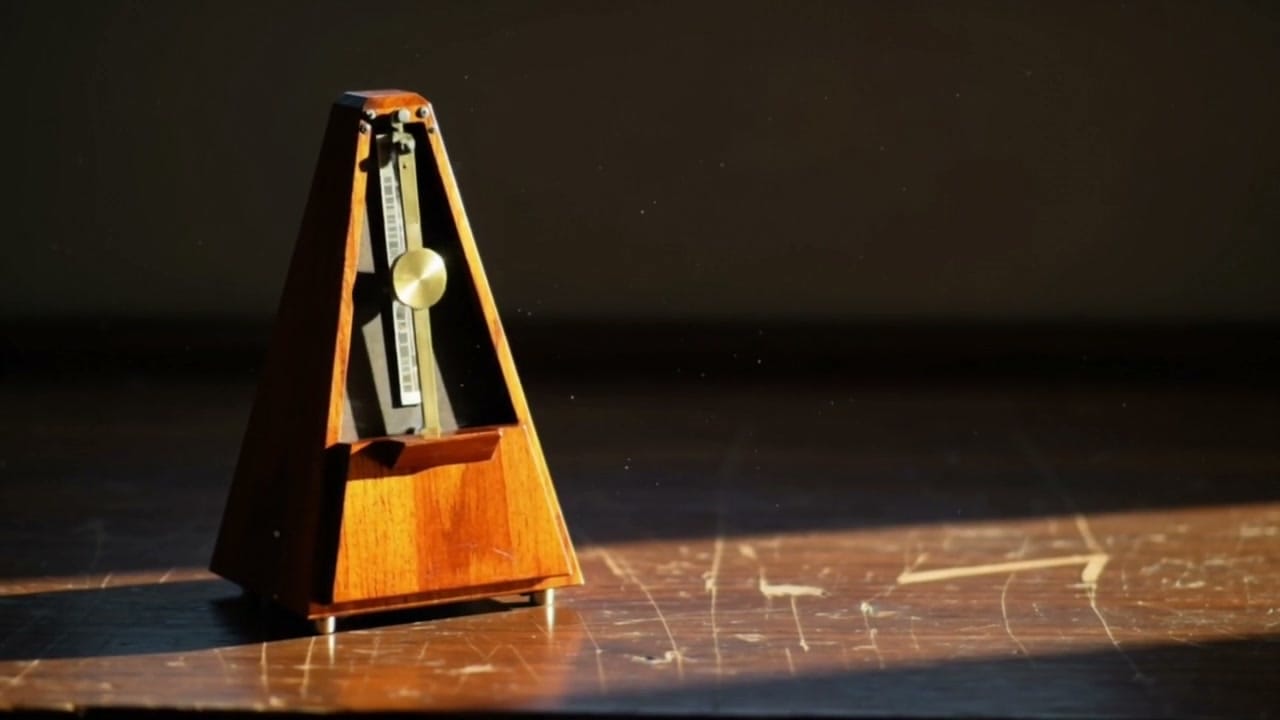
V6 kept the whole object in frame, set it on a workbench whose scratched surface and stray pencil marks are legible, and put the light shaft where the prompt asked. Dust motes drift through the beam.
The honest caveat: the pendulum does not visibly swing. Comparing the frame at 0.5 seconds with the frame at 4.4 seconds, the metronome sits in the same pose and the arm has barely moved. What animates the shot is the drifting dust and the changing light, not the motion the prompt described. For a camera move this would matter; for a held product shot it does not.
V6 with audio: same picture, more money
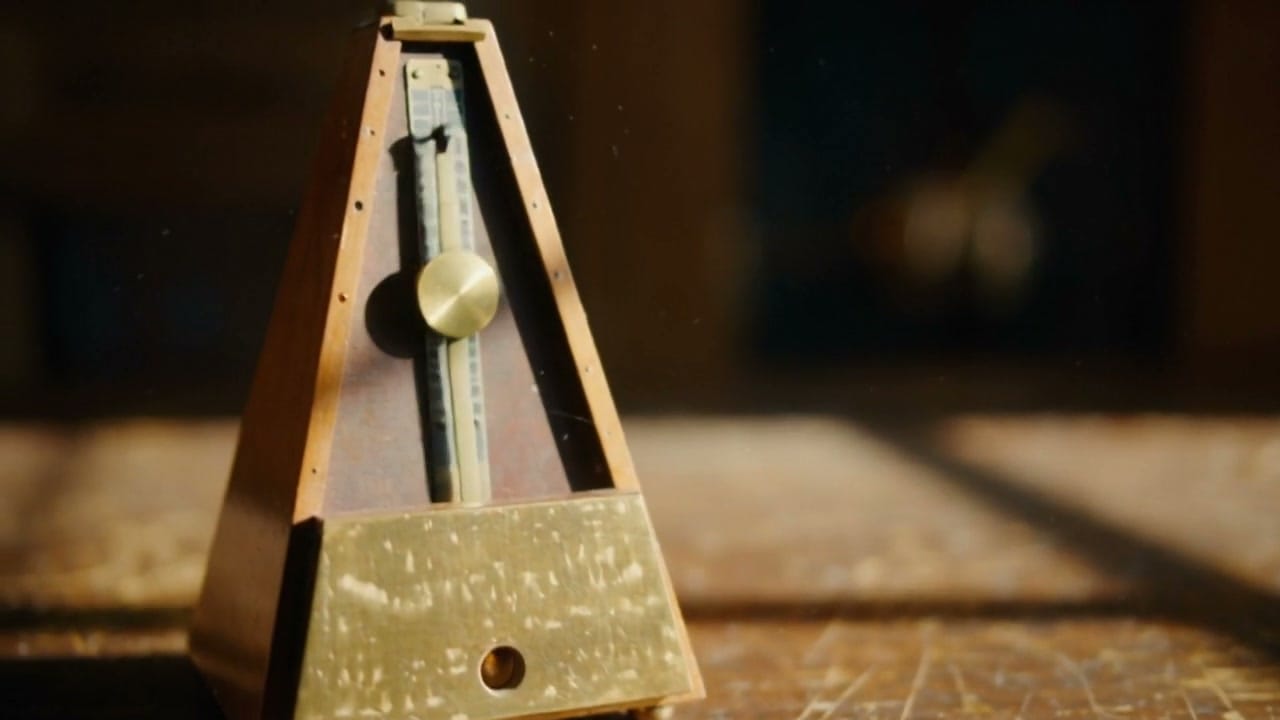
The visual result is close to run 1. The difference is the billed price, $0.27 against $0.203, and 25 extra seconds of wall time. If the clip is going to be scored or replaced in an editor anyway, this is the switch to leave off.
C1: the close-up
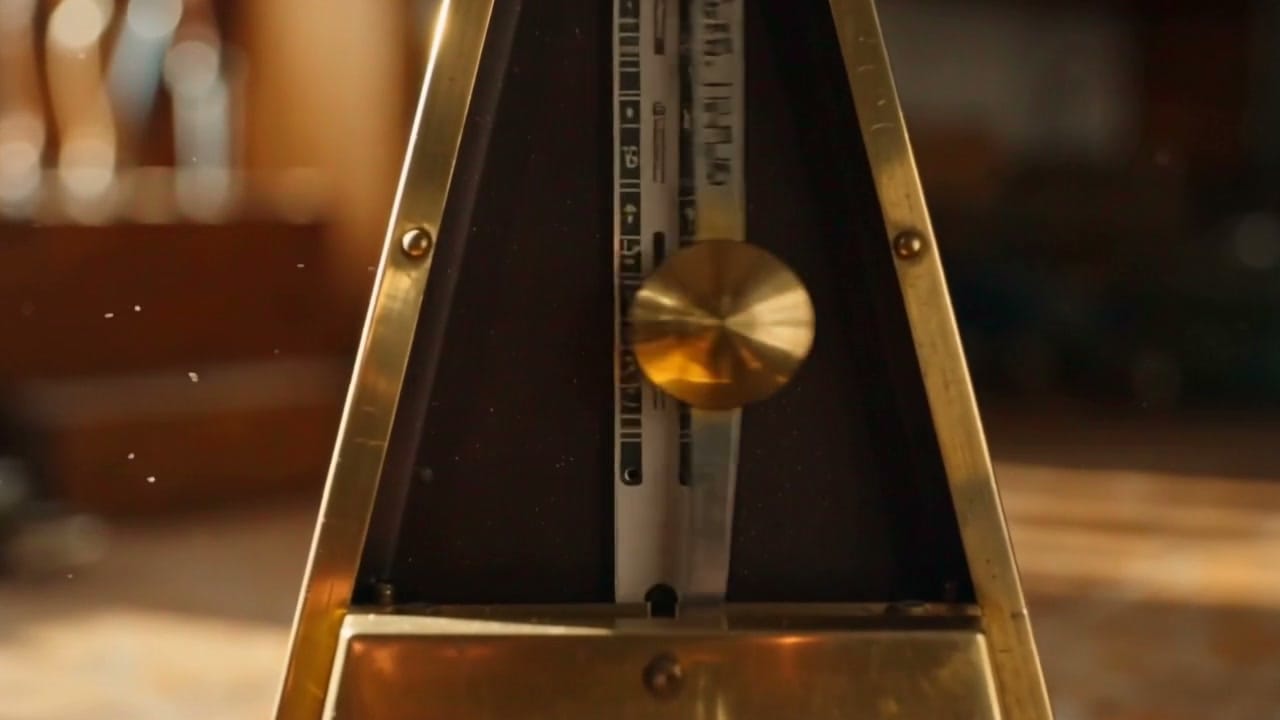
C1 read the same prompt and cut to a macro shot of the dial face, with the brass pivot sharp and the workshop thrown into bokeh. It was the fastest run at 46 seconds and the most expensive at $0.25, and it ignored the instruction to keep the whole object visible.
That is the trade: C1 gives you a director's framing decision, which is useful when you want a cinematic look and unhelpful when you need the product legible and complete.
The two request shapes are not interchangeable
Moving between the routes means rewriting the payload.
PixVerse's own API, as its platform documents it, takes model and media references and returns a video for a generation. Siray AI takes a flat JSON body:
{
  "model": "pixverse/pixverse-v6-t2v",
  "prompt": "A brass metronome ticking steadily on a scratched oak workbench...",
  "duration": 5,
  "size": "720p",
  "aspect_ratio": "16:9",
  "audio_enable": false,
  "seed": -1,
  "thinking_type": "enabled"
}
The Siray endpoint accepts eight aspect ratios from 21:9 down to 9:16, durations from 1 to 15 whole seconds, and four resolution tiers. Three parameter notes worth knowing before you port:
thinking_typetakesenabled,disabledorauto. It is PixVerse-specific and has no equivalent on most other video models on the platform, so a generic wrapper needs to pass it through rather than drop it.multi_cliptoggles PixVerse's multi-shot mode. It is a boolean on the same endpoint rather than a separate model, which keeps the price identical either way.seedaccepts -1 for random, or an integer up to 2147483647. Reusing a seed is the cheapest way to keep a series consistent while you change the prompt.
Choosing by need
| If you need | Use | Why |
|---|---|---|
| The lowest per-second rate at 720p | Siray AI V6 | $0.0405/s, about $2.43 per minute |
| PixVerse's full feature surface (transitions, extension, lip sync, sound effects) | PixVerse | Documented on its own platform |
| Clips shorter than 5 seconds | Either | Siray AI bills from 1 second on V6 and C1 |
| A decided, cinematic framing | Either, but price it | C1 gave the tighter shot at $0.05/s on Siray AI |
| One key across several video vendors | Siray AI | V6 and C1 sit beside Kling, Seedance, Wan and Veo |
| Audio generated with the video | Either, budget for it | Adds about a third at 720p on Siray AI |
| Published per-minute pricing to cite internally | PixVerse | Its comparison chart is public |
Quickstart on Siray AI
Every video model on Siray AI uses the same two calls. Submit a job to POST /v1/video/generations to get a task_id, then poll GET /v1/video/generations/{task_id} until data.status is SUCCESS or FAILURE. The video URL arrives in data.outputs.
This is the dependency-free Node.js script used for all three runs above (Node.js 18 or later):
// node generate.mjs request.json out.mp4
import { readFile, writeFile } from "node:fs/promises";

const API = "https://api.siray.ai/v1/video/generations";
const headers = {
  Authorization: `Bearer ${process.env.SIRAY_API_KEY}`,
  "Content-Type": "application/json",
};
const sleep = (ms) => new Promise((r) => setTimeout(r, ms));

const body = JSON.parse(await readFile(process.argv[2], "utf8"));
const out = process.argv[3] ?? "output.mp4";

const submit = await (await fetch(API, { method: "POST", headers, body: JSON.stringify(body) })).json();
const taskId = submit.task_id ?? submit.data?.task_id;
if (!taskId) throw new Error(`No task_id: ${JSON.stringify(submit)}`);

const started = Date.now();
while (Date.now() - started < 15 * 60 * 1000) {
  await sleep(5000);
  const { data } = await (await fetch(`${API}/${taskId}`, { headers })).json();
  if (data.status === "SUCCESS") {
    const url = [].concat(data.outputs)[0];
    await writeFile(out, Buffer.from(await (await fetch(url)).arrayBuffer()));
    console.log(`done in ${Math.round((Date.now() - started) / 1000)}s`);
    process.exit(0);
  }
  if (data.status === "FAILURE") throw new Error(data.fail_reason);
}
throw new Error(`timed out; keep polling task ${taskId}`);
The request.json above is what produced run 1. To reproduce run 2, set audio_enable to true. To reproduce run 3, change model to pixverse/pixverse-c1-t2v and audio_enable back to false.
Two things the reference does not spell out: the task_id has come back at the top level of the submit response while the docs show it under data, so the script reads both. And a poll interval of 5 seconds is conservative for this model, which finished in under a minute every time.
When staying on PixVerse makes sense
PixVerse is the first-party route and that is a real advantage:
- You get V6's full feature set, including transitions, extension, reference-guided generation, lip sync and sound effects, as documented on its own platform.
- New model revisions land there first.
- Its per-minute pricing is published, which is convenient if your finance team prefers a headline rate to a per-second multiplication.
- You deal directly with the vendor rather than through a reseller.
The trade-off is scope. PixVerse's API covers PixVerse's models. A pipeline that also needs Kling, Seedance, Wan or Veo is several accounts and several invoices on that route, and one key on the other.
FAQ
Does PixVerse have a public API?
Yes. PixVerse runs a developer platform at platform.pixverse.ai covering V6, C1 and older models such as V5.6 and V4.5, with text-to-video, image-to-video, transitions, extension, reference-guided generation, lip sync and sound effects.
How much does the PixVerse API cost?
PixVerse's own model chart lists V6 at $4.80 per minute of API output, without stating the resolution. On Siray AI the same model costs about $2.43 per minute at 720p and $4.86 at 1080p, checked November 25, 2026.
What is the difference between PixVerse V6 and C1?
V6 is the general model: multi-shot output, camera direction, optional generated audio, 1 to 15 seconds at up to 1080p. C1 is positioned as a cinematic production model. Given the same prompt, V6 framed a medium-wide shot while C1 cut to a macro close-up, and C1 ran faster at a higher per-second price.
Does PixVerse generate audio?
V6 can generate audio in the same call when audio_enable is true. On Siray AI that raised a 720p five-second clip from $0.203 to $0.270 and took the render from 52 to 77 seconds.
Can I switch from the PixVerse API to Siray AI without changing code?
No. The endpoints, keys and request bodies differ, and PixVerse-specific fields such as thinking_type and multi_clip need to be passed through deliberately. The asynchronous submit-and-poll pattern is similar, so the change is usually small.
Try these models on Siray AI
Create an API key in the Siray AI console and run the script above with pixverse/pixverse-v6-t2v or pixverse/pixverse-c1-t2v. One key covers the PixVerse family alongside Kling, Seedance, Wan, Veo and the image models.
Sources
- PixVerse, model reference for V6 and C1 (inputs, durations, resolutions, feature list), accessed November 25, 2026.
- PixVerse, model comparison chart with per-minute API cost, accessed November 25, 2026.
- Siray AI pricing API,
GET /v1/models/pricing, November 25, 2026, archived aspricing-archive/2026-11-25.json. - Siray AI API reference, PixVerse V6 text-to-video endpoint, November 25, 2026.
- Siray AI API, three test runs on November 25, 2026: task ids
bcabb0a1-9b50-4b21-a7b5-d00453fe6cc7,63798538-9974-4076-a1cb-f8eb63069b71,ba9a9f65-eb86-4930-9f9a-93cee43809ea.