
Z-Image Spicy Pro NSFW Prompt Guide: Uncensored 2026

Prompting Z-Image Spicy Pro is not the same job as prompting Z-Image turbo, and the difference is not subtle. The Pro tier adds a parameter that rewrites prompts by default, and a resolution ceiling high enough that detail language starts paying for itself.
This guide covers the Pro tier specifically. For the turbo tier, the Z-Image NSFW Prompt Guide still applies unchanged — the two tiers want different prompts, so they get separate guides.
Key Takeaways
- Set prompt_expansion_enable to false first. It defaults to true on Pro, and turbo has no equivalent field at all.
- The size enum reaches 2560x1440 and 1440x2560, which is where detail wording starts showing up in the output.
- Neither tier has a negative_prompt field, so exclusions have to be written as positive descriptions.
- Pro runs $0.020 per output image against turbo's $0.004. Full spec in Z-Image Spicy Pro is live.
Step 0: Turn Off Prompt Expansion
Turbo users have never had to do this, because turbo has no such field. On Pro, prompt_expansion_enable defaults to true, and left on, the model rewrites and expands the prompt before generation.
For a three-word prompt that helps. For a prompt where wardrobe state, pose, and lighting are specified deliberately, it is a liability: the rewrite can soften explicit wording, reorder what the prompt emphasised, or contradict what was asked for. Set it to false and treat that as the default for directed work. Everything below assumes it is off.
Element 1: Subject and Frame, Written Together
The eight size values fall into three groups. 1024x768, 768x1024, and 1024x1024 are turbo's whole range. 1024x1536 and 1536x1024 are a middle step. 2560x1440 and 1440x2560 are the Pro-only jump. custom frees width and height, though Siray's spec does not publish bounds for them.
Frame language has to match the canvas. A prompt written for a square crop and rendered at 1440x2560 leaves two thirds of the frame unaccounted for, and the model fills it as it likes.
- For 1440x2560: full body, head to feet, standing, vertical composition with headroom above and floor visible below
- For 2560x1440: reclining across the frame, body horizontal, room visible on both sides
Element 2: Detail Language That Only Pays at 2560
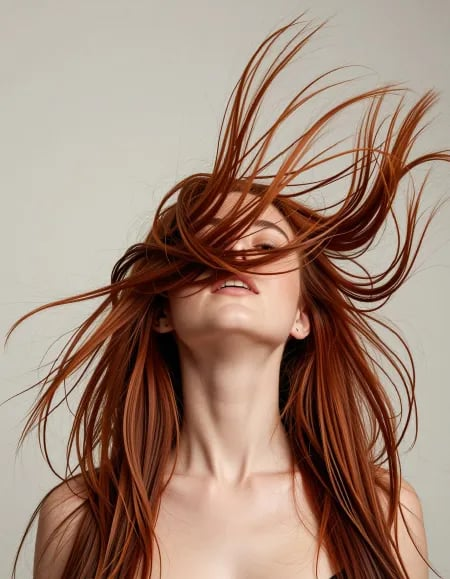
On a 1024-pixel output, words like visible pores, fine fabric weave, or individual strands of hair are mostly wasted. There are not enough pixels for the difference to survive. At 2560x1440 there are 3.69 MP against turbo's 1.05 MP, and the same words start to land.
Worth adding at Pro resolution, and not at turbo:
- Skin — visible pores, fine skin texture, subtle sheen across the collarbone
- Fabric — sheer fabric with visible weave, lace edge detail at the hem
- Hair — individual strands catching the light at the edges
This is the main reason to pay five times the rate: a prompt with no detail language gets a bigger version of the same picture, not worth $0.016 extra per image. Lighting and skin-texture wording is covered element by element in Z-Image NSFW lighting and skin texture control.
Element 3: Explicit Tier Control
The same scene can be written at three levels, and the wording carries the level — there is no parameter for it.
- Suggestive — open silk robe slipping off one shoulder, implied nudity, nothing explicit in frame
- Topless — robe fully open, bare chest, soft natural light from the window
- Explicit — fully nude, reclining, legs apart, unobstructed view
Pick the tier outright — an ambiguous prompt gets resolved by the model's own defaults, which vary run to run even with a fixed seed.
Element 4: Excluding Without a negative_prompt
Neither tier has a negative_prompt field, so every exclusion has to be written as its positive opposite.
To avoid | Write instead |
deformed hands | both hands visible, fingers separated and countable |
cluttered background | plain matte backdrop, nothing else in frame |
unwanted straps or jewellery | bare shoulders, no straps, no jewellery |
washed-out skin | warm skin tone with visible shadow under the jaw |
The pattern is the same every time: name what should be there, in the place the unwanted thing would otherwise appear.
Stacking It
Parameters: size: 1440x2560, prompt_expansion_enable: false, seed fixed.
fully nude woman reclining on a dark linen bed, legs apart, unobstructed view, full body head to feet, vertical composition with headroom above, visible pores and fine skin texture, subtle sheen across the collarbone, individual strands of hair catching the light, both hands visible with fingers separated, plain matte backdrop, warm skin tone with visible shadow under the jaw, low warm lamp light from the left
Every clause does one of the four jobs above; nothing is decoration.
Cost, and When to Use Qwen Instead
Pro is $0.020 per output image; turbo is $0.004. Neither Z-Image tier has an n field, so batching means client-side loops either way.
alibaba/qwen-image-3-t2i-spicy at $0.035 per image is worth a look when a run needs real batching: it takes n from 1 to 6 in a single call, which Z-Image does not offer on either tier. Against that, its size tops out at the 2k tier and framing comes from a required aspect_ratio, so 1440x2560-style control is not available there. Prompt structure for that endpoint is covered in Qwen Image 3 Spicy prompting.
Create your free Siray account and start generating uncensored images with Z-Image Spicy Pro through one API key.
A Note on Compliance
Siray's NSFW and uncensored models generate legal, consensual adult content for verified adults only. CSAM and any other illegal content are refused with zero tolerance. Z-Image Spicy Pro is a third-party model available through Siray's API, not a Siray-hosted model, and the same standard applies to everything generated with it.