
Grok Imagine Aspect Ratio Guide: 13 Formats Plus Auto

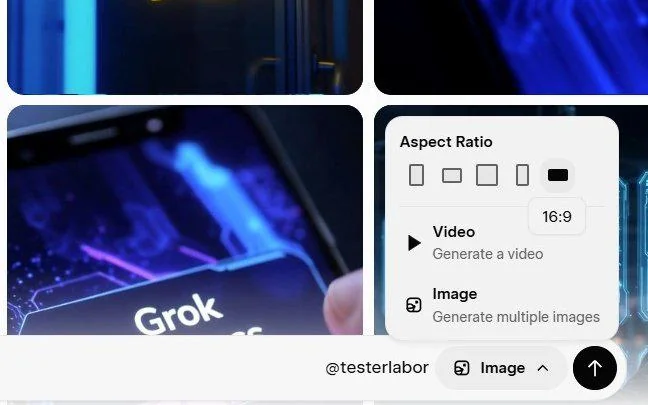
Most image endpoints hand you a handful of aspect ratios and expect you to crop from there. x-ai/grok-imagine-image-t2i takes a required aspect_ratio with 14 accepted values — 13 actual ratios plus auto — and four of those ratios are phone-screen shapes that no other image endpoint on Siray offers. The trade is that this is also the most stripped-down image endpoint in the pool.
Key Takeaways
- aspect_ratio is required and accepts 14 values: 13 ratios plus auto, which hands the choice to the model.
- Four of them — 9:19.5, 19.5:9, 9:20, 20:9 — are phone-screen shapes, useful for wallpapers and full-bleed vertical banners.
- The endpoint has four fields in total, all required. There is no seed, no n, and no negative_prompt.
- The i2i sibling inherits the same shape: one added field (images, 1 to 3 entries), still all required, still no seed, n, or negative_prompt.
- $0.017 per output image, currently a 15% promotional rate.
The 14 Values, Grouped
aspect_ratio accepts exactly these, and rejects anything else:
- Square — 1:1
- Standard photo — 3:4, 4:3, 2:3, 3:2
- Widescreen and vertical video — 16:9, 9:16
- Extreme panoramic — 1:2, 2:1
- Phone screen — 9:19.5, 19.5:9, 9:20, 20:9
- Model's choice — auto
Thirteen of those are ratios. auto is not a format; it is a decision handed over.
The Four Phone Ratios Nobody Else Has
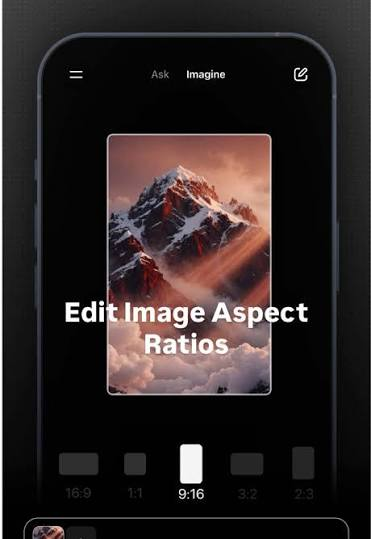
9:19.5 and 9:20 are the tall shapes actual phones use. A modern handset screen is not 9:16 — that ratio is a video convention, and an image generated at 9:16 and set as a wallpaper gets letterboxed or cropped by the OS. Generating directly at 9:19.5 or 9:20 skips that step.
Concretely, this matters for three jobs:
- Phone wallpapers and lock screens, where the whole point is edge-to-edge fit
- Full-bleed vertical banners in apps and mobile web, where a crop eats the composition
- Story and reel backplates that need to fill the screen behind overlaid text
19.5:9 and 20:9 are the same shapes rotated — landscape phone, or an ultra-wide header. Ratios for paid social placements are worked through in batch social ad variants, which covers a family that also offers n and seed.
What auto Actually Does
auto lets the model infer the frame from the prompt. A prompt describing a standing figure tends to come back vertical; one describing a landscape tends to come back wide.
It is genuinely useful for exploration, and a poor fit for production. When a specific canvas is needed, naming the ratio costs nothing and removes a variable. auto is best treated as a first-pass tool, not a default.
The Trade: Four Fields and No Seed
This endpoint takes model, prompt, aspect_ratio, and size. That is the complete list, and all four are required. size accepts 1k or 2k.
What is absent matters more than what is present:
- No seed. Output is not reproducible. The same prompt run twice returns two different images, and there is no way to take a result and re-render it at a different ratio.
- No n. No server-side batching; every image is its own call.
- No negative_prompt. Exclusions have to be described positively — name what should occupy the space instead.
The missing seed is the one that reshapes workflows. Any process that depends on locking a look and then varying one thing does not work here. For that kind of control, a family with seed and n is the better starting point — see Qwen Image 3.0 explained. Endpoint-by-endpoint gaps of this kind are surveyed in what each image API won't let you control.
Use Grok Imagine when the frame is the requirement and reproducibility is not: one-off wallpapers, banner explorations, anything where the next image does not have to match the last. For repeatable product and mockup work, Z-Image product mockups covers an endpoint that holds a seed.
Cost
$0.017 per output image, shown on Siray's console as a 15% reduction, so re-check it before budgeting on that figure. The image family also has an i2i variant, x-ai/grok-imagine-image-i2i. Its spec adds one field, images — an array of 1 to 3 source photos — and that field sits in required alongside the other four, so nothing on this endpoint is optional either. The same absence carries over too: no seed, no n, no negative_prompt, and the identical 14 aspect_ratio values. A batch of image edits ends up just as unreproducible as a batch of text-only prompts.
Create your free Siray account and start generating at phone-screen ratios with Grok Imagine through one API key.